Client configuration instructions

Hi all, Due to popular demand, I've thrown together a page that should take you from unboxing a Metal 5SHPn modem to getting it on the air. See here for instructions: https://www.hamwan.org/t/tiki-index.php?page=Client+Node+Configuration&struc... NQ1E, if you could attach key-dsa-NQ1E.txt to that page when/if you see this, that would complete the instructions for now. Please let me know if the instructions need fixing or improving. --Bart

I tried configuring mine this evening, and it mostly went well, except for this line: [admin@N0GQ-KPAE] /interface wireless> set 0 disabled=no frequency-mode=superchannel scan-list=HamWAN ssid=HamWAN wireless-protocol=nv2 input does not match any value of name [admin@N0GQ-KPAE] /interface wireless> I'm afraid I'm not yet familiar enough with RouterOS to make heads or tails of that error message. I tried some obvious (and non-obvious) things, and managed to get some new and improved error messages, but never managed to quite figure out what I'm doing wrong. I haven't tried adding the keys and accounts yet. Figured there's no point in worrying about that until I can get the thing linked up to KPAE. FWIW, I've re-opened the hole in my firewall if you want to debug (per earlier irc chat). On Thu, Aug 29, 2013 at 6:29 PM, Bart Kus <me@bartk.us> wrote:
Hi all,
Due to popular demand, I've thrown together a page that should take you from unboxing a Metal 5SHPn modem to getting it on the air. See here for instructions:
https://www.hamwan.org/t/tiki-**index.php?page=Client+Node+** Configuration&structure=HamWAN<https://www.hamwan.org/t/tiki-index.php?page=Client+Node+Configuration&structure=HamWAN>
NQ1E, if you could attach key-dsa-NQ1E.txt to that page when/if you see this, that would complete the instructions for now.
Please let me know if the instructions need fixing or improving.
--Bart
______________________________**_________________ PSDR mailing list PSDR@hamwan.org http://mail.hamwan.org/**mailman/listinfo/psdr_hamwan.**org<http://mail.hamwan.org/mailman/listinfo/psdr_hamwan.org>
-- -=jeff=-
Oh, one other thing. There's a line that says: "Point your dish at any cell site and optimize for best signal. Look at the Interface -> Wireless -> wlan1 -> Status signal strength reports while you align." Not sure what the equivalent is in OS 6.2, but there's no such critter that I can find. The closest thing I've found is clicking on "Quick Set" where there's a display of signal strength, SNR, etc. On Thu, Aug 29, 2013 at 8:37 PM, Jeff Francis™ <jeff@gritch.org> wrote:
I tried configuring mine this evening, and it mostly went well, except for this line:
[admin@N0GQ-KPAE] /interface wireless> set 0 disabled=no frequency-mode=superchannel scan-list=HamWAN ssid=HamWAN wireless-protocol=nv2 input does not match any value of name [admin@N0GQ-KPAE] /interface wireless>
I'm afraid I'm not yet familiar enough with RouterOS to make heads or tails of that error message. I tried some obvious (and non-obvious) things, and managed to get some new and improved error messages, but never managed to quite figure out what I'm doing wrong.
I haven't tried adding the keys and accounts yet. Figured there's no point in worrying about that until I can get the thing linked up to KPAE.
FWIW, I've re-opened the hole in my firewall if you want to debug (per earlier irc chat).
On Thu, Aug 29, 2013 at 6:29 PM, Bart Kus <me@bartk.us> wrote:
Hi all,
Due to popular demand, I've thrown together a page that should take you from unboxing a Metal 5SHPn modem to getting it on the air. See here for instructions:
https://www.hamwan.org/t/tiki-**index.php?page=Client+Node+** Configuration&structure=HamWAN<https://www.hamwan.org/t/tiki-index.php?page=Client+Node+Configuration&structure=HamWAN>
NQ1E, if you could attach key-dsa-NQ1E.txt to that page when/if you see this, that would complete the instructions for now.
Please let me know if the instructions need fixing or improving.
--Bart
______________________________**_________________ PSDR mailing list PSDR@hamwan.org http://mail.hamwan.org/**mailman/listinfo/psdr_hamwan.**org<http://mail.hamwan.org/mailman/listinfo/psdr_hamwan.org>
-- -=jeff=-
-- -=jeff=-
Good catches. In terms of "input does not match any value of name" it looks like a bug in the command-line interface. I can repro it here: [eo@AE7SJ-Paine] /interface wireless> set wlan1 scan-list=HamWAN input does not match any value of name [eo@AE7SJ-Paine] /interface wireless> set wlan1 scan-list=default [eo@AE7SJ-Paine] /interface wireless> set wlan1 scan-list=Sector2 input does not match any value of name [eo@AE7SJ-Paine] /interface wireless> set wlan1 scan-list=5905 [eo@AE7SJ-Paine] /interface wireless> set wlan1 scan-list=HamWAN input does not match any value of name [eo@AE7SJ-Paine] /interface wireless> print Flags: X - disabled, R - running 0 R name="wlan1" mtu=1500 mac-address=D4:CA:6D:7A:B8:23 arp=enabled interface-type=Atheros AR92xx mode=station ssid="HamWAN" frequency=5905 band=5ghz-onlyn channel-width=5mhz *scan-list=5905* wireless-protocol=nv2 wds-mode=disabled wds-default-bridge=none wds-ignore-ssid=no bridge-mode=enabled default-authentication=yes default-forwarding=yes default-ap-tx-limit=0 default-client-tx-limit=0 hide-ssid=no security-profile=default compression=no You can see the scan-list was NOT set properly. However, if you set it using WinBox it DOES set it properly AND uses it properly to scan through the channels. I'll try to reach out to Mikrotik support to get their take on this. In terms of your other report of no such thing existing, drop the initial "Interface". It's just Wireless, and then the rest of the click path is OK. You can see Signal Strength readings there. --Bart On 8/29/2013 8:55 PM, Jeff Francis^(TM) wrote:
Oh, one other thing. There's a line that says:
"Point your dish at any cell site and optimize for best signal. Look at the Interface -> Wireless -> wlan1 -> Status signal strength reports while you align."
Not sure what the equivalent is in OS 6.2, but there's no such critter that I can find. The closest thing I've found is clicking on "Quick Set" where there's a display of signal strength, SNR, etc.
On Thu, Aug 29, 2013 at 8:37 PM, Jeff Francis^(TM) <jeff@gritch.org <mailto:jeff@gritch.org>> wrote:
I tried configuring mine this evening, and it mostly went well, except for this line:
[admin@N0GQ-KPAE] /interface wireless> set 0 disabled=no frequency-mode=superchannel scan-list=HamWAN ssid=HamWAN wireless-protocol=nv2 input does not match any value of name [admin@N0GQ-KPAE] /interface wireless>
I'm afraid I'm not yet familiar enough with RouterOS to make heads or tails of that error message. I tried some obvious (and non-obvious) things, and managed to get some new and improved error messages, but never managed to quite figure out what I'm doing wrong.
I haven't tried adding the keys and accounts yet. Figured there's no point in worrying about that until I can get the thing linked up to KPAE.
FWIW, I've re-opened the hole in my firewall if you want to debug (per earlier irc chat).
On Thu, Aug 29, 2013 at 6:29 PM, Bart Kus <me@bartk.us <mailto:me@bartk.us>> wrote:
Hi all,
Due to popular demand, I've thrown together a page that should take you from unboxing a Metal 5SHPn modem to getting it on the air. See here for instructions:
https://www.hamwan.org/t/tiki-index.php?page=Client+Node+Configuration&struc...
NQ1E, if you could attach key-dsa-NQ1E.txt to that page when/if you see this, that would complete the instructions for now.
Please let me know if the instructions need fixing or improving.
--Bart
_______________________________________________ PSDR mailing list PSDR@hamwan.org <mailto:PSDR@hamwan.org> http://mail.hamwan.org/mailman/listinfo/psdr_hamwan.org
-- -=jeff=-
-- -=jeff=-
_______________________________________________ PSDR mailing list PSDR@hamwan.org http://mail.hamwan.org/mailman/listinfo/psdr_hamwan.org

So I ran into another problem, when I got past the scan-list issue. At step 12, where I'm telling the radio interface to pull DHCP from HamWAN, it is telling me the interface already exists. When I look at the interfaces in WinBox, they are not named quite the same. (ether1-local and wlan1-gateway) But when I tried using interface=wlan1-gateway, it still didn't work. The next step (13) seems to work fine..... Any ideas? Thanks Kenny [admin@KU7M-CapitolPark] /ip dhcp-client>> /ip dhcp-client [admin@KU7M-CapitolPark] /ip dhcp-client>> add add-default-route=yes dhcp-options=hostname,clientid disabled=no in terface=wlan1 failure: dhcp-client on that interface already exists [admin@KU7M-CapitolPark] /ip dhcp-client> On Thu, Aug 29, 2013 at 9:10 PM, Bart Kus <me@bartk.us> wrote:
Good catches.
In terms of "input does not match any value of name" it looks like a bug in the command-line interface. I can repro it here:
[eo@AE7SJ-Paine] /interface wireless> set wlan1 scan-list=HamWAN
input does not match any value of name [eo@AE7SJ-Paine] /interface wireless> set wlan1 scan-list=default [eo@AE7SJ-Paine] /interface wireless> set wlan1 scan-list=Sector2
input does not match any value of name [eo@AE7SJ-Paine] /interface wireless> set wlan1 scan-list=5905 [eo@AE7SJ-Paine] /interface wireless> set wlan1 scan-list=HamWAN
input does not match any value of name [eo@AE7SJ-Paine] /interface wireless> print Flags: X - disabled, R - running 0 R name="wlan1" mtu=1500 mac-address=D4:CA:6D:7A:B8:23 arp=enabled interface-type=Atheros AR92xx mode=station ssid="HamWAN" frequency=5905 band=5ghz-onlyn channel-width=5mhz *scan-list=5905*wireless-protocol=nv2 wds-mode=disabled wds-default-bridge=none wds-ignore-ssid=no bridge-mode=enabled default-authentication=yes default-forwarding=yes default-ap-tx-limit=0 default-client-tx-limit=0 hide-ssid=no security-profile=default compression=no
You can see the scan-list was NOT set properly. However, if you set it using WinBox it DOES set it properly AND uses it properly to scan through the channels. I'll try to reach out to Mikrotik support to get their take on this.
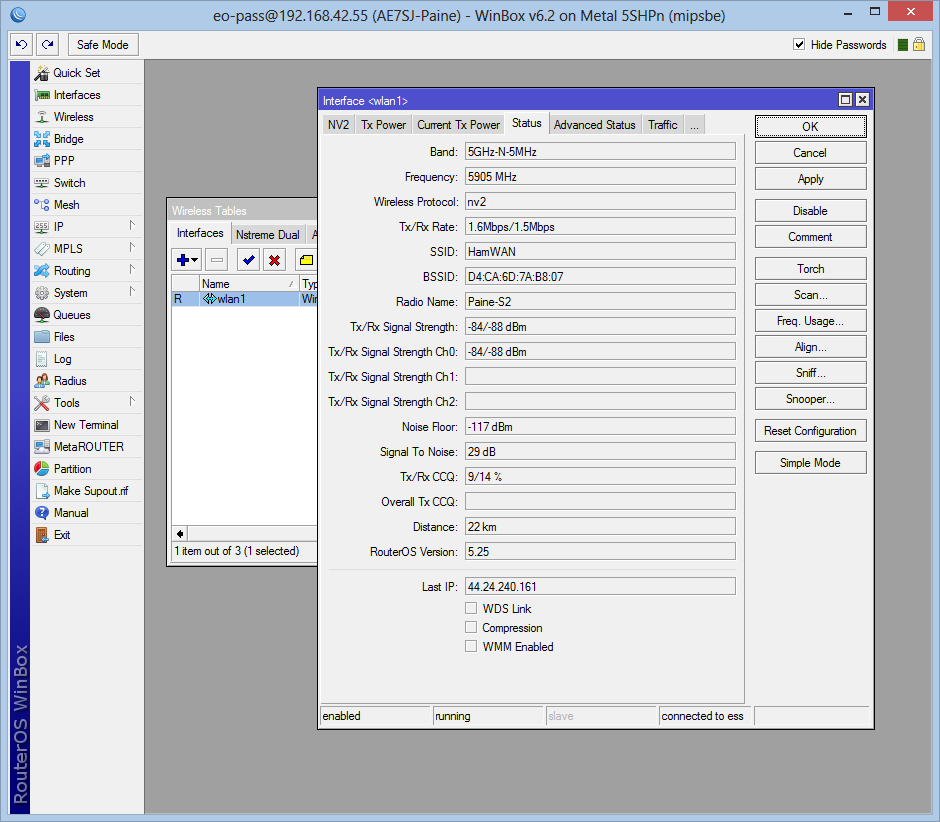
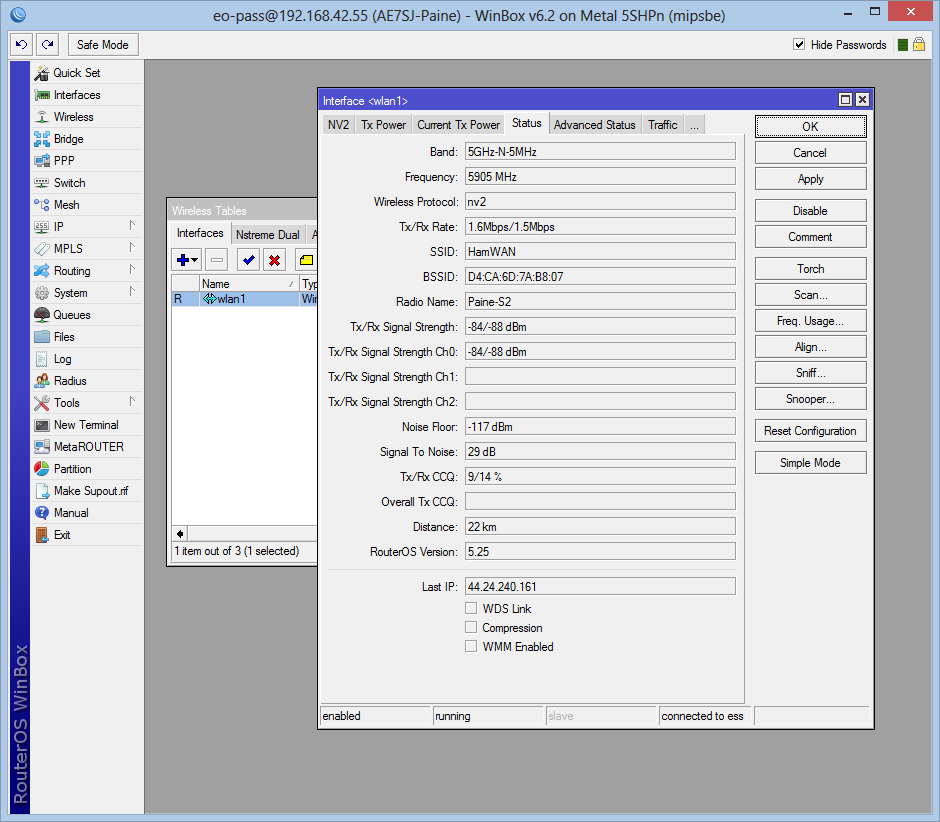
In terms of your other report of no such thing existing, drop the initial "Interface". It's just Wireless, and then the rest of the click path is OK.
You can see Signal Strength readings there.
--Bart
On 8/29/2013 8:55 PM, Jeff Francis™ wrote:
Oh, one other thing. There's a line that says:
"Point your dish at any cell site and optimize for best signal. Look at the Interface -> Wireless -> wlan1 -> Status signal strength reports while you align."
Not sure what the equivalent is in OS 6.2, but there's no such critter that I can find. The closest thing I've found is clicking on "Quick Set" where there's a display of signal strength, SNR, etc.
On Thu, Aug 29, 2013 at 8:37 PM, Jeff Francis™ <jeff@gritch.org> wrote:
I tried configuring mine this evening, and it mostly went well, except for this line:
[admin@N0GQ-KPAE] /interface wireless> set 0 disabled=no frequency-mode=superchannel scan-list=HamWAN ssid=HamWAN wireless-protocol=nv2 input does not match any value of name [admin@N0GQ-KPAE] /interface wireless>
I'm afraid I'm not yet familiar enough with RouterOS to make heads or tails of that error message. I tried some obvious (and non-obvious) things, and managed to get some new and improved error messages, but never managed to quite figure out what I'm doing wrong.
I haven't tried adding the keys and accounts yet. Figured there's no point in worrying about that until I can get the thing linked up to KPAE.
FWIW, I've re-opened the hole in my firewall if you want to debug (per earlier irc chat).
On Thu, Aug 29, 2013 at 6:29 PM, Bart Kus <me@bartk.us> wrote:
Hi all,
Due to popular demand, I've thrown together a page that should take you from unboxing a Metal 5SHPn modem to getting it on the air. See here for instructions:
https://www.hamwan.org/t/tiki-index.php?page=Client+Node+Configuration&struc...
NQ1E, if you could attach key-dsa-NQ1E.txt to that page when/if you see this, that would complete the instructions for now.
Please let me know if the instructions need fixing or improving.
--Bart
_______________________________________________ PSDR mailing list PSDR@hamwan.org http://mail.hamwan.org/mailman/listinfo/psdr_hamwan.org
-- -=jeff=-
-- -=jeff=-
_______________________________________________ PSDR mailing listPSDR@hamwan.orghttp://mail.hamwan.org/mailman/listinfo/psdr_hamwan.org
_______________________________________________ PSDR mailing list PSDR@hamwan.org http://mail.hamwan.org/mailman/listinfo/psdr_hamwan.org
If dhcp-client is already set on wlan1-gateway, then just make sure the options are set properly by replacing the "add" with a "set": /ip dhcp-client set 0 add-default-route=yes dhcp-options=hostname,clientid disabled=no You should be good to go if everything else worked out OK. --Bart On 8/31/2013 12:24 AM, Kenny Richards wrote:
So I ran into another problem, when I got past the scan-list issue.
At step 12, where I'm telling the radio interface to pull DHCP from HamWAN, it is telling me the interface already exists. When I look at the interfaces in WinBox, they are not named quite the same. (ether1-local and wlan1-gateway) But when I tried using interface=wlan1-gateway, it still didn't work.
The next step (13) seems to work fine.....
Any ideas?
Thanks Kenny
[admin@KU7M-CapitolPark] /ip dhcp-client>> /ip dhcp-client [admin@KU7M-CapitolPark] /ip dhcp-client>> add add-default-route=yes dhcp-options=hostname,clientid disabled=no in terface=wlan1 failure: dhcp-client on that interface already exists [admin@KU7M-CapitolPark] /ip dhcp-client>
On Thu, Aug 29, 2013 at 9:10 PM, Bart Kus <me@bartk.us <mailto:me@bartk.us>> wrote:
Good catches.
In terms of "input does not match any value of name" it looks like a bug in the command-line interface. I can repro it here:
[eo@AE7SJ-Paine] /interface wireless> set wlan1 scan-list=HamWAN
input does not match any value of name [eo@AE7SJ-Paine] /interface wireless> set wlan1 scan-list=default [eo@AE7SJ-Paine] /interface wireless> set wlan1 scan-list=Sector2
input does not match any value of name [eo@AE7SJ-Paine] /interface wireless> set wlan1 scan-list=5905 [eo@AE7SJ-Paine] /interface wireless> set wlan1 scan-list=HamWAN
input does not match any value of name [eo@AE7SJ-Paine] /interface wireless> print Flags: X - disabled, R - running 0 R name="wlan1" mtu=1500 mac-address=D4:CA:6D:7A:B8:23 arp=enabled interface-type=Atheros AR92xx mode=station ssid="HamWAN" frequency=5905 band=5ghz-onlyn channel-width=5mhz *scan-list=5905* wireless-protocol=nv2 wds-mode=disabled wds-default-bridge=none wds-ignore-ssid=no bridge-mode=enabled default-authentication=yes default-forwarding=yes default-ap-tx-limit=0 default-client-tx-limit=0 hide-ssid=no security-profile=default compression=no
You can see the scan-list was NOT set properly. However, if you set it using WinBox it DOES set it properly AND uses it properly to scan through the channels. I'll try to reach out to Mikrotik support to get their take on this.
In terms of your other report of no such thing existing, drop the initial "Interface". It's just Wireless, and then the rest of the click path is OK.
You can see Signal Strength readings there.
--Bart
On 8/29/2013 8:55 PM, Jeff Francis^(TM) wrote:
Oh, one other thing. There's a line that says:
"Point your dish at any cell site and optimize for best signal. Look at the Interface -> Wireless -> wlan1 -> Status signal strength reports while you align."
Not sure what the equivalent is in OS 6.2, but there's no such critter that I can find. The closest thing I've found is clicking on "Quick Set" where there's a display of signal strength, SNR, etc.
On Thu, Aug 29, 2013 at 8:37 PM, Jeff Francis^(TM) <jeff@gritch.org <mailto:jeff@gritch.org>> wrote:
I tried configuring mine this evening, and it mostly went well, except for this line:
[admin@N0GQ-KPAE] /interface wireless> set 0 disabled=no frequency-mode=superchannel scan-list=HamWAN ssid=HamWAN wireless-protocol=nv2 input does not match any value of name [admin@N0GQ-KPAE] /interface wireless>
I'm afraid I'm not yet familiar enough with RouterOS to make heads or tails of that error message. I tried some obvious (and non-obvious) things, and managed to get some new and improved error messages, but never managed to quite figure out what I'm doing wrong.
I haven't tried adding the keys and accounts yet. Figured there's no point in worrying about that until I can get the thing linked up to KPAE.
FWIW, I've re-opened the hole in my firewall if you want to debug (per earlier irc chat).
On Thu, Aug 29, 2013 at 6:29 PM, Bart Kus <me@bartk.us <mailto:me@bartk.us>> wrote:
Hi all,
Due to popular demand, I've thrown together a page that should take you from unboxing a Metal 5SHPn modem to getting it on the air. See here for instructions:
https://www.hamwan.org/t/tiki-index.php?page=Client+Node+Configuration&struc...
NQ1E, if you could attach key-dsa-NQ1E.txt to that page when/if you see this, that would complete the instructions for now.
Please let me know if the instructions need fixing or improving.
--Bart
_______________________________________________ PSDR mailing list PSDR@hamwan.org <mailto:PSDR@hamwan.org> http://mail.hamwan.org/mailman/listinfo/psdr_hamwan.org
-- -=jeff=-
-- -=jeff=-
_______________________________________________ PSDR mailing list PSDR@hamwan.org <mailto:PSDR@hamwan.org> http://mail.hamwan.org/mailman/listinfo/psdr_hamwan.org
_______________________________________________ PSDR mailing list PSDR@hamwan.org <mailto:PSDR@hamwan.org> http://mail.hamwan.org/mailman/listinfo/psdr_hamwan.org
_______________________________________________ PSDR mailing list PSDR@hamwan.org http://mail.hamwan.org/mailman/listinfo/psdr_hamwan.org
That fixed it. For reference, I took mine straight out of the box yesterday and followed your directions. So other newbies will probably hit the same problem. Now on to the antenna assembly. Might run up to DEM this afternoon after the window guy gets done. Thanks! Sent from my iPad On Aug 31, 2013, at 7:51 AM, Bart Kus <me@bartk.us> wrote:
If dhcp-client is already set on wlan1-gateway, then just make sure the options are set properly by replacing the "add" with a "set":
/ip dhcp-client set 0 add-default-route=yes dhcp-options=hostname,clientid disabled=no
You should be good to go if everything else worked out OK.
--Bart
On 8/31/2013 12:24 AM, Kenny Richards wrote:
So I ran into another problem, when I got past the scan-list issue.
At step 12, where I'm telling the radio interface to pull DHCP from HamWAN, it is telling me the interface already exists. When I look at the interfaces in WinBox, they are not named quite the same. (ether1-local and wlan1-gateway) But when I tried using interface=wlan1-gateway, it still didn't work.
The next step (13) seems to work fine.....
Any ideas?
Thanks Kenny
[admin@KU7M-CapitolPark] /ip dhcp-client>> /ip dhcp-client [admin@KU7M-CapitolPark] /ip dhcp-client>> add add-default-route=yes dhcp-options=hostname,clientid disabled=no in terface=wlan1 failure: dhcp-client on that interface already exists [admin@KU7M-CapitolPark] /ip dhcp-client>
On Thu, Aug 29, 2013 at 9:10 PM, Bart Kus <me@bartk.us> wrote:
Good catches.
In terms of "input does not match any value of name" it looks like a bug in the command-line interface. I can repro it here:
[eo@AE7SJ-Paine] /interface wireless> set wlan1 scan-list=HamWAN
input does not match any value of name [eo@AE7SJ-Paine] /interface wireless> set wlan1 scan-list=default [eo@AE7SJ-Paine] /interface wireless> set wlan1 scan-list=Sector2
input does not match any value of name [eo@AE7SJ-Paine] /interface wireless> set wlan1 scan-list=5905 [eo@AE7SJ-Paine] /interface wireless> set wlan1 scan-list=HamWAN
input does not match any value of name [eo@AE7SJ-Paine] /interface wireless> print Flags: X - disabled, R - running 0 R name="wlan1" mtu=1500 mac-address=D4:CA:6D:7A:B8:23 arp=enabled interface-type=Atheros AR92xx mode=station ssid="HamWAN" frequency=5905 band=5ghz-onlyn channel-width=5mhz scan-list=5905 wireless-protocol=nv2 wds-mode=disabled wds-default-bridge=none wds-ignore-ssid=no bridge-mode=enabled default-authentication=yes default-forwarding=yes default-ap-tx-limit=0 default-client-tx-limit=0 hide-ssid=no security-profile=default compression=no
You can see the scan-list was NOT set properly. However, if you set it using WinBox it DOES set it properly AND uses it properly to scan through the channels. I'll try to reach out to Mikrotik support to get their take on this.
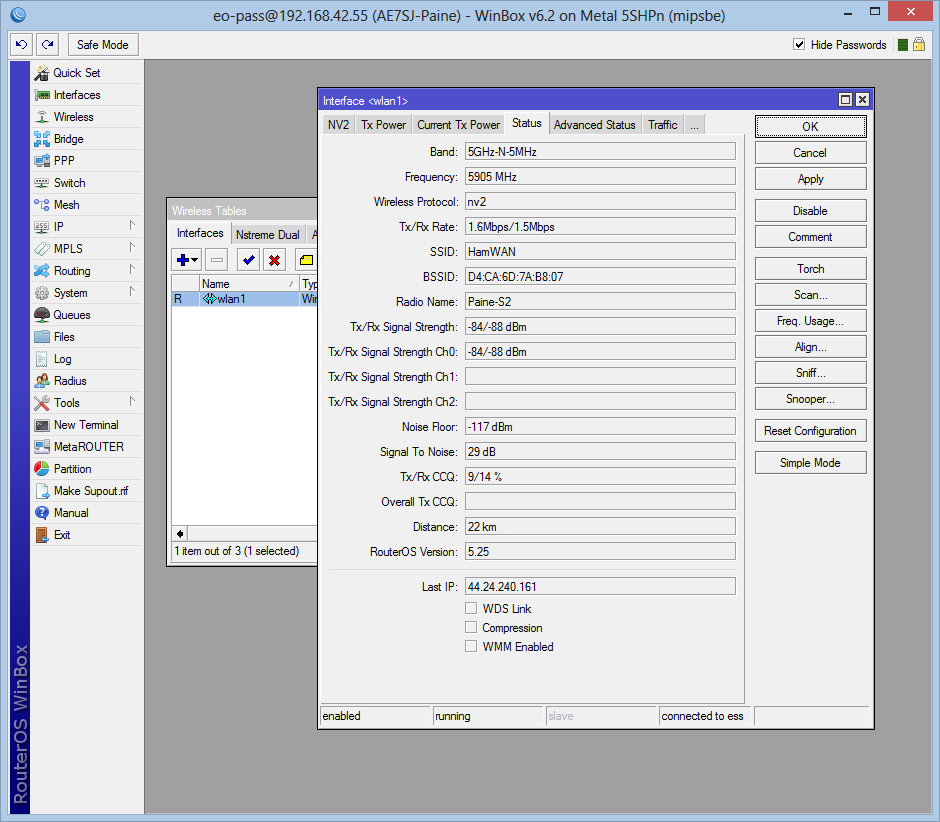
In terms of your other report of no such thing existing, drop the initial "Interface". It's just Wireless, and then the rest of the click path is OK.
<mime-attachment.png>
You can see Signal Strength readings there.
--Bart
On 8/29/2013 8:55 PM, Jeff Francis™ wrote:
Oh, one other thing. There's a line that says:
"Point your dish at any cell site and optimize for best signal. Look at the Interface -> Wireless -> wlan1 -> Status signal strength reports while you align."
Not sure what the equivalent is in OS 6.2, but there's no such critter that I can find. The closest thing I've found is clicking on "Quick Set" where there's a display of signal strength, SNR, etc.
On Thu, Aug 29, 2013 at 8:37 PM, Jeff Francis™ <jeff@gritch.org> wrote:
I tried configuring mine this evening, and it mostly went well, except for this line:
[admin@N0GQ-KPAE] /interface wireless> set 0 disabled=no frequency-mode=superchannel scan-list=HamWAN ssid=HamWAN wireless-protocol=nv2 input does not match any value of name [admin@N0GQ-KPAE] /interface wireless>
I'm afraid I'm not yet familiar enough with RouterOS to make heads or tails of that error message. I tried some obvious (and non-obvious) things, and managed to get some new and improved error messages, but never managed to quite figure out what I'm doing wrong.
I haven't tried adding the keys and accounts yet. Figured there's no point in worrying about that until I can get the thing linked up to KPAE.
FWIW, I've re-opened the hole in my firewall if you want to debug (per earlier irc chat).
On Thu, Aug 29, 2013 at 6:29 PM, Bart Kus <me@bartk.us> wrote:
Hi all,
Due to popular demand, I've thrown together a page that should take you from unboxing a Metal 5SHPn modem to getting it on the air. See here for instructions:
https://www.hamwan.org/t/tiki-index.php?page=Client+Node+Configuration&struc...
NQ1E, if you could attach key-dsa-NQ1E.txt to that page when/if you see this, that would complete the instructions for now.
Please let me know if the instructions need fixing or improving.
--Bart
_______________________________________________ PSDR mailing list PSDR@hamwan.org http://mail.hamwan.org/mailman/listinfo/psdr_hamwan.org
-- -=jeff=-
-- -=jeff=-
_______________________________________________ PSDR mailing list PSDR@hamwan.org http://mail.hamwan.org/mailman/listinfo/psdr_hamwan.org
_______________________________________________ PSDR mailing list PSDR@hamwan.org http://mail.hamwan.org/mailman/listinfo/psdr_hamwan.org
_______________________________________________ PSDR mailing list PSDR@hamwan.org http://mail.hamwan.org/mailman/listinfo/psdr_hamwan.org
_______________________________________________ PSDR mailing list PSDR@hamwan.org http://mail.hamwan.org/mailman/listinfo/psdr_hamwan.org
One more suggestion I picked up from watching today's installation work. You might want to point out in the instructions that HamWAN uses horizontal polarization. If Nigel hadn't brought it up today, I wouldn't have had a clue when I assembled the BBQ tonight. 73, Kenny On Sat, Aug 31, 2013 at 9:48 AM, Kenny Richards <richark@gmail.com> wrote:
That fixed it. For reference, I took mine straight out of the box yesterday and followed your directions. So other newbies will probably hit the same problem.
Now on to the antenna assembly. Might run up to DEM this afternoon after the window guy gets done.
Thanks!
Sent from my iPad
On Aug 31, 2013, at 7:51 AM, Bart Kus <me@bartk.us> wrote:
If dhcp-client is already set on wlan1-gateway, then just make sure the options are set properly by replacing the "add" with a "set":
/ip dhcp-client set 0 add-default-route=yes dhcp-options=hostname,clientid disabled=no
You should be good to go if everything else worked out OK.
--Bart
On 8/31/2013 12:24 AM, Kenny Richards wrote:
So I ran into another problem, when I got past the scan-list issue.
At step 12, where I'm telling the radio interface to pull DHCP from HamWAN, it is telling me the interface already exists. When I look at the interfaces in WinBox, they are not named quite the same. (ether1-local and wlan1-gateway) But when I tried using interface=wlan1-gateway, it still didn't work.
The next step (13) seems to work fine.....
Any ideas?
Thanks Kenny
[admin@KU7M-CapitolPark] /ip dhcp-client>> /ip dhcp-client [admin@KU7M-CapitolPark] /ip dhcp-client>> add add-default-route=yes dhcp-options=hostname,clientid disabled=no in terface=wlan1 failure: dhcp-client on that interface already exists [admin@KU7M-CapitolPark] /ip dhcp-client>
On Thu, Aug 29, 2013 at 9:10 PM, Bart Kus <me@bartk.us> wrote:
Good catches.
In terms of "input does not match any value of name" it looks like a bug in the command-line interface. I can repro it here:
[eo@AE7SJ-Paine] /interface wireless> set wlan1 scan-list=HamWAN
input does not match any value of name [eo@AE7SJ-Paine] /interface wireless> set wlan1 scan-list=default [eo@AE7SJ-Paine] /interface wireless> set wlan1 scan-list=Sector2
input does not match any value of name [eo@AE7SJ-Paine] /interface wireless> set wlan1 scan-list=5905 [eo@AE7SJ-Paine] /interface wireless> set wlan1 scan-list=HamWAN
input does not match any value of name [eo@AE7SJ-Paine] /interface wireless> print Flags: X - disabled, R - running 0 R name="wlan1" mtu=1500 mac-address=D4:CA:6D:7A:B8:23 arp=enabled interface-type=Atheros AR92xx mode=station ssid="HamWAN" frequency=5905 band=5ghz-onlyn channel-width=5mhz *scan-list=5905*wireless-protocol=nv2 wds-mode=disabled wds-default-bridge=none wds-ignore-ssid=no bridge-mode=enabled default-authentication=yes default-forwarding=yes default-ap-tx-limit=0 default-client-tx-limit=0 hide-ssid=no security-profile=default compression=no
You can see the scan-list was NOT set properly. However, if you set it using WinBox it DOES set it properly AND uses it properly to scan through the channels. I'll try to reach out to Mikrotik support to get their take on this.
In terms of your other report of no such thing existing, drop the initial "Interface". It's just Wireless, and then the rest of the click path is OK.
<mime-attachment.png>
You can see Signal Strength readings there.
--Bart
On 8/29/2013 8:55 PM, Jeff Francis™ wrote:
Oh, one other thing. There's a line that says:
"Point your dish at any cell site and optimize for best signal. Look at the Interface -> Wireless -> wlan1 -> Status signal strength reports while you align."
Not sure what the equivalent is in OS 6.2, but there's no such critter that I can find. The closest thing I've found is clicking on "Quick Set" where there's a display of signal strength, SNR, etc.
On Thu, Aug 29, 2013 at 8:37 PM, Jeff Francis™ <jeff@gritch.org> wrote:
I tried configuring mine this evening, and it mostly went well, except for this line:
[admin@N0GQ-KPAE] /interface wireless> set 0 disabled=no frequency-mode=superchannel scan-list=HamWAN ssid=HamWAN wireless-protocol=nv2 input does not match any value of name [admin@N0GQ-KPAE] /interface wireless>
I'm afraid I'm not yet familiar enough with RouterOS to make heads or tails of that error message. I tried some obvious (and non-obvious) things, and managed to get some new and improved error messages, but never managed to quite figure out what I'm doing wrong.
I haven't tried adding the keys and accounts yet. Figured there's no point in worrying about that until I can get the thing linked up to KPAE.
FWIW, I've re-opened the hole in my firewall if you want to debug (per earlier irc chat).
On Thu, Aug 29, 2013 at 6:29 PM, Bart Kus <me@bartk.us> wrote:
Hi all,
Due to popular demand, I've thrown together a page that should take you from unboxing a Metal 5SHPn modem to getting it on the air. See here for instructions:
https://www.hamwan.org/t/tiki-index.php?page=Client+Node+Configuration&struc...
NQ1E, if you could attach key-dsa-NQ1E.txt to that page when/if you see this, that would complete the instructions for now.
Please let me know if the instructions need fixing or improving.
--Bart
_______________________________________________ PSDR mailing list PSDR@hamwan.org http://mail.hamwan.org/mailman/listinfo/psdr_hamwan.org
-- -=jeff=-
-- -=jeff=-
_______________________________________________ PSDR mailing listPSDR@hamwan.orghttp://mail.hamwan.org/mailman/listinfo/psdr_hamwan.org
_______________________________________________ PSDR mailing list PSDR@hamwan.org http://mail.hamwan.org/mailman/listinfo/psdr_hamwan.org
_______________________________________________ PSDR mailing listPSDR@hamwan.orghttp://mail.hamwan.org/mailman/listinfo/psdr_hamwan.org
_______________________________________________ PSDR mailing list PSDR@hamwan.org http://mail.hamwan.org/mailman/listinfo/psdr_hamwan.org
participants (3)
-
 Bart Kus
 -
 Jeff Francis™
 -
 Kenny Richards