
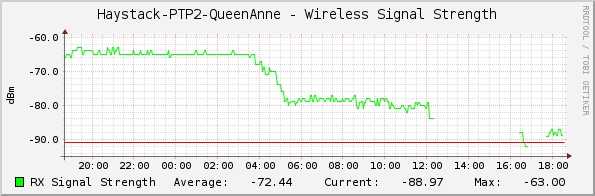
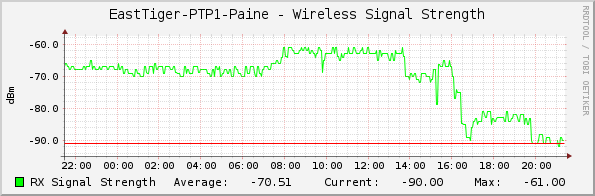
So, we're taking a beating. This wind+rain storm has caused an outage on our QueenAnne<->Haystack link: QA-Haystack It's also taken down our ETiger<->SnoDEM link: ETiger-SnoDEM And the Baldi site has lost power for several short periods throughout the day today. There are generators on-site, but the UPS there is dead, so it causes brief outages as power switches over. I'm not sure if we're on generators or not @ Baldi right now, but it's up at least. Now, even though we're taking this beating, I'm pleased to report that none of these link failures have caused any parts of the network to become disconnected. We are still routing 100% of HamWAN! On the down side, we just burned through all our redundancy, and the next link to go down will cause an outage somewhere. --Bart

Yaaayyy redundancy! Yaaayyy redundancy! Yaaayyy redundancy! Oops… Yaaayyy redundancy! Yaaayyy redundancy! Oops… Yay! From: PSDR [mailto:psdr-bounces@hamwan.org] On Behalf Of Bart Kus Sent: Tuesday, November 17, 2015 9:33 PM To: Puget Sound Data Ring Subject: [HamWAN PSDR] Damage report, Mr.Sulu So, we're taking a beating. This wind+rain storm has caused an outage on our QueenAnne<->Haystack link: QA-Haystack It's also taken down our ETiger<->SnoDEM link: ETiger-SnoDEM And the Baldi site has lost power for several short periods throughout the day today. There are generators on-site, but the UPS there is dead, so it causes brief outages as power switches over. I'm not sure if we're on generators or not @ Baldi right now, but it's up at least. Now, even though we're taking this beating, I'm pleased to report that none of these link failures have caused any parts of the network to become disconnected. We are still routing 100% of HamWAN! On the down side, we just burned through all our redundancy, and the next link to go down will cause an outage somewhere. --Bart
Thanks to Scott's efforts we have a photo of the SnoDEM side of the ETiger-SnoDEM link: SnoDEM->ETiger It looks in good shape, and is roughly aimed at the right direction. We also know the top gust @ SnoDEM was 60mph, which is well within the 125mph rating of the gear. We don't have any data yet on ETiger physical condition, but we do have a very strange signal report: ETiger-SnoDEM It has risen from the dead, all by itself!?? Sure wish we had 24/7 night vision video of just what went down @ ETiger. It can't be as boring as water drying out of connectors, since that would take a long time and not exhibit a sharp spike like that @ 1AM. Perhaps a wind gust blew the dish back into position? But that wouldn't account for the very slow rise in signal after the sharp spike. So confused. Theories welcome. On the QueenAnne-Haystack front, I made a config change to the link last night to increase power spectral density by reducing the link's bandwidth to 5MHz. Whatever has affected that link doesn't seem to be changing, and the increased PSD is saving the day: QA-Haystack A far cry from the -60dBm we normally run @ 40MHz, but it's better than a lost link! Using the PTZ cam, this is the shot I can get of the dish hardware on the Haystack side: There is a lot of icing on the cam dome (not water), so it's likely the dish is iced slightly too. It doesn't look like any trees fell on it. I tried to see if trees fell in its path, but the dome is too iced up in that direction to tell. Still waiting to hear about damage on the Queen Anne side. --Bart On 11/18/2015 7:28 AM, Rob Salsgiver wrote:
Yaaayyy redundancy!
Yaaayyy redundancy!
Yaaayyy redundancy!
Oops…
Yaaayyy redundancy!
Yaaayyy redundancy!
Oops…
Yay!
*From:*PSDR [mailto:psdr-bounces@hamwan.org] *On Behalf Of *Bart Kus *Sent:* Tuesday, November 17, 2015 9:33 PM *To:* Puget Sound Data Ring *Subject:* [HamWAN PSDR] Damage report, Mr.Sulu
So, we're taking a beating. This wind+rain storm has caused an outage on our QueenAnne<->Haystack link:
QA-Haystack
It's also taken down our ETiger<->SnoDEM link:
ETiger-SnoDEM
And the Baldi site has lost power for several short periods throughout the day today. There are generators on-site, but the UPS there is dead, so it causes brief outages as power switches over. I'm not sure if we're on generators or not @ Baldi right now, but it's up at least.
Now, even though we're taking this beating, I'm pleased to report that none of these link failures have caused any parts of the network to become disconnected. We are still routing 100% of HamWAN! On the down side, we just burned through all our redundancy, and the next link to go down will cause an outage somewhere.
--Bart
_______________________________________________ PSDR mailing list PSDR@hamwan.org http://mail.hamwan.net/mailman/listinfo/psdr

Hi - I’m new to the PSDR, and could use some help getting my HamWAN connection going. I installed a Poynting + Mikrotik Router Board system on my roof, and configured using the Wiki, no problems. I’m getting strong signals between my QTH at north Mercer Island and the Capitol Park station: Connected to ess, CapitolPark-S2/AE7SJ nv2 Signal: -68dBm SNR 51dB Tx: 16.2Mbps, 96% ccq, 16.2Mbps Rx: 16.2Mbps, 96% ccq, 16.2Mbps However, I get sporadic Internet performance, measured using Speedtest.net. Here are a few readings this morning: ping down up 21ms 3.9 2.8 35ms <0.1 stopped 77ms 0.27 0.46 42ms 2.0 0.1 I did check my cabling between the radio and the computer by substitution - no change. Two things: 1. Anybody have any suggestions? What data rate are others of you getting? 2. Is there a place to go to get help on subjects like this? Thanks, WA6PXX, Mercer Island
On Nov 18, 2015, at 11:31 AM, Bart Kus <me@bartk.us> wrote:
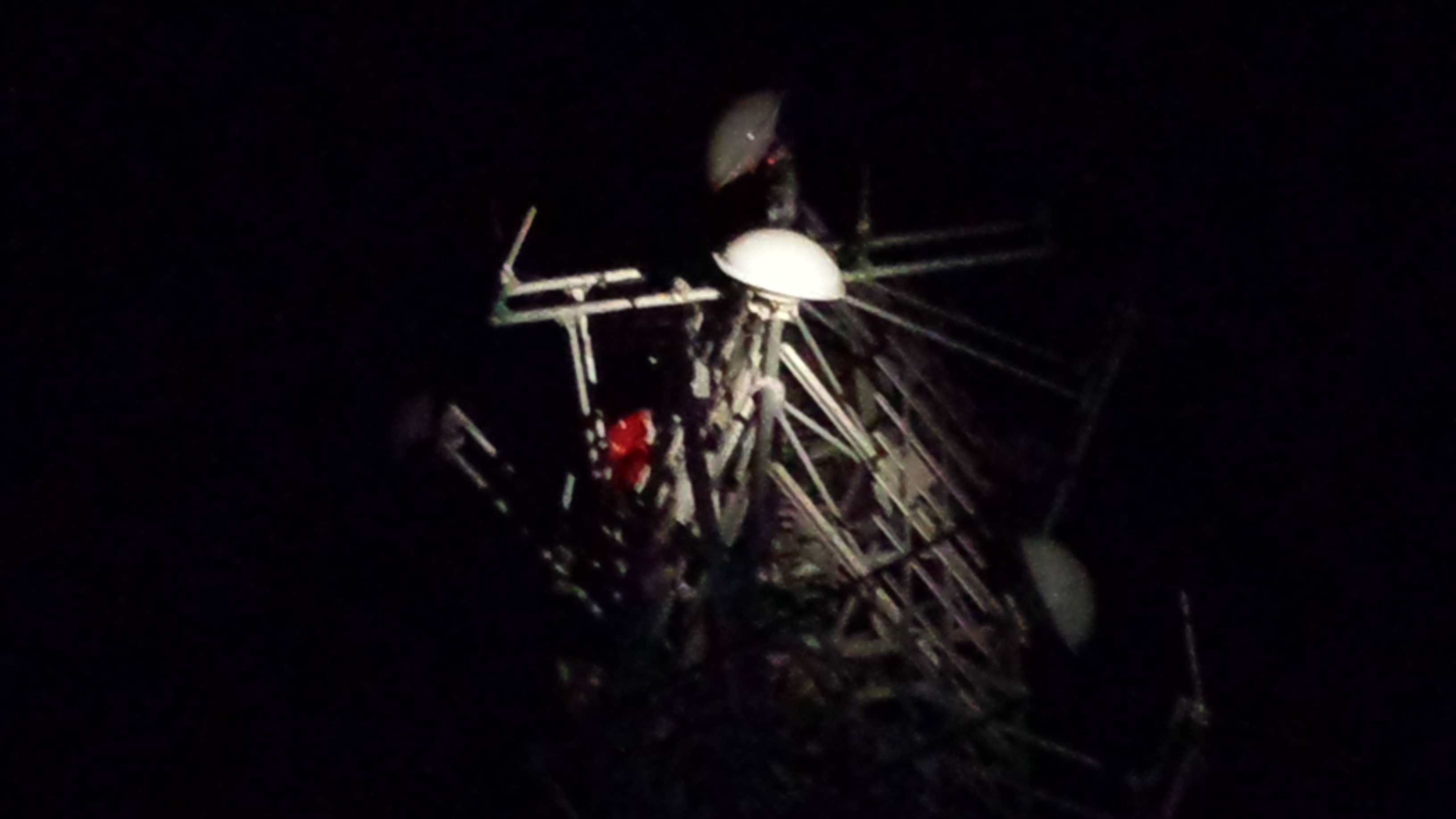
Thanks to Scott's efforts we have a photo of the SnoDEM side of the ETiger-SnoDEM link:
<2015-11-17 22.24.56.jpg>
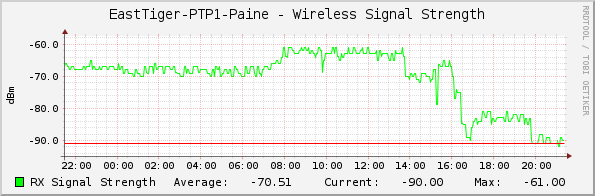
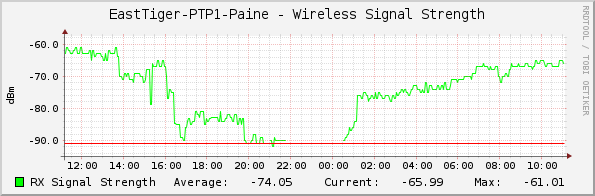
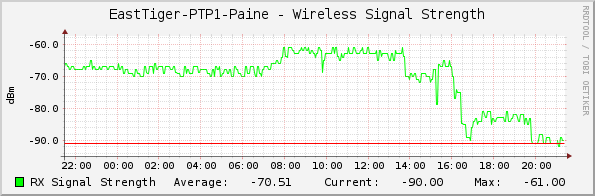
It looks in good shape, and is roughly aimed at the right direction. We also know the top gust @ SnoDEM was 60mph, which is well within the 125mph rating of the gear. We don't have any data yet on ETiger physical condition, but we do have a very strange signal report:
<graph_image (2).png>
It has risen from the dead, all by itself!?? Sure wish we had 24/7 night vision video of just what went down @ ETiger. It can't be as boring as water drying out of connectors, since that would take a long time and not exhibit a sharp spike like that @ 1AM. Perhaps a wind gust blew the dish back into position? But that wouldn't account for the very slow rise in signal after the sharp spike. So confused. Theories welcome.
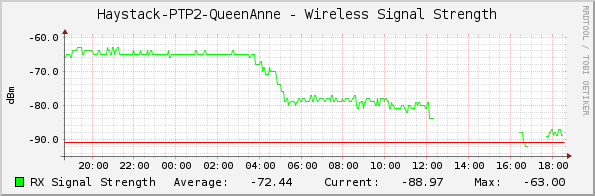
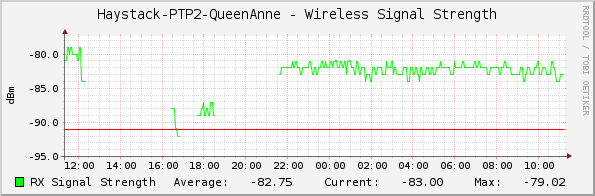
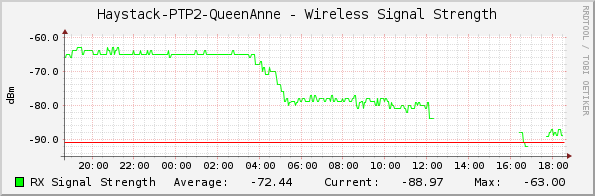
On the QueenAnne-Haystack front, I made a config change to the link last night to increase power spectral density by reducing the link's bandwidth to 5MHz. Whatever has affected that link doesn't seem to be changing, and the increased PSD is saving the day:
<graph_image (3).png>
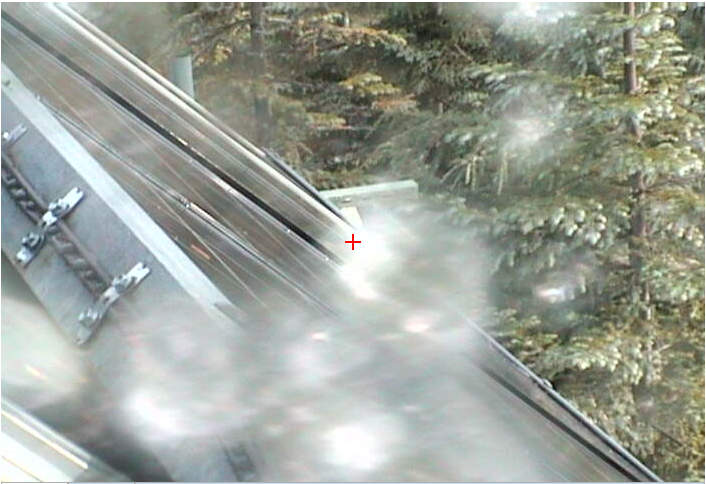
A far cry from the -60dBm we normally run @ 40MHz, but it's better than a lost link! Using the PTZ cam, this is the shot I can get of the dish hardware on the Haystack side:
<fbhgiehb.png>
There is a lot of icing on the cam dome (not water), so it's likely the dish is iced slightly too. It doesn't look like any trees fell on it. I tried to see if trees fell in its path, but the dome is too iced up in that direction to tell. Still waiting to hear about damage on the Queen Anne side.
--Bart
On 11/18/2015 7:28 AM, Rob Salsgiver wrote:
Yaaayyy redundancy!
Yaaayyy redundancy!
Yaaayyy redundancy!
Oops…
Yaaayyy redundancy!
Yaaayyy redundancy!
Oops…
Yay!
From: PSDR [mailto:psdr-bounces@hamwan.org <mailto:psdr-bounces@hamwan.org>] On Behalf Of Bart Kus Sent: Tuesday, November 17, 2015 9:33 PM To: Puget Sound Data Ring Subject: [HamWAN PSDR] Damage report, Mr.Sulu
So, we're taking a beating. This wind+rain storm has caused an outage on our QueenAnne<->Haystack link:
<Mail Attachment.png>
It's also taken down our ETiger<->SnoDEM link:
<Mail Attachment.png>
And the Baldi site has lost power for several short periods throughout the day today. There are generators on-site, but the UPS there is dead, so it causes brief outages as power switches over. I'm not sure if we're on generators or not @ Baldi right now, but it's up at least.
Now, even though we're taking this beating, I'm pleased to report that none of these link failures have caused any parts of the network to become disconnected. We are still routing 100% of HamWAN! On the down side, we just burned through all our redundancy, and the next link to go down will cause an outage somewhere.
--Bart
_______________________________________________ PSDR mailing list PSDR@hamwan.org <mailto:PSDR@hamwan.org> http://mail.hamwan.net/mailman/listinfo/psdr <http://mail.hamwan.net/mailman/listinfo/psdr>
_______________________________________________ PSDR mailing list PSDR@hamwan.org <mailto:PSDR@hamwan.org> http://mail.hamwan.net/mailman/listinfo/psdr <http://mail.hamwan.net/mailman/listinfo/psdr>
Can you post a traceroute or better yet an mtr <https://en.wikipedia.org/wiki/MTR_%28software%29> to show where the problem might be? It's unlikely to be your last hop since that looks strong with a high CCQ. --Bart On 4/4/2016 1:01 PM, David Giuliani wrote:
Hi - I’m new to the PSDR, and could use some help getting my HamWAN connection going. I installed a Poynting + Mikrotik Router Board system on my roof, and configured using the Wiki, no problems. I’m getting strong signals between my QTH at north Mercer Island and the Capitol Park station:
Connected to ess, CapitolPark-S2/AE7SJ nv2 Signal: -68dBm SNR 51dB Tx: 16.2Mbps, 96% ccq, 16.2Mbps Rx: 16.2Mbps, 96% ccq, 16.2Mbps
However, I get sporadic Internet performance, measured using Speedtest.net <http://speedtest.net>. Here are a few readings this morning:
*ping down up* 21ms 3.9 2.8 35ms <0.1 stopped 77ms 0.27 0.46 42ms 2.0 0.1
I did check my cabling between the radio and the computer by substitution - no change.
Two things: 1. Anybody have any suggestions? What data rate are others of you getting? 2. Is there a place to go to get help on subjects like this?
Thanks,
WA6PXX, Mercer Island
On Nov 18, 2015, at 11:31 AM, Bart Kus <me@bartk.us <mailto:me@bartk.us>> wrote:
Thanks to Scott's efforts we have a photo of the SnoDEM side of the ETiger-SnoDEM link:
<2015-11-17 22.24.56.jpg>
It looks in good shape, and is roughly aimed at the right direction. We also know the top gust @ SnoDEM was 60mph, which is well within the 125mph rating of the gear. We don't have any data yet on ETiger physical condition, but we do have a very strange signal report:
<graph_image (2).png>
It has risen from the dead, all by itself!?? Sure wish we had 24/7 night vision video of just what went down @ ETiger. It can't be as boring as water drying out of connectors, since that would take a long time and not exhibit a sharp spike like that @ 1AM. Perhaps a wind gust blew the dish back into position? But that wouldn't account for the very slow rise in signal after the sharp spike. So confused. Theories welcome.
On the QueenAnne-Haystack front, I made a config change to the link last night to increase power spectral density by reducing the link's bandwidth to 5MHz. Whatever has affected that link doesn't seem to be changing, and the increased PSD is saving the day:
<graph_image (3).png>
A far cry from the -60dBm we normally run @ 40MHz, but it's better than a lost link! Using the PTZ cam, this is the shot I can get of the dish hardware on the Haystack side:
<fbhgiehb.png>
There is a lot of icing on the cam dome (not water), so it's likely the dish is iced slightly too. It doesn't look like any trees fell on it. I tried to see if trees fell in its path, but the dome is too iced up in that direction to tell. Still waiting to hear about damage on the Queen Anne side.
--Bart
On 11/18/2015 7:28 AM, Rob Salsgiver wrote:
Yaaayyy redundancy! Yaaayyy redundancy! Yaaayyy redundancy! Oops… Yaaayyy redundancy! Yaaayyy redundancy! Oops… Yay! *From:*PSDR [mailto:psdr-bounces@hamwan.org]*On Behalf Of*Bart Kus *Sent:*Tuesday, November 17, 2015 9:33 PM *To:*Puget Sound Data Ring *Subject:*[HamWAN PSDR] Damage report, Mr.Sulu
So, we're taking a beating. This wind+rain storm has caused an outage on our QueenAnne<->Haystack link:
<Mail Attachment.png>
It's also taken down our ETiger<->SnoDEM link:
<Mail Attachment.png>
And the Baldi site has lost power for several short periods throughout the day today. There are generators on-site, but the UPS there is dead, so it causes brief outages as power switches over. I'm not sure if we're on generators or not @ Baldi right now, but it's up at least.
Now, even though we're taking this beating, I'm pleased to report that none of these link failures have caused any parts of the network to become disconnected. We are still routing 100% of HamWAN! On the down side, we just burned through all our redundancy, and the next link to go down will cause an outage somewhere.
--Bart
_______________________________________________ PSDR mailing list PSDR@hamwan.org http://mail.hamwan.net/mailman/listinfo/psdr
_______________________________________________ PSDR mailing list PSDR@hamwan.org <mailto:PSDR@hamwan.org> http://mail.hamwan.net/mailman/listinfo/psdr
_______________________________________________ PSDR mailing list PSDR@hamwan.org http://mail.hamwan.net/mailman/listinfo/psdr

On Mon, Apr 4, 2016 at 1:01 PM, David Giuliani <David@giuliani.org> wrote:
Hi - I’m new to the PSDR, and could use some help getting my HamWAN connection going. I installed a Poynting + Mikrotik Router Board system on my roof, and configured using the Wiki, no problems. I’m getting strong signals between my QTH at north Mercer Island and the Capitol Park station:
Connected to ess, CapitolPark-S2/AE7SJ nv2 Signal: -68dBm SNR 51dB Tx: 16.2Mbps, 96% ccq, 16.2Mbps Rx: 16.2Mbps, 96% ccq, 16.2Mbps
However, I get sporadic Internet performance, measured using Speedtest.net <http://speedtest.net>. Here are a few readings this morning:
*ping down up* 21ms 3.9 2.8 35ms <0.1 stopped 77ms 0.27 0.46 42ms 2.0 0.1
I did check my cabling between the radio and the computer by substitution - no change.
Two things: 1. Anybody have any suggestions? What data rate are others of you getting? 2. Is there a place to go to get help on subjects like this?
Hi David, Nice to see you have had some success with HamWAN! -68 dBm is a great signal strength and I'm sure many others here envy your clear line-of-sight to a HamWAN site. I took a look at this and the slow hop between you and the Internet is between our Capitol Park and Queen Anne sites. That link is sub-optimal because it's connected off the sidelobe of a dish that is pointed at the SnoDEM site. It's enough to work, but as you've found it's not the fastest. There's nothing you can do about it. The way I investigated this is by doing speed tests to each of the hops in your path. You can find the path like this (from your modem): /tool traceroute use-dns=yes 8.8.8.8 (8.8.8.8 is Google public DNS servers. It's likely to always be up. Feel free to use any other target depending on the nature of your test.) To run a speed test (this should work to all HamWAN routers--let me know if it doesn't): /tool bandwidth-test protocol=tcp CapitolPark-S2.hamwan.net This will test speed between your modem and CapitolPark-S2.hamwan.net. You can test the other direction by adding direction=transmit to the command. This is a perfect forum to ask questions like this. Tom KD7LXL
This answer lacks a resolution for David's problem. Let us come back to you with a better response. --Bart On 4/4/2016 1:53 PM, Tom Hayward wrote:
On Mon, Apr 4, 2016 at 1:01 PM, David Giuliani <David@giuliani.org <mailto:David@giuliani.org>> wrote:
Hi - I’m new to the PSDR, and could use some help getting my HamWAN connection going. I installed a Poynting + Mikrotik Router Board system on my roof, and configured using the Wiki, no problems. I’m getting strong signals between my QTH at north Mercer Island and the Capitol Park station:
Connected to ess, CapitolPark-S2/AE7SJ nv2 Signal: -68dBm SNR 51dB Tx: 16.2Mbps, 96% ccq, 16.2Mbps Rx: 16.2Mbps, 96% ccq, 16.2Mbps
However, I get sporadic Internet performance, measured using Speedtest.net <http://speedtest.net>. Here are a few readings this morning:
*ping down up* 21ms 3.9 2.8 35ms <0.1 stopped 77ms 0.27 0.46 42ms 2.0 0.1
I did check my cabling between the radio and the computer by substitution - no change.
Two things: 1. Anybody have any suggestions? What data rate are others of you getting? 2. Is there a place to go to get help on subjects like this?
Hi David,
Nice to see you have had some success with HamWAN! -68 dBm is a great signal strength and I'm sure many others here envy your clear line-of-sight to a HamWAN site.
I took a look at this and the slow hop between you and the Internet is between our Capitol Park and Queen Anne sites. That link is sub-optimal because it's connected off the sidelobe of a dish that is pointed at the SnoDEM site. It's enough to work, but as you've found it's not the fastest. There's nothing you can do about it.
The way I investigated this is by doing speed tests to each of the hops in your path. You can find the path like this (from your modem):
/tool traceroute use-dns=yes 8.8.8.8
(8.8.8.8 is Google public DNS servers. It's likely to always be up. Feel free to use any other target depending on the nature of your test.)
To run a speed test (this should work to all HamWAN routers--let me know if it doesn't):
/tool bandwidth-test protocol=tcp CapitolPark-S2.hamwan.net <http://CapitolPark-S2.hamwan.net>
This will test speed between your modem and CapitolPark-S2.hamwan.net <http://CapitolPark-S2.hamwan.net>. You can test the other direction by adding direction=transmit to the command.
This is a perfect forum to ask questions like this.
Tom KD7LXL
_______________________________________________ PSDR mailing list PSDR@hamwan.org http://mail.hamwan.net/mailman/listinfo/psdr

Bart, David's test location is near where you and I tested last year. I recommended in another communication that David determine if connecting to Baldi is an option, as we received a surprisingly functional connection to it last summer. Could be an interim solution. Michael On Mon, Apr 4, 2016 at 1:59 PM, Bart Kus <me@bartk.us> wrote:
This answer lacks a resolution for David's problem. Let us come back to you with a better response.
--Bart
On 4/4/2016 1:53 PM, Tom Hayward wrote:
On Mon, Apr 4, 2016 at 1:01 PM, David Giuliani <David@giuliani.org> wrote:
Hi - I’m new to the PSDR, and could use some help getting my HamWAN connection going. I installed a Poynting + Mikrotik Router Board system on my roof, and configured using the Wiki, no problems. I’m getting strong signals between my QTH at north Mercer Island and the Capitol Park station:
Connected to ess, CapitolPark-S2/AE7SJ nv2 Signal: -68dBm SNR 51dB Tx: 16.2Mbps, 96% ccq, 16.2Mbps Rx: 16.2Mbps, 96% ccq, 16.2Mbps
However, I get sporadic Internet performance, measured using Speedtest.net <http://speedtest.net>. Here are a few readings this morning:
*ping down up* 21ms 3.9 2.8 35ms <0.1 stopped 77ms 0.27 0.46 42ms 2.0 0.1
I did check my cabling between the radio and the computer by substitution - no change.
Two things: 1. Anybody have any suggestions? What data rate are others of you getting? 2. Is there a place to go to get help on subjects like this?
Hi David,
Nice to see you have had some success with HamWAN! -68 dBm is a great signal strength and I'm sure many others here envy your clear line-of-sight to a HamWAN site.
I took a look at this and the slow hop between you and the Internet is between our Capitol Park and Queen Anne sites. That link is sub-optimal because it's connected off the sidelobe of a dish that is pointed at the SnoDEM site. It's enough to work, but as you've found it's not the fastest. There's nothing you can do about it.
The way I investigated this is by doing speed tests to each of the hops in your path. You can find the path like this (from your modem):
/tool traceroute use-dns=yes 8.8.8.8
(8.8.8.8 is Google public DNS servers. It's likely to always be up. Feel free to use any other target depending on the nature of your test.)
To run a speed test (this should work to all HamWAN routers--let me know if it doesn't):
/tool bandwidth-test protocol=tcp CapitolPark-S2.hamwan.net
This will test speed between your modem and CapitolPark-S2.hamwan.net. You can test the other direction by adding direction=transmit to the command.
This is a perfect forum to ask questions like this.
Tom KD7LXL
_______________________________________________ PSDR mailing listPSDR@hamwan.orghttp://mail.hamwan.net/mailman/listinfo/psdr
On Mon, Apr 4, 2016 at 2:07 PM, Michael Roessler <michael@roesslercentral.com> wrote:
Bart,
David's test location is near where you and I tested last year. I recommended in another communication that David determine if connecting to Baldi is an option, as we received a surprisingly functional connection to it last summer. Could be an interim solution.
He should have a good shot at Haystack to the NE too. Tom KD7LXL
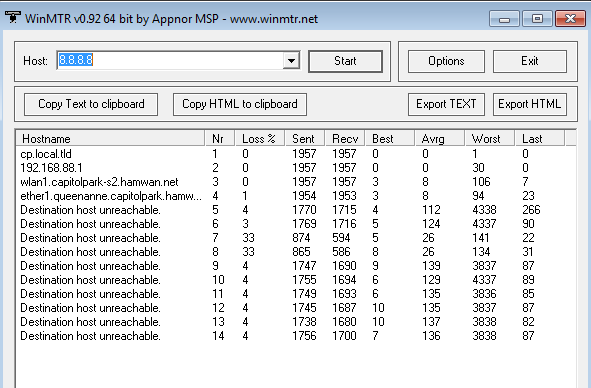
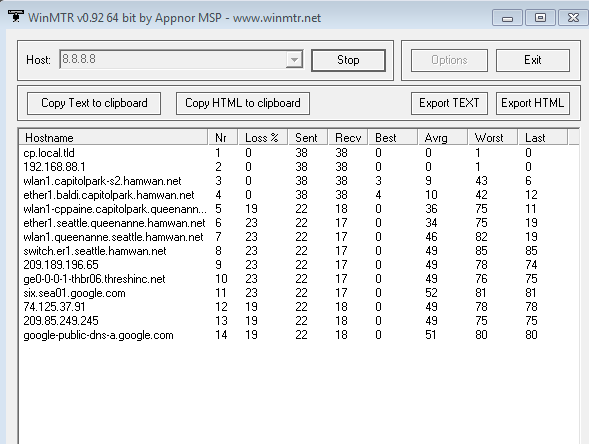
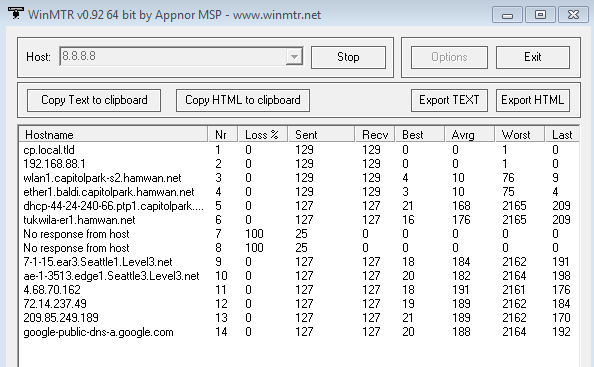
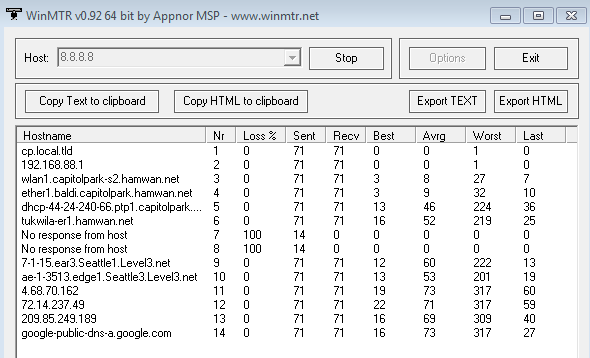
Thanks for the suggestions today, guys. I used WinMTR to monitor routes, and ran some speed tests during the day. 5.9GHz link has remained strong at about 50dB SNR aimed at CapitolPark. Here’s a performance report: ~12 noon: had one recording of 6.5Mbps download - cool! 2pm-3:15pm ping 42-55mS down: 1.3-1.74 Mbps up: 1.45-1.6 Mbps 3:20: no connection possible 3:23-3:35 similar performance to 2-3:15 4:10: performance faltered, and within a couple minutes the routing adjusted and restored performance. (Note time in file name) 7:35pm: ping: 53mS, down = 1.06Mbps, up =0.9Mbps = lowest so far today 8:44pm: ping: 86mS, down=0.8Mbps and erratic; up=1.1Mbps 10:22pm: ping=24mS (fast!), down=1.46Mbps, up=2.0Mbps Note the two “no response” entries, but similar link performance as earlier in the day, plus faster ping. I hope this helps you guys figure out how the system’s working. As far as I’m concerned, the 1.5Mbps speeds are find for WINLINK, it’s just the availability reliability that’s concerning. WA6PXX, Mercer Island
On Apr 4, 2016, at 1:59 PM, Bart Kus <me@bartk.us> wrote:
This answer lacks a resolution for David's problem. Let us come back to you with a better response.
--Bart
On 4/4/2016 1:53 PM, Tom Hayward wrote:
On Mon, Apr 4, 2016 at 1:01 PM, David Giuliani <David@giuliani.org <mailto:David@giuliani.org>> wrote: Hi - I’m new to the PSDR, and could use some help getting my HamWAN connection going. I installed a Poynting + Mikrotik Router Board system on my roof, and configured using the Wiki, no problems. I’m getting strong signals between my QTH at north Mercer Island and the Capitol Park station:
Connected to ess, CapitolPark-S2/AE7SJ nv2 Signal: -68dBm SNR 51dB Tx: 16.2Mbps, 96% ccq, 16.2Mbps Rx: 16.2Mbps, 96% ccq, 16.2Mbps
However, I get sporadic Internet performance, measured using Speedtest.net <http://speedtest.net/>. Here are a few readings this morning:
ping down up 21ms 3.9 2.8 35ms <0.1 stopped 77ms 0.27 0.46 42ms 2.0 0.1
I did check my cabling between the radio and the computer by substitution - no change.
Two things: 1. Anybody have any suggestions? What data rate are others of you getting? 2. Is there a place to go to get help on subjects like this?
Hi David,
Nice to see you have had some success with HamWAN! -68 dBm is a great signal strength and I'm sure many others here envy your clear line-of-sight to a HamWAN site.
I took a look at this and the slow hop between you and the Internet is between our Capitol Park and Queen Anne sites. That link is sub-optimal because it's connected off the sidelobe of a dish that is pointed at the SnoDEM site. It's enough to work, but as you've found it's not the fastest. There's nothing you can do about it.
The way I investigated this is by doing speed tests to each of the hops in your path. You can find the path like this (from your modem):
/tool traceroute use-dns=yes 8.8.8.8
(8.8.8.8 is Google public DNS servers. It's likely to always be up. Feel free to use any other target depending on the nature of your test.)
To run a speed test (this should work to all HamWAN routers--let me know if it doesn't):
/tool bandwidth-test protocol=tcp CapitolPark-S2.hamwan.net <http://capitolpark-s2.hamwan.net/>
This will test speed between your modem and CapitolPark-S2.hamwan.net <http://capitolpark-s2.hamwan.net/>. You can test the other direction by adding direction=transmit to the command.
This is a perfect forum to ask questions like this.
Tom KD7LXL
_______________________________________________ PSDR mailing list PSDR@hamwan.org <mailto:PSDR@hamwan.org> http://mail.hamwan.net/mailman/listinfo/psdr <http://mail.hamwan.net/mailman/listinfo/psdr>
_______________________________________________ PSDR mailing list PSDR@hamwan.org http://mail.hamwan.net/mailman/listinfo/psdr
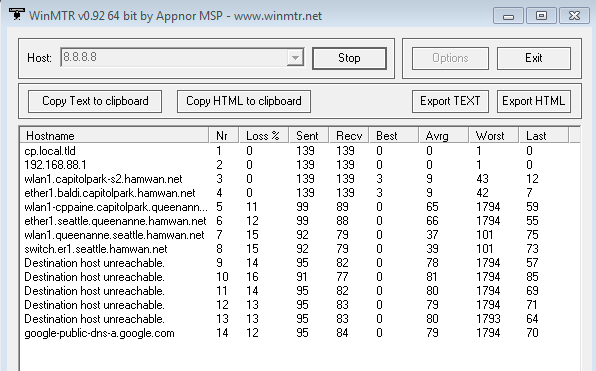
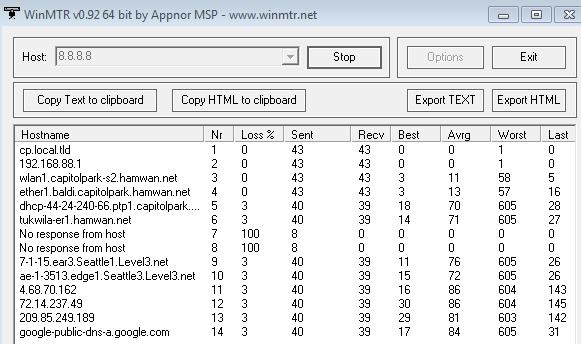
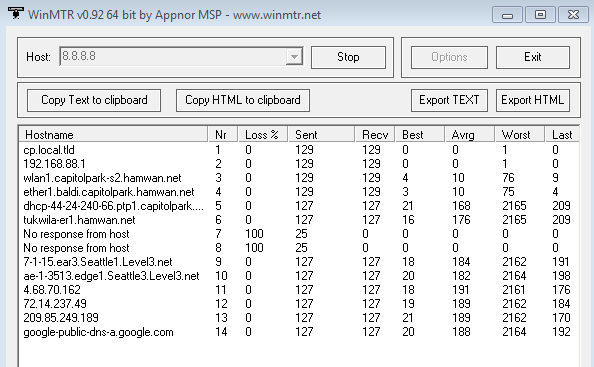
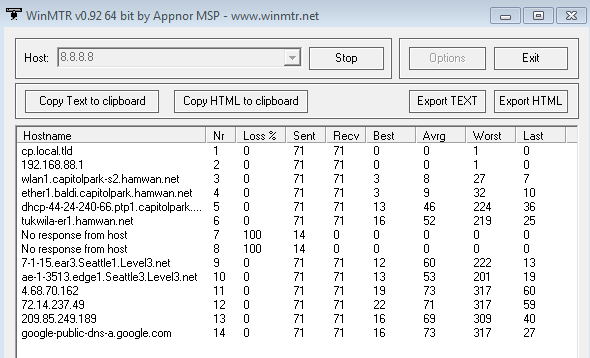
Thanks for the excellent data. If you'd like to have more fun, I'd also like to point out that all of our routers should be running bandwidth-server instances. This means you can make actual RF throughput measures on a per-hop basis. Try it to your first hop: [eo@WA6PXX-MercerIs] /tool bandwidth-server> /tool traceroute 8.8.8.8 # ADDRESS LOSS SENT LAST AVG BEST WORST STD-DEV STATUS 1 44.24.240.33 0% 1 7.6ms 7.6 7.6 7.6 0 2 44.24.240.6 0% 1 3.6ms 3.6 3.6 3.6 0 3 44.24.240.66 0% 1 24.2ms 24.2 24.2 24.2 0 4 44.24.241.113 0% 1 56.8ms 56.8 56.8 56.8 0 5 0% 1 0ms [eo@WA6PXX-MercerIs] /tool bandwidth-server> /tool bandwidth-test direction=receive 44.24.240.33 status: running duration: 12s rx-current: 7.1Mbps rx-10-second-average: 7.0Mbps rx-total-average: 6.9Mbps lost-packets: 143 random-data: no direction: receive rx-size: 1500 and so on... By the third hop, you may begin to notice the problems: [eo@WA6PXX-MercerIs] /tool bandwidth-server> /tool bandwidth-test direction=receive 44.24.240.66 status: running duration: 7s rx-current: 204.0kbps rx-10-second-average: 921.8kbps rx-total-average: 921.8kbps lost-packets: 34 random-data: no direction: receive rx-size: 1500 Of course your throughput will be limited by existing network load. You can monitor that using our public traffic graphs: http://monitoring.hamwan.net/cacti/ The login / password is hamwan / hamwan. (I though I had gotten rid of it, but it persists.) These only update once every 5 minutes, so they're not as handy as they could be for manual testing. In most cases though, the network is idle enough that you won't need them, and bandwidth-test results will be highly indicative of link speed. Be sure to give the links at least 30 seconds to come up to speed. They default to sitting at a lower speed when they're not being asked to move lots of data, and then they train up on higher speeds as required. This is to maximize their reliability when only low data rates are required. Oh, and you will not be able to do a bandwidth-test to the edge routers. These have firewall rules that prevent bandwidth-testing. We should really fix that at some point. Speaking of fixing, I've started writing some software last night to help us optimize the QA-CP and QA-Westin links. Both of these sometimes affect your connection. As Tom mentioned, QA-CP is affected by a poor path to the side of a dish, but QA-Westin is affected by Amazon constructing a new building right in the signal path. You can view the path obstacle here: http://cam.westin.hamwan.net/ If we can't get either of these links to perform acceptably, we can manually give them a lower priority on the network. The QA-CP link might be helped a lot just by installing a higher gain modem @ QA and/or rotating/upgrading the dish @ CP. The QA-Westin problem is a little harder. So far we've reduced the bandwidth of QA-Westin to help it out, and you can see the signal increase in the associated graph: http://monitoring.hamwan.net/cacti/graph.php?action=view&local_graph_id=439&... But it doesn't seem to have helped speeds at all, so now we need to do some interference-avoidance work. I hope to have that software finished this week. The last problem we should address here is the apparent route flapping inside the network. We don't have any good tools in place to monitor that, and it looks to be affecting your path. While this shouldn't result in outages for you, it does indicate marginal network stability, so it's a problem we need to look into. I do have designs to monitor this and mitigate it, but they're slightly longer-term. --Bart On 4/4/2016 10:42 PM, David Giuliani wrote:
Thanks for the suggestions today, guys. I used WinMTR to monitor routes, and ran some speed tests during the day. 5.9GHz link has remained strong at about 50dB SNR aimed at CapitolPark. Here’s a performance report:
~12 noon: had one recording of 6.5Mbps download - cool! 2pm-3:15pm ping 42-55mS down: 1.3-1.74 Mbps up: 1.45-1.6 Mbps 3:20: no connection possible 3:23-3:35 similar performance to 2-3:15 4:10: performance faltered, and within a couple minutes the routing adjusted and restored performance. (Note time in file name)
7:35pm: ping: 53mS, down = 1.06Mbps, up =0.9Mbps = lowest so far today
8:44pm: ping: 86mS, down=0.8Mbps and erratic; up=1.1Mbps
10:22pm: ping=24mS (fast!), down=1.46Mbps, up=2.0Mbps Note the two “no response” entries, but similar link performance as earlier in the day, plus faster ping.
I hope this helps you guys figure out how the system’s working. As far as I’m concerned, the 1.5Mbps speeds are find for WINLINK, it’s just the availability reliability that’s concerning.
WA6PXX, Mercer Island
On Apr 4, 2016, at 1:59 PM, Bart Kus <me@bartk.us <mailto:me@bartk.us>> wrote:
This answer lacks a resolution for David's problem. Let us come back to you with a better response.
--Bart
On 4/4/2016 1:53 PM, Tom Hayward wrote:
On Mon, Apr 4, 2016 at 1:01 PM, David Giuliani <David@giuliani.org <mailto:David@giuliani.org>> wrote:
Hi - I’m new to the PSDR, and could use some help getting my HamWAN connection going. I installed a Poynting + Mikrotik Router Board system on my roof, and configured using the Wiki, no problems. I’m getting strong signals between my QTH at north Mercer Island and the Capitol Park station:
Connected to ess, CapitolPark-S2/AE7SJ nv2 Signal: -68dBm SNR 51dB Tx: 16.2Mbps, 96% ccq, 16.2Mbps Rx: 16.2Mbps, 96% ccq, 16.2Mbps
However, I get sporadic Internet performance, measured using Speedtest.net <http://speedtest.net/>. Here are a few readings this morning:
*ping down up* 21ms 3.9 2.8 35ms <0.1 stopped 77ms 0.27 0.46 42ms 2.0 0.1
I did check my cabling between the radio and the computer by substitution - no change.
Two things: 1. Anybody have any suggestions? What data rate are others of you getting? 2. Is there a place to go to get help on subjects like this?
Hi David,
Nice to see you have had some success with HamWAN! -68 dBm is a great signal strength and I'm sure many others here envy your clear line-of-sight to a HamWAN site.
I took a look at this and the slow hop between you and the Internet is between our Capitol Park and Queen Anne sites. That link is sub-optimal because it's connected off the sidelobe of a dish that is pointed at the SnoDEM site. It's enough to work, but as you've found it's not the fastest. There's nothing you can do about it.
The way I investigated this is by doing speed tests to each of the hops in your path. You can find the path like this (from your modem):
/tool traceroute use-dns=yes 8.8.8.8
(8.8.8.8 is Google public DNS servers. It's likely to always be up. Feel free to use any other target depending on the nature of your test.)
To run a speed test (this should work to all HamWAN routers--let me know if it doesn't):
/tool bandwidth-test protocol=tcp CapitolPark-S2.hamwan.net <http://capitolpark-s2.hamwan.net/>
This will test speed between your modem and CapitolPark-S2.hamwan.net <http://capitolpark-s2.hamwan.net/>. You can test the other direction by adding direction=transmit to the command.
This is a perfect forum to ask questions like this.
Tom KD7LXL
_______________________________________________ PSDR mailing list PSDR@hamwan.org http://mail.hamwan.net/mailman/listinfo/psdr
_______________________________________________ PSDR mailing list PSDR@hamwan.org <mailto:PSDR@hamwan.org> http://mail.hamwan.net/mailman/listinfo/psdr
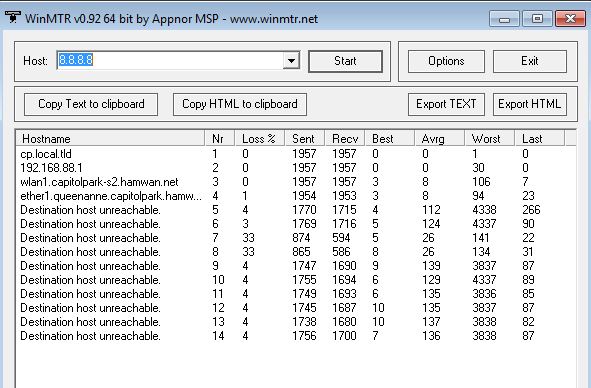
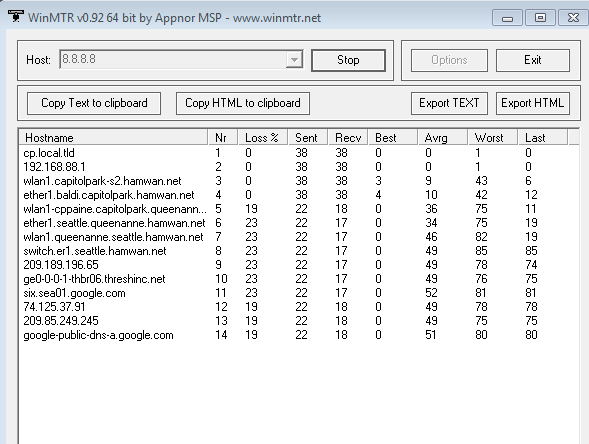
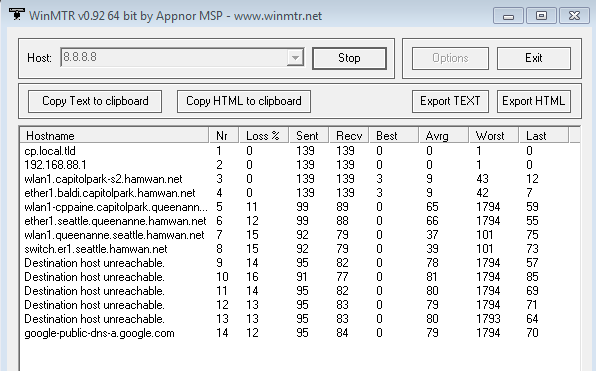
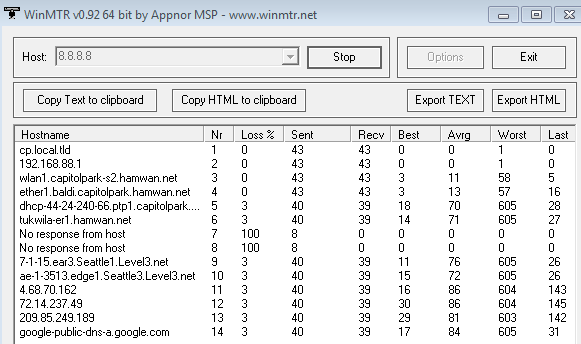
Hmmm, lots of things to learn about here, Bart. I’ll play with this when I have a few. Anything we can do to have a solid network is greatly appreciated. I’d like to learn more about HamWAN to make sure I can represent it will to our club (Mercer Island Radio Operators). Where can I find out what is located at each 44…. address? Otherwise it’s just a bunch of numbers. I wonder if you have a detailed system map somewhere on-line?
On Apr 5, 2016, at 9:35 AM, Bart Kus <me@bartk.us> wrote:
Thanks for the excellent data. If you'd like to have more fun, I'd also like to point out that all of our routers should be running bandwidth-server instances. This means you can make actual RF throughput measures on a per-hop basis. Try it to your first hop:
[eo@WA6PXX-MercerIs] /tool bandwidth-server> /tool traceroute 8.8.8.8 # ADDRESS LOSS SENT LAST AVG BEST WORST STD-DEV STATUS 1 44.24.240.33 0% 1 7.6ms 7.6 7.6 7.6 0 2 44.24.240.6 0% 1 3.6ms 3.6 3.6 3.6 0 3 44.24.240.66 0% 1 24.2ms 24.2 24.2 24.2 0 4 44.24.241.113 0% 1 56.8ms 56.8 56.8 56.8 0 5 0% 1 0ms
[eo@WA6PXX-MercerIs] /tool bandwidth-server> /tool bandwidth-test direction=receive 44.24.240.33 status: running duration: 12s rx-current: 7.1Mbps rx-10-second-average: 7.0Mbps rx-total-average: 6.9Mbps lost-packets: 143 random-data: no direction: receive rx-size: 1500
and so on... By the third hop, you may begin to notice the problems:
[eo@WA6PXX-MercerIs] /tool bandwidth-server> /tool bandwidth-test direction=receive 44.24.240.66 status: running duration: 7s rx-current: 204.0kbps rx-10-second-average: 921.8kbps rx-total-average: 921.8kbps lost-packets: 34 random-data: no direction: receive rx-size: 1500
Of course your throughput will be limited by existing network load. You can monitor that using our public traffic graphs:
http://monitoring.hamwan.net/cacti/ <http://monitoring.hamwan.net/cacti/>
The login / password is hamwan / hamwan. (I though I had gotten rid of it, but it persists.) These only update once every 5 minutes, so they're not as handy as they could be for manual testing. In most cases though, the network is idle enough that you won't need them, and bandwidth-test results will be highly indicative of link speed. Be sure to give the links at least 30 seconds to come up to speed. They default to sitting at a lower speed when they're not being asked to move lots of data, and then they train up on higher speeds as required. This is to maximize their reliability when only low data rates are required.
Oh, and you will not be able to do a bandwidth-test to the edge routers. These have firewall rules that prevent bandwidth-testing. We should really fix that at some point.
Speaking of fixing, I've started writing some software last night to help us optimize the QA-CP and QA-Westin links. Both of these sometimes affect your connection. As Tom mentioned, QA-CP is affected by a poor path to the side of a dish, but QA-Westin is affected by Amazon constructing a new building right in the signal path. You can view the path obstacle here:
http://cam.westin.hamwan.net/ <http://cam.westin.hamwan.net/>
If we can't get either of these links to perform acceptably, we can manually give them a lower priority on the network. The QA-CP link might be helped a lot just by installing a higher gain modem @ QA and/or rotating/upgrading the dish @ CP. The QA-Westin problem is a little harder. So far we've reduced the bandwidth of QA-Westin to help it out, and you can see the signal increase in the associated graph:
<http://monitoring.hamwan.net/cacti/graph.php?action=view&local_graph_id=439&rra_id=all>http://monitoring.hamwan.net/cacti/graph.php?action=view&local_graph_id=439&rra_id=all <http://monitoring.hamwan.net/cacti/graph.php?action=view&local_graph_id=439&rra_id=all>
But it doesn't seem to have helped speeds at all, so now we need to do some interference-avoidance work. I hope to have that software finished this week.
The last problem we should address here is the apparent route flapping inside the network. We don't have any good tools in place to monitor that, and it looks to be affecting your path. While this shouldn't result in outages for you, it does indicate marginal network stability, so it's a problem we need to look into. I do have designs to monitor this and mitigate it, but they're slightly longer-term.
--Bart
On 4/4/2016 10:42 PM, David Giuliani wrote:
Thanks for the suggestions today, guys. I used WinMTR to monitor routes, and ran some speed tests during the day. 5.9GHz link has remained strong at about 50dB SNR aimed at CapitolPark. Here’s a performance report:
~12 noon: had one recording of 6.5Mbps download - cool! 2pm-3:15pm ping 42-55mS down: 1.3-1.74 Mbps up: 1.45-1.6 Mbps 3:20: no connection possible 3:23-3:35 similar performance to 2-3:15 4:10: performance faltered, and within a couple minutes the routing adjusted and restored performance. (Note time in file name) <Mail Attachment.png><Mail Attachment.png><Mail Attachment.png>
7:35pm: ping: 53mS, down = 1.06Mbps, up =0.9Mbps = lowest so far today
<Mail Attachment.png>
8:44pm: ping: 86mS, down=0.8Mbps and erratic; up=1.1Mbps <Mail Attachment.png>
10:22pm: ping=24mS (fast!), down=1.46Mbps, up=2.0Mbps <Mail Attachment.png> Note the two “no response” entries, but similar link performance as earlier in the day, plus faster ping.
I hope this helps you guys figure out how the system’s working. As far as I’m concerned, the 1.5Mbps speeds are find for WINLINK, it’s just the availability reliability that’s concerning.
<PastedGraphic-3.tiff> WA6PXX, Mercer Island
On Apr 4, 2016, at 1:59 PM, Bart Kus < <mailto:me@bartk.us>me@bartk.us <mailto:me@bartk.us>> wrote:
This answer lacks a resolution for David's problem. Let us come back to you with a better response.
--Bart
On 4/4/2016 1:53 PM, Tom Hayward wrote:
On Mon, Apr 4, 2016 at 1:01 PM, David Giuliani <David@giuliani.org <mailto:David@giuliani.org>> wrote: Hi - I’m new to the PSDR, and could use some help getting my HamWAN connection going. I installed a Poynting + Mikrotik Router Board system on my roof, and configured using the Wiki, no problems. I’m getting strong signals between my QTH at north Mercer Island and the Capitol Park station:
Connected to ess, CapitolPark-S2/AE7SJ nv2 Signal: -68dBm SNR 51dB Tx: 16.2Mbps, 96% ccq, 16.2Mbps Rx: 16.2Mbps, 96% ccq, 16.2Mbps
However, I get sporadic Internet performance, measured using Speedtest.net <http://speedtest.net/>. Here are a few readings this morning:
ping down up 21ms 3.9 2.8 35ms <0.1 stopped 77ms 0.27 0.46 42ms 2.0 0.1
I did check my cabling between the radio and the computer by substitution - no change.
Two things: 1. Anybody have any suggestions? What data rate are others of you getting? 2. Is there a place to go to get help on subjects like this?
Hi David,
Nice to see you have had some success with HamWAN! -68 dBm is a great signal strength and I'm sure many others here envy your clear line-of-sight to a HamWAN site.
I took a look at this and the slow hop between you and the Internet is between our Capitol Park and Queen Anne sites. That link is sub-optimal because it's connected off the sidelobe of a dish that is pointed at the SnoDEM site. It's enough to work, but as you've found it's not the fastest. There's nothing you can do about it.
The way I investigated this is by doing speed tests to each of the hops in your path. You can find the path like this (from your modem):
/tool traceroute use-dns=yes 8.8.8.8
(8.8.8.8 is Google public DNS servers. It's likely to always be up. Feel free to use any other target depending on the nature of your test.)
To run a speed test (this should work to all HamWAN routers--let me know if it doesn't):
/tool bandwidth-test protocol=tcp CapitolPark-S2.hamwan.net <http://capitolpark-s2.hamwan.net/>
This will test speed between your modem and CapitolPark-S2.hamwan.net <http://capitolpark-s2.hamwan.net/>. You can test the other direction by adding direction=transmit to the command.
This is a perfect forum to ask questions like this.
Tom KD7LXL
_______________________________________________ PSDR mailing list PSDR@hamwan.org <mailto:PSDR@hamwan.org> http://mail.hamwan.net/mailman/listinfo/psdr <http://mail.hamwan.net/mailman/listinfo/psdr>
_______________________________________________ PSDR mailing list PSDR@hamwan.org <mailto:PSDR@hamwan.org> http://mail.hamwan.net/mailman/listinfo/psdr <http://mail.hamwan.net/mailman/listinfo/psdr>

David, Be advised there are 16 million 44.x.x.x addresses -- most do not have anything attached. An exhaustive list of hosts and servers would be very difficult to achieve. This might help with an individual address http://mxtoolbox.com/ReverseLookup.aspx John On Tue, Apr 5, 2016 at 9:48 AM, David Giuliani <David@giuliani.org> wrote:
Hmmm, lots of things to learn about here, Bart. I’ll play with this when I have a few. Anything we can do to have a solid network is greatly appreciated. I’d like to learn more about HamWAN to make sure I can represent it will to our club (Mercer Island Radio Operators).
Where can I find out what is located at each 44…. address? Otherwise it’s just a bunch of numbers. I wonder if you have a detailed system map somewhere on-line?
On Apr 5, 2016, at 9:35 AM, Bart Kus <me@bartk.us> wrote:
Thanks for the excellent data. If you'd like to have more fun, I'd also like to point out that all of our routers should be running bandwidth-server instances. This means you can make actual RF throughput measures on a per-hop basis. Try it to your first hop:
[eo@WA6PXX-MercerIs] /tool bandwidth-server> /tool traceroute 8.8.8.8 # ADDRESS LOSS SENT LAST AVG BEST WORST STD-DEV STATUS 1 44.24.240.33 0% 1 7.6ms 7.6 7.6 7.6 0 2 44.24.240.6 0% 1 3.6ms 3.6 3.6 3.6 0 3 44.24.240.66 0% 1 24.2ms 24.2 24.2 24.2 0 4 44.24.241.113 0% 1 56.8ms 56.8 56.8 56.8 0 5 0% 1 0ms
[eo@WA6PXX-MercerIs] /tool bandwidth-server> /tool bandwidth-test direction=receive 44.24.240.33 status: running duration: 12s rx-current: 7.1Mbps rx-10-second-average: 7.0Mbps rx-total-average: 6.9Mbps lost-packets: 143 random-data: no direction: receive rx-size: 1500
and so on... By the third hop, you may begin to notice the problems:
[eo@WA6PXX-MercerIs] /tool bandwidth-server> /tool bandwidth-test direction=receive 44.24.240.66 status: running duration: 7s rx-current: 204.0kbps rx-10-second-average: 921.8kbps rx-total-average: 921.8kbps lost-packets: 34 random-data: no direction: receive rx-size: 1500
Of course your throughput will be limited by existing network load. You can monitor that using our public traffic graphs:
http://monitoring.hamwan.net/cacti/
The login / password is hamwan / hamwan. (I though I had gotten rid of it, but it persists.) These only update once every 5 minutes, so they're not as handy as they could be for manual testing. In most cases though, the network is idle enough that you won't need them, and bandwidth-test results will be highly indicative of link speed. Be sure to give the links at least 30 seconds to come up to speed. They default to sitting at a lower speed when they're not being asked to move lots of data, and then they train up on higher speeds as required. This is to maximize their reliability when only low data rates are required.
Oh, and you will not be able to do a bandwidth-test to the edge routers. These have firewall rules that prevent bandwidth-testing. We should really fix that at some point.
Speaking of fixing, I've started writing some software last night to help us optimize the QA-CP and QA-Westin links. Both of these sometimes affect your connection. As Tom mentioned, QA-CP is affected by a poor path to the side of a dish, but QA-Westin is affected by Amazon constructing a new building right in the signal path. You can view the path obstacle here:
If we can't get either of these links to perform acceptably, we can manually give them a lower priority on the network. The QA-CP link might be helped a lot just by installing a higher gain modem @ QA and/or rotating/upgrading the dish @ CP. The QA-Westin problem is a little harder. So far we've reduced the bandwidth of QA-Westin to help it out, and you can see the signal increase in the associated graph:
<http://monitoring.hamwan.net/cacti/graph.php?action=view&local_graph_id=439&rra_id=all> http://monitoring.hamwan.net/cacti/graph.php?action=view&local_graph_id=439&...
But it doesn't seem to have helped speeds at all, so now we need to do some interference-avoidance work. I hope to have that software finished this week.
The last problem we should address here is the apparent route flapping inside the network. We don't have any good tools in place to monitor that, and it looks to be affecting your path. While this shouldn't result in outages for you, it does indicate marginal network stability, so it's a problem we need to look into. I do have designs to monitor this and mitigate it, but they're slightly longer-term.
--Bart
On 4/4/2016 10:42 PM, David Giuliani wrote:
Thanks for the suggestions today, guys. I used WinMTR to monitor routes, and ran some speed tests during the day. 5.9GHz link has remained strong at about 50dB SNR aimed at CapitolPark. Here’s a performance report:
~12 noon: had one recording of 6.5Mbps download - cool! 2pm-3:15pm ping 42-55mS down: 1.3-1.74 Mbps up: 1.45-1.6 Mbps 3:20: no connection possible 3:23-3:35 similar performance to 2-3:15 4:10: performance faltered, and within a couple minutes the routing adjusted and restored performance. (Note time in file name) <Mail Attachment.png><Mail Attachment.png><Mail Attachment.png>
7:35pm: ping: 53mS, down = 1.06Mbps, up =0.9Mbps = lowest so far today
<Mail Attachment.png>
8:44pm: ping: 86mS, down=0.8Mbps and erratic; up=1.1Mbps <Mail Attachment.png>
10:22pm: ping=24mS (fast!), down=1.46Mbps, up=2.0Mbps <Mail Attachment.png> Note the two “no response” entries, but similar link performance as earlier in the day, plus faster ping.
I hope this helps you guys figure out how the system’s working. As far as I’m concerned, the 1.5Mbps speeds are find for WINLINK, it’s just the availability reliability that’s concerning.
<PastedGraphic-3.tiff> WA6PXX, Mercer Island
On Apr 4, 2016, at 1:59 PM, Bart Kus < <me@bartk.us>me@bartk.us> wrote:
This answer lacks a resolution for David's problem. Let us come back to you with a better response.
--Bart
On 4/4/2016 1:53 PM, Tom Hayward wrote:
On Mon, Apr 4, 2016 at 1:01 PM, David Giuliani <David@giuliani.org> wrote:
Hi - I’m new to the PSDR, and could use some help getting my HamWAN connection going. I installed a Poynting + Mikrotik Router Board system on my roof, and configured using the Wiki, no problems. I’m getting strong signals between my QTH at north Mercer Island and the Capitol Park station:
Connected to ess, CapitolPark-S2/AE7SJ nv2 Signal: -68dBm SNR 51dB Tx: 16.2Mbps, 96% ccq, 16.2Mbps Rx: 16.2Mbps, 96% ccq, 16.2Mbps
However, I get sporadic Internet performance, measured using Speedtest.net <http://speedtest.net/>. Here are a few readings this morning:
*ping down up* 21ms 3.9 2.8 35ms <0.1 stopped 77ms 0.27 0.46 42ms 2.0 0.1
I did check my cabling between the radio and the computer by substitution - no change.
Two things: 1. Anybody have any suggestions? What data rate are others of you getting? 2. Is there a place to go to get help on subjects like this?
Hi David,
Nice to see you have had some success with HamWAN! -68 dBm is a great signal strength and I'm sure many others here envy your clear line-of-sight to a HamWAN site.
I took a look at this and the slow hop between you and the Internet is between our Capitol Park and Queen Anne sites. That link is sub-optimal because it's connected off the sidelobe of a dish that is pointed at the SnoDEM site. It's enough to work, but as you've found it's not the fastest. There's nothing you can do about it.
The way I investigated this is by doing speed tests to each of the hops in your path. You can find the path like this (from your modem):
/tool traceroute use-dns=yes 8.8.8.8
(8.8.8.8 is Google public DNS servers. It's likely to always be up. Feel free to use any other target depending on the nature of your test.)
To run a speed test (this should work to all HamWAN routers--let me know if it doesn't):
/tool bandwidth-test protocol=tcp CapitolPark-S2.hamwan.net <http://capitolpark-s2.hamwan.net/>
This will test speed between your modem and CapitolPark-S2.hamwan.net <http://capitolpark-s2.hamwan.net/>. You can test the other direction by adding direction=transmit to the command.
This is a perfect forum to ask questions like this.
Tom KD7LXL
_______________________________________________ PSDR mailing listPSDR@hamwan.orghttp://mail.hamwan.net/mailman/listinfo/psdr
_______________________________________________ PSDR mailing list PSDR@hamwan.org http://mail.hamwan.net/mailman/listinfo/psdr
_______________________________________________ PSDR mailing list PSDR@hamwan.org http://mail.hamwan.net/mailman/listinfo/psdr
-- ------------------------------ John D. Hays K7VE PO Box 1223, Edmonds, WA 98020-1223 <http://k7ve.org/blog> <http://twitter.com/#!/john_hays> <http://www.facebook.com/john.d.hays>
What a cool tool, John!
On Apr 5, 2016, at 9:56 AM, John D. Hays <john@hays.org> wrote:
David,
Be advised there are 16 million 44.x.x.x addresses -- most do not have anything attached. An exhaustive list of hosts and servers would be very difficult to achieve.
This might help with an individual address http://mxtoolbox.com/ReverseLookup.aspx <http://mxtoolbox.com/ReverseLookup.aspx>
John
On Tue, Apr 5, 2016 at 9:48 AM, David Giuliani <David@giuliani.org <mailto:David@giuliani.org>> wrote: Hmmm, lots of things to learn about here, Bart. I’ll play with this when I have a few. Anything we can do to have a solid network is greatly appreciated. I’d like to learn more about HamWAN to make sure I can represent it will to our club (Mercer Island Radio Operators).
Where can I find out what is located at each 44…. address? Otherwise it’s just a bunch of numbers. I wonder if you have a detailed system map somewhere on-line?
<PastedGraphic-3.tiff>
On Apr 5, 2016, at 9:35 AM, Bart Kus <me@bartk.us <mailto:me@bartk.us>> wrote:
Thanks for the excellent data. If you'd like to have more fun, I'd also like to point out that all of our routers should be running bandwidth-server instances. This means you can make actual RF throughput measures on a per-hop basis. Try it to your first hop:
[eo@WA6PXX-MercerIs] /tool bandwidth-server> /tool traceroute 8.8.8.8 # ADDRESS LOSS SENT LAST AVG BEST WORST STD-DEV STATUS 1 44.24.240.33 0% 1 7.6ms 7.6 7.6 7.6 0 2 44.24.240.6 0% 1 3.6ms 3.6 3.6 3.6 0 3 44.24.240.66 0% 1 24.2ms 24.2 24.2 24.2 0 4 44.24.241.113 0% 1 56.8ms 56.8 56.8 56.8 0 5 0% 1 0ms
[eo@WA6PXX-MercerIs] /tool bandwidth-server> /tool bandwidth-test direction=receive 44.24.240.33 status: running duration: 12s rx-current: 7.1Mbps rx-10-second-average: 7.0Mbps rx-total-average: 6.9Mbps lost-packets: 143 random-data: no direction: receive rx-size: 1500
and so on... By the third hop, you may begin to notice the problems:
[eo@WA6PXX-MercerIs] /tool bandwidth-server> /tool bandwidth-test direction=receive 44.24.240.66 status: running duration: 7s rx-current: 204.0kbps rx-10-second-average: 921.8kbps rx-total-average: 921.8kbps lost-packets: 34 random-data: no direction: receive rx-size: 1500
Of course your throughput will be limited by existing network load. You can monitor that using our public traffic graphs:
http://monitoring.hamwan.net/cacti/ <http://monitoring.hamwan.net/cacti/>
The login / password is hamwan / hamwan. (I though I had gotten rid of it, but it persists.) These only update once every 5 minutes, so they're not as handy as they could be for manual testing. In most cases though, the network is idle enough that you won't need them, and bandwidth-test results will be highly indicative of link speed. Be sure to give the links at least 30 seconds to come up to speed. They default to sitting at a lower speed when they're not being asked to move lots of data, and then they train up on higher speeds as required. This is to maximize their reliability when only low data rates are required.
Oh, and you will not be able to do a bandwidth-test to the edge routers. These have firewall rules that prevent bandwidth-testing. We should really fix that at some point.
Speaking of fixing, I've started writing some software last night to help us optimize the QA-CP and QA-Westin links. Both of these sometimes affect your connection. As Tom mentioned, QA-CP is affected by a poor path to the side of a dish, but QA-Westin is affected by Amazon constructing a new building right in the signal path. You can view the path obstacle here:
http://cam.westin.hamwan.net/ <http://cam.westin.hamwan.net/>
If we can't get either of these links to perform acceptably, we can manually give them a lower priority on the network. The QA-CP link might be helped a lot just by installing a higher gain modem @ QA and/or rotating/upgrading the dish @ CP. The QA-Westin problem is a little harder. So far we've reduced the bandwidth of QA-Westin to help it out, and you can see the signal increase in the associated graph:
<http://monitoring.hamwan.net/cacti/graph.php?action=view&local_graph_id=439&rra_id=all>http://monitoring.hamwan.net/cacti/graph.php?action=view&local_graph_id=439&rra_id=all <http://monitoring.hamwan.net/cacti/graph.php?action=view&local_graph_id=439&rra_id=all>
But it doesn't seem to have helped speeds at all, so now we need to do some interference-avoidance work. I hope to have that software finished this week.
The last problem we should address here is the apparent route flapping inside the network. We don't have any good tools in place to monitor that, and it looks to be affecting your path. While this shouldn't result in outages for you, it does indicate marginal network stability, so it's a problem we need to look into. I do have designs to monitor this and mitigate it, but they're slightly longer-term.
--Bart
On 4/4/2016 10:42 PM, David Giuliani wrote:
Thanks for the suggestions today, guys. I used WinMTR to monitor routes, and ran some speed tests during the day. 5.9GHz link has remained strong at about 50dB SNR aimed at CapitolPark. Here’s a performance report:
~12 noon: had one recording of 6.5Mbps download - cool! 2pm-3:15pm ping 42-55mS down: 1.3-1.74 Mbps up: 1.45-1.6 Mbps 3:20: no connection possible 3:23-3:35 similar performance to 2-3:15 4:10: performance faltered, and within a couple minutes the routing adjusted and restored performance. (Note time in file name) <Mail Attachment.png><Mail Attachment.png><Mail Attachment.png>
7:35pm: ping: 53mS, down = 1.06Mbps, up =0.9Mbps = lowest so far today
<Mail Attachment.png>
8:44pm: ping: 86mS, down=0.8Mbps and erratic; up=1.1Mbps <Mail Attachment.png>
10:22pm: ping=24mS (fast!), down=1.46Mbps, up=2.0Mbps <Mail Attachment.png> Note the two “no response” entries, but similar link performance as earlier in the day, plus faster ping.
I hope this helps you guys figure out how the system’s working. As far as I’m concerned, the 1.5Mbps speeds are find for WINLINK, it’s just the availability reliability that’s concerning.
<PastedGraphic-3.tiff> WA6PXX, Mercer Island
On Apr 4, 2016, at 1:59 PM, Bart Kus < <mailto:me@bartk.us>me@bartk.us <mailto:me@bartk.us>> wrote:
This answer lacks a resolution for David's problem. Let us come back to you with a better response.
--Bart
On 4/4/2016 1:53 PM, Tom Hayward wrote:
On Mon, Apr 4, 2016 at 1:01 PM, David Giuliani <David@giuliani.org <mailto:David@giuliani.org>> wrote: Hi - I’m new to the PSDR, and could use some help getting my HamWAN connection going. I installed a Poynting + Mikrotik Router Board system on my roof, and configured using the Wiki, no problems. I’m getting strong signals between my QTH at north Mercer Island and the Capitol Park station:
Connected to ess, CapitolPark-S2/AE7SJ nv2 Signal: -68dBm SNR 51dB Tx: 16.2Mbps, 96% ccq, 16.2Mbps Rx: 16.2Mbps, 96% ccq, 16.2Mbps
However, I get sporadic Internet performance, measured using Speedtest.net <http://speedtest.net/>. Here are a few readings this morning:
ping down up 21ms 3.9 2.8 35ms <0.1 stopped 77ms 0.27 0.46 42ms 2.0 0.1
I did check my cabling between the radio and the computer by substitution - no change.
Two things: 1. Anybody have any suggestions? What data rate are others of you getting? 2. Is there a place to go to get help on subjects like this?
Hi David,
Nice to see you have had some success with HamWAN! -68 dBm is a great signal strength and I'm sure many others here envy your clear line-of-sight to a HamWAN site.
I took a look at this and the slow hop between you and the Internet is between our Capitol Park and Queen Anne sites. That link is sub-optimal because it's connected off the sidelobe of a dish that is pointed at the SnoDEM site. It's enough to work, but as you've found it's not the fastest. There's nothing you can do about it.
The way I investigated this is by doing speed tests to each of the hops in your path. You can find the path like this (from your modem):
/tool traceroute use-dns=yes 8.8.8.8
(8.8.8.8 is Google public DNS servers. It's likely to always be up. Feel free to use any other target depending on the nature of your test.)
To run a speed test (this should work to all HamWAN routers--let me know if it doesn't):
/tool bandwidth-test protocol=tcp CapitolPark-S2.hamwan.net <http://capitolpark-s2.hamwan.net/>
This will test speed between your modem and CapitolPark-S2.hamwan.net <http://capitolpark-s2.hamwan.net/>. You can test the other direction by adding direction=transmit to the command.
This is a perfect forum to ask questions like this.
Tom KD7LXL
_______________________________________________ PSDR mailing list PSDR@hamwan.org <mailto:PSDR@hamwan.org> http://mail.hamwan.net/mailman/listinfo/psdr <http://mail.hamwan.net/mailman/listinfo/psdr>
_______________________________________________ PSDR mailing list PSDR@hamwan.org <mailto:PSDR@hamwan.org> http://mail.hamwan.net/mailman/listinfo/psdr <http://mail.hamwan.net/mailman/listinfo/psdr>
_______________________________________________ PSDR mailing list PSDR@hamwan.org <mailto:PSDR@hamwan.org> http://mail.hamwan.net/mailman/listinfo/psdr <http://mail.hamwan.net/mailman/listinfo/psdr>
--
John D. Hays K7VE PO Box 1223, Edmonds, WA 98020-1223 <http://k7ve.org/blog> <http://twitter.com/#!/john_hays> <http://www.facebook.com/john.d.hays>
_______________________________________________ PSDR mailing list PSDR@hamwan.org http://mail.hamwan.net/mailman/listinfo/psdr

Be advised there are 16 million 44.x.x.x addresses -- most do not have anything attached. An exhaustive list of hosts and servers would be very difficult to achieve.
True. But somebody did just recently scan the whole 44 net range and posted a listing of both working servers. (Just kidding.) I'll send that list to David and point him to the local 44 range. Some of the 'published' HamWAN services are on the wiki at: https://www.hamwan.org/t/Services Bill, WA7NWP

On 04/05/2016 09:56 AM, John D. Hays wrote:
Be advised there are 16 million 44.x.x.x addresses -- most do not have anything attached. An exhaustive list of hosts and servers would be very difficult to achieve.
256^3 is closer to 17 million, but quite easy actually if one lets the computer do the work. It will take some time of course, but to get just a list of those addresses responding to pings can be further parsed for a more detailed analysis of each responding host: nmap -sn 44.0.0.0/8
Please don't do this ... On Wed, Apr 6, 2016 at 10:03 AM, Tony Ross <w7efs@centurylink.net> wrote:
nmap -sn 44.0.0.0/8
-- ------------------------------ John D. Hays K7VE PO Box 1223, Edmonds, WA 98020-1223 <http://k7ve.org/blog> <http://twitter.com/#!/john_hays> <http://www.facebook.com/john.d.hays>
Be advised there are 16 million 44.x.x.x addresses -- most do not have anything attached. An exhaustive list of hosts and servers would be very difficult to achieve.
256^3 is closer to 17 million, but quite easy actually if one lets the computer do the work. It will take some time of course, but to get just a list of those addresses responding to pings can be further parsed for a more detailed analysis of each responding host:
nmap -sn 44.0.0.0/8
The fun part is doing it on the air at 1200 baud... Does seem to have a problem with slowing down the mp3 downloads... Bill
On Tue, Apr 5, 2016 at 9:48 AM, David Giuliani <David@giuliani.org> wrote:
Where can I find out what is located at each 44…. address? Otherwise it’s just a bunch of numbers. I wonder if you have a detailed system map somewhere on-line?
David, The Mikrotik traceroute tool has an option called "use-dns=yes" that will resolve the names for each of the IP addresses for you. Here's an example with and without: [tom@WA6PXX-MercerIs] > /tool traceroute 8.8.8.8 # ADDRESS LOSS SENT LAST AVG BEST 1 44.24.240.33 0% 5 6.6ms 6 3 2 44.24.240.7 0% 5 4.2ms 4.2 4.1 3 44.24.242.37 0% 5 8.3ms 9.7 7.8 4 44.24.241.82 0% 5 8.3ms 12 7.8 5 44.24.242.34 0% 5 16.9ms 16.3 12 6 44.24.241.97 0% 5 11.7ms 15.2 11.7 7 209.189.196.65 0% 5 20ms 18 12.3 8 209.189.202.199 0% 5 20.6ms 18.2 11.7 9 206.81.80.17 0% 4 21.3ms 17.5 12.6 10 74.125.37.91 0% 4 16.8ms 15.2 11.7 11 209.85.249.245 0% 4 23.5ms 19 11.8 12 8.8.8.8 0% 4 19.9ms 16.1 12 [tom@WA6PXX-MercerIs] > /tool traceroute 8.8.8.8 *use-dns=yes* # ADDRESS LOSS SENT LAST AVG BEST 1 wlan1.capitolpark-s2.hamwan.net 0% 8 5ms 7.7 3.7 2 ether1.queenanne.capitolpark.... 0% 8 4.1ms 6.6 4 3 wlan1-cppaine.capitolpark.que... 0% 8 12.6ms 12.2 7.8 4 ether1.seattle.queenanne.hamw... 0% 8 12.2ms 11.8 8.4 5 wlan1.queenanne.seattle.hamwa... 0% 8 12.4ms 18.3 12 6 switch.er1.seattle.hamwan.net 0% 8 12.4ms 16.9 12 7 209.189.196.65 0% 8 11.9ms 21.7 11.9 8 ge0-0-0-1-thbr06.threshinc.net 0% 8 12.4ms 17.3 12 9 six.sea01.google.com 0% 8 16.7ms 17.4 12.5 10 74.125.37.91 0% 8 16ms 16.7 12.3 11 209.85.249.245 0% 8 16.6ms 18.3 12.3 12 google-public-dns-a.google.com 0% 8 12.4ms 17.4 11.9 The naming convention we try to follow is INTERFACE.TASK.LOCATION.hamwan.net. For example, the second hop from you is ether1.queenanne.capitolpark.hamwan.net. That is a router at the Capitol Park site pointed at Queen Anne, and you're getting a response from its ethernet port. The physical locations of the sites can be found on the map: https://hamwan.org/t/Coverage+Map A full list of HamWAN routers can be found at http://portal.hamwan.org/host/all Tom KD7LXL
Hi David, Tom and I looked at this issue today, and eventually discovered that there was an interfering station that "recently" (>1mo ago) came on the air and was causing the drama on the Tukwila-Baldi link. We shifted frequencies slightly and the link is feeling much better now. If you re-run your tests, you should see better results. The QA-Westin and QA-CP links still need fixing, but they shouldn't affect you since you're routing through Baldi to hit the Internet. --Bart On 4/5/2016 10:09 AM, Tom Hayward wrote:
On Tue, Apr 5, 2016 at 9:48 AM, David Giuliani <David@giuliani.org <mailto:David@giuliani.org>> wrote:
Where can I find out what is located at each 44…. address? Otherwise it’s just a bunch of numbers. I wonder if you have a detailed system map somewhere on-line?
David,
The Mikrotik traceroute tool has an option called "use-dns=yes" that will resolve the names for each of the IP addresses for you. Here's an example with and without:
[tom@WA6PXX-MercerIs] > /tool traceroute 8.8.8.8 # ADDRESS LOSS SENT LAST AVG BEST 1 44.24.240.33 0% 5 6.6ms 6 3 2 44.24.240.7 0% 5 4.2ms 4.2 4.1 3 44.24.242.37 0% 5 8.3ms 9.7 7.8 4 44.24.241.82 0% 5 8.3ms 12 7.8 5 44.24.242.34 0% 5 16.9ms 16.3 12 6 44.24.241.97 0% 5 11.7ms 15.2 11.7 7 209.189.196.65 0% 5 20ms 18 12.3 8 209.189.202.199 0% 5 20.6ms 18.2 11.7 9 206.81.80.17 0% 4 21.3ms 17.5 12.6 10 74.125.37.91 0% 4 16.8ms 15.2 11.7 11 209.85.249.245 0% 4 23.5ms 19 11.8 12 8.8.8.8 0% 4 19.9ms 16.1 12
[tom@WA6PXX-MercerIs] > /tool traceroute 8.8.8.8 *use-dns=yes* # ADDRESS LOSS SENT LAST AVG BEST 1 wlan1.capitolpark-s2.hamwan.net <http://wlan1.capitolpark-s2.hamwan.net> 0% 8 5ms 7.7 3.7 2 ether1.queenanne.capitolpark.... 0% 8 4.1ms 6.6 4 3 wlan1-cppaine.capitolpark.que... 0% 8 12.6ms 12.2 7.8 4 ether1.seattle.queenanne.hamw... 0% 8 12.2ms 11.8 8.4 5 wlan1.queenanne.seattle.hamwa... 0% 8 12.4ms 18.3 12 6 switch.er1.seattle.hamwan.net <http://switch.er1.seattle.hamwan.net> 0% 8 12.4ms 16.9 12 7 209.189.196.65 0% 8 11.9ms 21.7 11.9 8 ge0-0-0-1-thbr06.threshinc.net <http://ge0-0-0-1-thbr06.threshinc.net> 0% 8 12.4ms 17.3 12 9 six.sea01.google.com <http://six.sea01.google.com> 0% 8 16.7ms 17.4 12.5 10 74.125.37.91 0% 8 16ms 16.7 12.3 11 209.85.249.245 0% 8 16.6ms 18.3 12.3 12 google-public-dns-a.google.com <http://google-public-dns-a.google.com> 0% 8 12.4ms 17.4 11.9
The naming convention we try to follow is INTERFACE.TASK.LOCATION.hamwan.net <http://INTERFACE.TASK.LOCATION.hamwan.net>. For example, the second hop from you is ether1.queenanne.capitolpark.hamwan.net <http://ether1.queenanne.capitolpark.hamwan.net>. That is a router at the Capitol Park site pointed at Queen Anne, and you're getting a response from its ethernet port.
The physical locations of the sites can be found on the map: https://hamwan.org/t/Coverage+Map
A full list of HamWAN routers can be found at http://portal.hamwan.org/host/all
Tom KD7LXL
Now I am beginning to I appreciate the challenges of managing a radio based multi-hop system in a crowded urban environment! Yes, much better now. I ran 4 tests between 4pm and 10pm today: ping: 45 - 74 mS down: 3.0 - 3.9 Mbps up: 4.1 - 5.1 Mbps Nice fix, Bart & Tom. Thanks!
On Apr 5, 2016, at 5:22 PM, Bart Kus <me@bartk.us> wrote:
Hi David,
Tom and I looked at this issue today, and eventually discovered that there was an interfering station that "recently" (>1mo ago) came on the air and was causing the drama on the Tukwila-Baldi link. We shifted frequencies slightly and the link is feeling much better now. If you re-run your tests, you should see better results.
The QA-Westin and QA-CP links still need fixing, but they shouldn't affect you since you're routing through Baldi to hit the Internet.
--Bart
On 4/5/2016 10:09 AM, Tom Hayward wrote:
On Tue, Apr 5, 2016 at 9:48 AM, David Giuliani <David@giuliani.org <mailto:David@giuliani.org>> wrote: Where can I find out what is located at each 44…. address? Otherwise it’s just a bunch of numbers. I wonder if you have a detailed system map somewhere on-line?
David,
The Mikrotik traceroute tool has an option called "use-dns=yes" that will resolve the names for each of the IP addresses for you. Here's an example with and without:
[tom@WA6PXX-MercerIs] > /tool traceroute 8.8.8.8 # ADDRESS LOSS SENT LAST AVG BEST 1 44.24.240.33 0% 5 6.6ms 6 3 2 44.24.240.7 0% 5 4.2ms 4.2 4.1 3 44.24.242.37 0% 5 8.3ms 9.7 7.8 4 44.24.241.82 0% 5 8.3ms 12 7.8 5 44.24.242.34 0% 5 16.9ms 16.3 12 6 44.24.241.97 0% 5 11.7ms 15.2 11.7 7 209.189.196.65 0% 5 20ms 18 12.3 8 209.189.202.199 0% 5 20.6ms 18.2 11.7 9 206.81.80.17 0% 4 21.3ms 17.5 12.6 10 74.125.37.91 0% 4 16.8ms 15.2 11.7 11 209.85.249.245 0% 4 23.5ms 19 11.8 12 8.8.8.8 0% 4 19.9ms 16.1 12
[tom@WA6PXX-MercerIs] > /tool traceroute 8.8.8.8 use-dns=yes # ADDRESS LOSS SENT LAST AVG BEST 1 wlan1.capitolpark-s2.hamwan.net <http://wlan1.capitolpark-s2.hamwan.net/> 0% 8 5ms 7.7 3.7 2 ether1.queenanne.capitolpark.... 0% 8 4.1ms 6.6 4 3 wlan1-cppaine.capitolpark.que... 0% 8 12.6ms 12.2 7.8 4 ether1.seattle.queenanne.hamw... 0% 8 12.2ms 11.8 8.4 5 wlan1.queenanne.seattle.hamwa... 0% 8 12.4ms 18.3 12 6 switch.er1.seattle.hamwan.net <http://switch.er1.seattle.hamwan.net/> 0% 8 12.4ms 16.9 12 7 209.189.196.65 0% 8 11.9ms 21.7 11.9 8 ge0-0-0-1-thbr06.threshinc.net <http://ge0-0-0-1-thbr06.threshinc.net/> 0% 8 12.4ms 17.3 12 9 six.sea01.google.com <http://six.sea01.google.com/> 0% 8 16.7ms 17.4 12.5 10 74.125.37.91 0% 8 16ms 16.7 12.3 11 209.85.249.245 0% 8 16.6ms 18.3 12.3 12 google-public-dns-a.google.com <http://google-public-dns-a.google.com/> 0% 8 12.4ms 17.4 11.9
The naming convention we try to follow is INTERFACE.TASK.LOCATION.hamwan.net <http://interface.task.location.hamwan.net/>. For example, the second hop from you is ether1.queenanne.capitolpark.hamwan.net <http://ether1.queenanne.capitolpark.hamwan.net/>. That is a router at the Capitol Park site pointed at Queen Anne, and you're getting a response from its ethernet port.
The physical locations of the sites can be found on the map: https://hamwan.org/t/Coverage+Map <https://hamwan.org/t/Coverage+Map>
A full list of HamWAN routers can be found at <http://portal.hamwan.org/host/all>http://portal.hamwan.org/host/all <http://portal.hamwan.org/host/all>
Tom KD7LXL
_______________________________________________ PSDR mailing list PSDR@hamwan.org http://mail.hamwan.net/mailman/listinfo/psdr
participants (8)
-
 Bart Kus
 -
 Bill Vodall
 -
 David Giuliani
 -
 John D. Hays
 -
 Michael Roessler
 -
 Rob Salsgiver
 -
 Tom Hayward
 -
 Tony Ross