
OK, I figured out my problem and I now have Winbox talking to the radio and reporting status. I's not linking to anything since the antenna is still on the ground. How much configuration can I do before mounting it on my roof. The only question in my sight path may be some trees but I think I can aim just over them and get a signal. My friend Bruce/WA7BAM will be helping with the antenna installation on Wed afternoon. Making progress... Phil Cornell W7PLC SHARES NCS590 Hybrid Gateway W7PLC TCARES VP

Hi Phil, You can do all of the configuration while on the ground, but obviously you won’t have any signal. You don’t indicate what specific equipment you have, but if you have the mAnt30 dish and separate router/modem, make sure you have the antenna connected before powering it up. As to trees, they are an absolute show stopper. You must have clear, visual, line of sight to the HamWAN site you are shooting to. Hopefully you will have that, or can achieve that, from where you plan to mount the dish. As to “just over them”, a microwave shot consists of the direct, pure line of sight, but also what is referred to as the Fresnel zone – a cigar shaped “balloon” around the pure line of sight. Items in the Fresnel zone (including trees) can reduce the amount of signal you have, so you may not get optimum performance, but some. In your initial post you commented about how to balance between your regular internet and HamWAN for a Winlink node. My suggestion would be to just leave it on one (whichever one) as the norm, and only switch to the other if the one goes down. You can also acquire routers that include failover capability to automatically make that switch. You can go more advanced with load sharing and such between multiple connections, but that requires much better understanding of internet routing, and for a winlink node basic failover will serve your purpose. Good luck, let us know how things turn out. Carl, N7KUW From: PSDR <psdr-bounces@hamwan.org> On Behalf Of Phil Cornell via PSDR Sent: Monday, March 15, 2021 12:11 PM To: psdr@hamwan.org Subject: [HamWAN PSDR] Newbie OK, I figured out my problem and I now have Winbox talking to the radio and reporting status. I's not linking to anything since the antenna is still on the ground. How much configuration can I do before mounting it on my roof. The only question in my sight path may be some trees but I think I can aim just over them and get a signal. My friend Bruce/WA7BAM will be helping with the antenna installation on Wed afternoon. Making progress... Phil Cornell W7PLC SHARES NCS590 Hybrid Gateway W7PLC TCARES VP

Just want to add two things to what Carl said already. 1) Line of sight means you can actually 'see' the HamWAN node, or at least you can with something like a pair of binoculars. 2) Remember that HamWAN is not meant to be a replacement for your home internet. Be very conscious of what traffic you are putting over HamWAN. I don't recommend connecting it to your home network unless you are familiar enough with routing rules to limit what traffic goes out the HamWAN link. Good luck, Kenny, KU7M On Mon, Mar 15, 2021 at 12:40 PM <carl@n7kuw.com> wrote:
Hi Phil,
You can do all of the configuration while on the ground, but obviously you won’t have any signal. You don’t indicate what specific equipment you have, but if you have the mAnt30 dish and separate router/modem, make sure you have the antenna connected before powering it up.
As to trees, they are an absolute show stopper. You must have clear, visual, line of sight to the HamWAN site you are shooting to. Hopefully you will have that, or can achieve that, from where you plan to mount the dish. As to “just over them”, a microwave shot consists of the direct, pure line of sight, but also what is referred to as the Fresnel zone – a cigar shaped “balloon” around the pure line of sight. Items in the Fresnel zone (including trees) can reduce the amount of signal you have, so you may not get optimum performance, but some.
In your initial post you commented about how to balance between your regular internet and HamWAN for a Winlink node. My suggestion would be to just leave it on one (whichever one) as the norm, and only switch to the other if the one goes down. You can also acquire routers that include failover capability to automatically make that switch. You can go more advanced with load sharing and such between multiple connections, but that requires much better understanding of internet routing, and for a winlink node basic failover will serve your purpose.
Good luck, let us know how things turn out.
Carl, N7KUW
*From:* PSDR <psdr-bounces@hamwan.org> *On Behalf Of *Phil Cornell via PSDR *Sent:* Monday, March 15, 2021 12:11 PM *To:* psdr@hamwan.org *Subject:* [HamWAN PSDR] Newbie
OK, I figured out my problem and I now have Winbox talking to the radio and reporting status. I's not linking to anything since the antenna is still on the ground. How much configuration can I do before mounting it on my roof. The only question in my sight path may be some trees but I think I can aim just over them and get a signal. My friend Bruce/WA7BAM will be helping with the antenna installation on Wed afternoon. Making progress...
*Phil Cornell *
*W7PLC *
*SHARES NCS590*
*Hybrid Gateway W7PLC*
*TCARES VP*
_______________________________________________ PSDR mailing list PSDR@hamwan.org http://mail.hamwan.net/mailman/listinfo/psdr
Thanks all. I will be taking a spotting scope up on the roof today. Hoping for good visibility. Sent from Yahoo Mail for iPhone On Monday, March 15, 2021, 12:49, Kenny Richards <richark@gmail.com> wrote: Just want to add two things to what Carl said already. 1) Line of sight means you can actually 'see' the HamWAN node, or at least you can with something like a pair of binoculars. 2) Remember that HamWAN is not meant to be a replacement for your home internet. Be very conscious of what traffic you are putting over HamWAN. I don't recommend connecting it to your home network unless you are familiar enough with routing rules to limit what traffic goes out the HamWAN link. Good luck, Kenny, KU7M On Mon, Mar 15, 2021 at 12:40 PM <carl@n7kuw.com> wrote: Hi Phil, You can do all of the configuration while on the ground, but obviously you won’t have any signal. You don’t indicate what specific equipment you have, but if you have the mAnt30 dish and separate router/modem, make sure you have the antenna connected before powering it up. As to trees, they are an absolute show stopper. You must have clear, visual, line of sight to the HamWAN site you are shooting to. Hopefully you will have that, or can achieve that, from where you plan to mount the dish. As to “just over them”, a microwave shot consists of the direct, pure line of sight, but also what is referred to as the Fresnel zone – a cigar shaped “balloon” around the pure line of sight. Items in the Fresnel zone (including trees) can reduce the amount of signal you have, so you may not get optimum performance, but some. In your initial post you commented about how to balance between your regular internet and HamWAN for a Winlink node. My suggestion would be to just leave it on one (whichever one) as the norm, and only switch to the other if the one goes down. You can also acquire routers that include failover capability to automatically make that switch. You can go more advanced with load sharing and such between multiple connections, but that requires much better understanding of internet routing, and for a winlink node basic failover will serve your purpose. Good luck, let us know how things turn out. Carl, N7KUW From: PSDR <psdr-bounces@hamwan.org> On Behalf Of Phil Cornell via PSDR Sent: Monday, March 15, 2021 12:11 PM To: psdr@hamwan.org Subject: [HamWAN PSDR] Newbie OK, I figured out my problem and I now have Winbox talking to the radio and reporting status. I's not linking to anything since the antenna is still on the ground. How much configuration can I do before mounting it on my roof. The only question in my sight path may be some trees but I think I can aim just over them and get a signal. My friend Bruce/WA7BAM will be helping with the antenna installation on Wed afternoon. Making progress... Phil Cornell W7PLC SHARES NCS590 Hybrid Gateway W7PLC TCARES VP _______________________________________________ PSDR mailing list PSDR@hamwan.org http://mail.hamwan.net/mailman/listinfo/psdr
Well, bad news. I have a wall of Douglas Fir at the end of the block between me and Capital Peak. I don't have a clear shot. I may set this station up at the Thurston County EOC for use in the radio room for Winlink traffic. My site is a no-go. Phil Cornell W7PLC SHARES NCS590 Hybrid Gateway W7PLC TCARES VP On Monday, March 15, 2021, 12:49:39 PM PDT, Kenny Richards <richark@gmail.com> wrote: Just want to add two things to what Carl said already. 1) Line of sight means you can actually 'see' the HamWAN node, or at least you can with something like a pair of binoculars. 2) Remember that HamWAN is not meant to be a replacement for your home internet. Be very conscious of what traffic you are putting over HamWAN. I don't recommend connecting it to your home network unless you are familiar enough with routing rules to limit what traffic goes out the HamWAN link. Good luck, Kenny, KU7M On Mon, Mar 15, 2021 at 12:40 PM <carl@n7kuw.com> wrote: Hi Phil, You can do all of the configuration while on the ground, but obviously you won’t have any signal. You don’t indicate what specific equipment you have, but if you have the mAnt30 dish and separate router/modem, make sure you have the antenna connected before powering it up. As to trees, they are an absolute show stopper. You must have clear, visual, line of sight to the HamWAN site you are shooting to. Hopefully you will have that, or can achieve that, from where you plan to mount the dish. As to “just over them”, a microwave shot consists of the direct, pure line of sight, but also what is referred to as the Fresnel zone – a cigar shaped “balloon” around the pure line of sight. Items in the Fresnel zone (including trees) can reduce the amount of signal you have, so you may not get optimum performance, but some. In your initial post you commented about how to balance between your regular internet and HamWAN for a Winlink node. My suggestion would be to just leave it on one (whichever one) as the norm, and only switch to the other if the one goes down. You can also acquire routers that include failover capability to automatically make that switch. You can go more advanced with load sharing and such between multiple connections, but that requires much better understanding of internet routing, and for a winlink node basic failover will serve your purpose. Good luck, let us know how things turn out. Carl, N7KUW From: PSDR <psdr-bounces@hamwan.org> On Behalf Of Phil Cornell via PSDR Sent: Monday, March 15, 2021 12:11 PM To: psdr@hamwan.org Subject: [HamWAN PSDR] Newbie OK, I figured out my problem and I now have Winbox talking to the radio and reporting status. I's not linking to anything since the antenna is still on the ground. How much configuration can I do before mounting it on my roof. The only question in my sight path may be some trees but I think I can aim just over them and get a signal. My friend Bruce/WA7BAM will be helping with the antenna installation on Wed afternoon. Making progress... Phil Cornell W7PLC SHARES NCS590 Hybrid Gateway W7PLC TCARES VP _______________________________________________ PSDR mailing list PSDR@hamwan.org http://mail.hamwan.net/mailman/listinfo/psdr

If you want to try it portable, I have used mine mounted on a tripod with good results. Makes for a large go-kit. Here’s a link to the tripod I use: https://www.dxengineering.com/parts/mfj-1919ex -Lionel K7BIX 206-778-3368 Hamshack Hotline#: 5670 From: PSDR <psdr-bounces@hamwan.org> On Behalf Of Phil Cornell via PSDR Sent: Monday, March 15, 2021 1:54 PM To: Puget Sound Data Ring <psdr@hamwan.org>; Kenny Richards <richark@gmail.com> Subject: Re: [HamWAN PSDR] Newbie Well, bad news. I have a wall of Douglas Fir at the end of the block between me and Capital Peak. I don't have a clear shot. I may set this station up at the Thurston County EOC for use in the radio room for Winlink traffic. My site is a no-go. Phil Cornell W7PLC SHARES NCS590 Hybrid Gateway W7PLC TCARES VP On Monday, March 15, 2021, 12:49:39 PM PDT, Kenny Richards <richark@gmail.com <mailto:richark@gmail.com> > wrote: Just want to add two things to what Carl said already. 1) Line of sight means you can actually 'see' the HamWAN node, or at least you can with something like a pair of binoculars. 2) Remember that HamWAN is not meant to be a replacement for your home internet. Be very conscious of what traffic you are putting over HamWAN. I don't recommend connecting it to your home network unless you are familiar enough with routing rules to limit what traffic goes out the HamWAN link. Good luck, Kenny, KU7M On Mon, Mar 15, 2021 at 12:40 PM <carl@n7kuw.com <mailto:carl@n7kuw.com> > wrote: Hi Phil, You can do all of the configuration while on the ground, but obviously you won’t have any signal. You don’t indicate what specific equipment you have, but if you have the mAnt30 dish and separate router/modem, make sure you have the antenna connected before powering it up. As to trees, they are an absolute show stopper. You must have clear, visual, line of sight to the HamWAN site you are shooting to. Hopefully you will have that, or can achieve that, from where you plan to mount the dish. As to “just over them”, a microwave shot consists of the direct, pure line of sight, but also what is referred to as the Fresnel zone – a cigar shaped “balloon” around the pure line of sight. Items in the Fresnel zone (including trees) can reduce the amount of signal you have, so you may not get optimum performance, but some. In your initial post you commented about how to balance between your regular internet and HamWAN for a Winlink node. My suggestion would be to just leave it on one (whichever one) as the norm, and only switch to the other if the one goes down. You can also acquire routers that include failover capability to automatically make that switch. You can go more advanced with load sharing and such between multiple connections, but that requires much better understanding of internet routing, and for a winlink node basic failover will serve your purpose. Good luck, let us know how things turn out. Carl, N7KUW From: PSDR <psdr-bounces@hamwan.org <mailto:psdr-bounces@hamwan.org> > On Behalf Of Phil Cornell via PSDR Sent: Monday, March 15, 2021 12:11 PM To: psdr@hamwan.org <mailto:psdr@hamwan.org> Subject: [HamWAN PSDR] Newbie OK, I figured out my problem and I now have Winbox talking to the radio and reporting status. I's not linking to anything since the antenna is still on the ground. How much configuration can I do before mounting it on my roof. The only question in my sight path may be some trees but I think I can aim just over them and get a signal. My friend Bruce/WA7BAM will be helping with the antenna installation on Wed afternoon. Making progress... Phil Cornell W7PLC SHARES NCS590 Hybrid Gateway W7PLC TCARES VP _______________________________________________ PSDR mailing list PSDR@hamwan.org <mailto:PSDR@hamwan.org> http://mail.hamwan.net/mailman/listinfo/psdr

Phil, you might still try it. 5.9 ghz is very line of sight, and the others are correct that the can I see it, is a good judge. A couple trees *may* be workable, lots of trees or buildings/landforms in the way is a no-go. Additionally I’ve seen strong behaviors that might be described as picket fencing when in suboptimal locations. Moving a couple feet can make a difference in cases where the path isn’t perfectly clear. Nigel
On Mar 15, 2021, at 14:16, lionelhlvrsn@gmail.com wrote:
If you want to try it portable, I have used mine mounted on a tripod with good results. Makes for a large go-kit. Here’s a link to the tripod I use: https://www.dxengineering.com/parts/mfj-1919ex -Lionel K7BIX 206-778-3368 Hamshack Hotline#: 5670
From: PSDR <psdr-bounces@hamwan.org> On Behalf Of Phil Cornell via PSDR Sent: Monday, March 15, 2021 1:54 PM To: Puget Sound Data Ring <psdr@hamwan.org>; Kenny Richards <richark@gmail.com> Subject: Re: [HamWAN PSDR] Newbie
Well, bad news. I have a wall of Douglas Fir at the end of the block between me and Capital Peak. I don't have a clear shot. I may set this station up at the Thurston County EOC for use in the radio room for Winlink traffic. My site is a no-go.
Phil Cornell W7PLC SHARES NCS590 Hybrid Gateway W7PLC TCARES VP
On Monday, March 15, 2021, 12:49:39 PM PDT, Kenny Richards <richark@gmail.com> wrote:
Just want to add two things to what Carl said already.
1) Line of sight means you can actually 'see' the HamWAN node, or at least you can with something like a pair of binoculars.
2) Remember that HamWAN is not meant to be a replacement for your home internet. Be very conscious of what traffic you are putting over HamWAN. I don't recommend connecting it to your home network unless you are familiar enough with routing rules to limit what traffic goes out the HamWAN link.
Good luck, Kenny, KU7M
On Mon, Mar 15, 2021 at 12:40 PM <carl@n7kuw.com> wrote: Hi Phil,
You can do all of the configuration while on the ground, but obviously you won’t have any signal. You don’t indicate what specific equipment you have, but if you have the mAnt30 dish and separate router/modem, make sure you have the antenna connected before powering it up.
As to trees, they are an absolute show stopper. You must have clear, visual, line of sight to the HamWAN site you are shooting to. Hopefully you will have that, or can achieve that, from where you plan to mount the dish. As to “just over them”, a microwave shot consists of the direct, pure line of sight, but also what is referred to as the Fresnel zone – a cigar shaped “balloon” around the pure line of sight. Items in the Fresnel zone (including trees) can reduce the amount of signal you have, so you may not get optimum performance, but some.
In your initial post you commented about how to balance between your regular internet and HamWAN for a Winlink node. My suggestion would be to just leave it on one (whichever one) as the norm, and only switch to the other if the one goes down. You can also acquire routers that include failover capability to automatically make that switch. You can go more advanced with load sharing and such between multiple connections, but that requires much better understanding of internet routing, and for a winlink node basic failover will serve your purpose.
Good luck, let us know how things turn out.
Carl, N7KUW
From: PSDR <psdr-bounces@hamwan.org> On Behalf Of Phil Cornell via PSDR Sent: Monday, March 15, 2021 12:11 PM To: psdr@hamwan.org Subject: [HamWAN PSDR] Newbie
OK, I figured out my problem and I now have Winbox talking to the radio and reporting status. I's not linking to anything since the antenna is still on the ground. How much configuration can I do before mounting it on my roof. The only question in my sight path may be some trees but I think I can aim just over them and get a signal. My friend Bruce/WA7BAM will be helping with the antenna installation on Wed afternoon. Making progress...
Phil Cornell
W7PLC
SHARES NCS590
Hybrid Gateway W7PLC
TCARES VP
_______________________________________________ PSDR mailing list PSDR@hamwan.org http://mail.hamwan.net/mailman/listinfo/psdr _______________________________________________ PSDR mailing list PSDR@hamwan.org http://mail.hamwan.net/mailman/listinfo/psdr
We would welcome Thurston County EOC into the mix. Currently (that I am aware of), Snohomish County, City of Seattle, and Washington State EMD EOC’s are all on HamWAN. As to portable, I find the Dynadish is a comfortable sized package for most any shot you might end up with, and some of the 12” or 5” panels are usable at medium to short range, and are even more portable. And, with a little reprogramming, they can also be put into point-to-point service to relay a link. Many options and opportunities (until you can build that 100 foot tower in your back yard). Carl, N7KUW From: PSDR <psdr-bounces@hamwan.org> On Behalf Of Phil Cornell via PSDR Sent: Monday, March 15, 2021 1:54 PM To: Puget Sound Data Ring <psdr@hamwan.org>; Kenny Richards <richark@gmail.com> Subject: Re: [HamWAN PSDR] Newbie Well, bad news. I have a wall of Douglas Fir at the end of the block between me and Capital Peak. I don't have a clear shot. I may set this station up at the Thurston County EOC for use in the radio room for Winlink traffic. My site is a no-go. Phil Cornell W7PLC SHARES NCS590 Hybrid Gateway W7PLC TCARES VP On Monday, March 15, 2021, 12:49:39 PM PDT, Kenny Richards <richark@gmail.com <mailto:richark@gmail.com> > wrote: Just want to add two things to what Carl said already. 1) Line of sight means you can actually 'see' the HamWAN node, or at least you can with something like a pair of binoculars. 2) Remember that HamWAN is not meant to be a replacement for your home internet. Be very conscious of what traffic you are putting over HamWAN. I don't recommend connecting it to your home network unless you are familiar enough with routing rules to limit what traffic goes out the HamWAN link. Good luck, Kenny, KU7M On Mon, Mar 15, 2021 at 12:40 PM <carl@n7kuw.com <mailto:carl@n7kuw.com> > wrote: Hi Phil, You can do all of the configuration while on the ground, but obviously you won’t have any signal. You don’t indicate what specific equipment you have, but if you have the mAnt30 dish and separate router/modem, make sure you have the antenna connected before powering it up. As to trees, they are an absolute show stopper. You must have clear, visual, line of sight to the HamWAN site you are shooting to. Hopefully you will have that, or can achieve that, from where you plan to mount the dish. As to “just over them”, a microwave shot consists of the direct, pure line of sight, but also what is referred to as the Fresnel zone – a cigar shaped “balloon” around the pure line of sight. Items in the Fresnel zone (including trees) can reduce the amount of signal you have, so you may not get optimum performance, but some. In your initial post you commented about how to balance between your regular internet and HamWAN for a Winlink node. My suggestion would be to just leave it on one (whichever one) as the norm, and only switch to the other if the one goes down. You can also acquire routers that include failover capability to automatically make that switch. You can go more advanced with load sharing and such between multiple connections, but that requires much better understanding of internet routing, and for a winlink node basic failover will serve your purpose. Good luck, let us know how things turn out. Carl, N7KUW From: PSDR <psdr-bounces@hamwan.org <mailto:psdr-bounces@hamwan.org> > On Behalf Of Phil Cornell via PSDR Sent: Monday, March 15, 2021 12:11 PM To: psdr@hamwan.org <mailto:psdr@hamwan.org> Subject: [HamWAN PSDR] Newbie OK, I figured out my problem and I now have Winbox talking to the radio and reporting status. I's not linking to anything since the antenna is still on the ground. How much configuration can I do before mounting it on my roof. The only question in my sight path may be some trees but I think I can aim just over them and get a signal. My friend Bruce/WA7BAM will be helping with the antenna installation on Wed afternoon. Making progress... Phil Cornell W7PLC SHARES NCS590 Hybrid Gateway W7PLC TCARES VP _______________________________________________ PSDR mailing list PSDR@hamwan.org <mailto:PSDR@hamwan.org> http://mail.hamwan.net/mailman/listinfo/psdr

Phil, an example of the ham band traffic that Kenny mentioned is not permitted by the FCC is encrypted communications traffic…this means the majority of websites your visit today and many email hosters, since websites commonly use TLS/SSL encryption (indicated by “https” in front of the URL in your browser address bar) or encrypted settings in your email hoster & client. Winlink does NOT use encryption, thus is legal, and is the primary application for my ARES team using HamWAN. As Kenny points out, certain routers (not inexpensive home models) can be used to split that traffic appropriately, but it is not an easy setup unless you have a background in data networks or cybersecurity…so it’s far easier to either use HamWAN just for your dedicated ARES laptop use or switch a cable back and forth using one pipe at a time. FWIW, Stephen W9SK From: PSDR <psdr-bounces@hamwan.org> On Behalf Of Kenny Richards Sent: Monday, March 15, 2021 12:49 PM To: Puget Sound Data Ring <psdr@hamwan.org> Subject: Re: [HamWAN PSDR] Newbie Just want to add two things to what Carl said already. 1) Line of sight means you can actually 'see' the HamWAN node, or at least you can with something like a pair of binoculars. 2) Remember that HamWAN is not meant to be a replacement for your home internet. Be very conscious of what traffic you are putting over HamWAN. I don't recommend connecting it to your home network unless you are familiar enough with routing rules to limit what traffic goes out the HamWAN link. Good luck, Kenny, KU7M On Mon, Mar 15, 2021 at 12:40 PM <carl@n7kuw.com <mailto:carl@n7kuw.com> > wrote: Hi Phil, You can do all of the configuration while on the ground, but obviously you won’t have any signal. You don’t indicate what specific equipment you have, but if you have the mAnt30 dish and separate router/modem, make sure you have the antenna connected before powering it up. As to trees, they are an absolute show stopper. You must have clear, visual, line of sight to the HamWAN site you are shooting to. Hopefully you will have that, or can achieve that, from where you plan to mount the dish. As to “just over them”, a microwave shot consists of the direct, pure line of sight, but also what is referred to as the Fresnel zone – a cigar shaped “balloon” around the pure line of sight. Items in the Fresnel zone (including trees) can reduce the amount of signal you have, so you may not get optimum performance, but some. In your initial post you commented about how to balance between your regular internet and HamWAN for a Winlink node. My suggestion would be to just leave it on one (whichever one) as the norm, and only switch to the other if the one goes down. You can also acquire routers that include failover capability to automatically make that switch. You can go more advanced with load sharing and such between multiple connections, but that requires much better understanding of internet routing, and for a winlink node basic failover will serve your purpose. Good luck, let us know how things turn out. Carl, N7KUW From: PSDR <psdr-bounces@hamwan.org <mailto:psdr-bounces@hamwan.org> > On Behalf Of Phil Cornell via PSDR Sent: Monday, March 15, 2021 12:11 PM To: psdr@hamwan.org <mailto:psdr@hamwan.org> Subject: [HamWAN PSDR] Newbie OK, I figured out my problem and I now have Winbox talking to the radio and reporting status. I's not linking to anything since the antenna is still on the ground. How much configuration can I do before mounting it on my roof. The only question in my sight path may be some trees but I think I can aim just over them and get a signal. My friend Bruce/WA7BAM will be helping with the antenna installation on Wed afternoon. Making progress... Phil Cornell W7PLC SHARES NCS590 Hybrid Gateway W7PLC TCARES VP _______________________________________________ PSDR mailing list PSDR@hamwan.org <mailto:PSDR@hamwan.org> http://mail.hamwan.net/mailman/listinfo/psdr

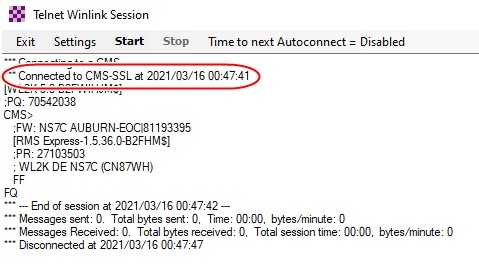
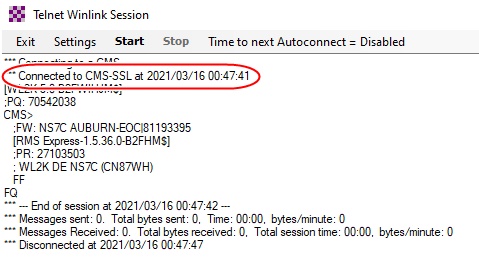
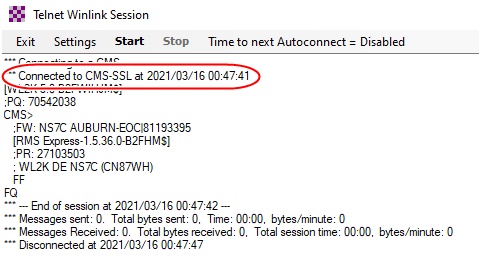
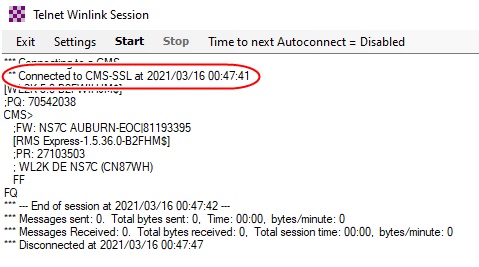
This is not entirely true. Winlink does use TLS/SSL connections for some things. The normal telnet connection is now SSL (will fallback to non-SSL if the connection fails). Also, RMS Gateway to the CMS is now SSL. Telnet P2P and telnet to RMS Relay is not SSL. I believe updates are also SSL now. [image: Winlink SSL.jpg] Winlink Express Link Test: Test started 2021/03/16 00:52 UTC Testing CMS telnet connection to cms.winlink.org through port 8772... Successfully connected to a CMS through port 8772 in 253 Milliseconds Testing CMS SSL telnet connection to cms.winlink.org through port 8773... Successfully connected to a CMS through port 8773 in 311 Milliseconds Testing API service access through port 443 to api.winlink.org... Successfully performed API service to api.winlink.org through port 443 in 756 Milliseconds Testing Autoupdate server access through port 443 to autoupdate2.winlink.org... Successfully checked autoupdate server through port 443 in 439 Milliseconds Testing connection to web site - www.winlink.org:443 Successfully connected to www.winlink.org through port 443 in 47 Milliseconds Testing FTP connection to SFI site - ftp://ftp.swpc.noaa.gov/pub/latest/SGAS.txt Successfully connected to ftp://ftp.swpc.noaa.gov/pub/latest/SGAS.txt through port 20/21 in 1522 Milliseconds Test completed successfully. -Scott, NS7C On Mon, Mar 15, 2021 at 5:45 PM Stephen Kangas <stephen@kangas.com> wrote:
Phil, an example of the ham band traffic that Kenny mentioned is not permitted by the FCC is encrypted communications traffic…this means the majority of websites your visit today and many email hosters, since websites commonly use TLS/SSL encryption (indicated by “https” in front of the URL in your browser address bar) or encrypted settings in your email hoster & client. Winlink does NOT use encryption, thus is legal, and is the primary application for my ARES team using HamWAN. As Kenny points out, certain routers (not inexpensive home models) can be used to split that traffic appropriately, but it is not an easy setup unless you have a background in data networks or cybersecurity…so it’s far easier to either use HamWAN just for your dedicated ARES laptop use or switch a cable back and forth using one pipe at a time.
FWIW, Stephen W9SK
*From:* PSDR <psdr-bounces@hamwan.org> *On Behalf Of *Kenny Richards *Sent:* Monday, March 15, 2021 12:49 PM *To:* Puget Sound Data Ring <psdr@hamwan.org> *Subject:* Re: [HamWAN PSDR] Newbie
Just want to add two things to what Carl said already.
1) Line of sight means you can actually 'see' the HamWAN node, or at least you can with something like a pair of binoculars.
2) Remember that HamWAN is not meant to be a replacement for your home internet. Be very conscious of what traffic you are putting over HamWAN. I don't recommend connecting it to your home network unless you are familiar enough with routing rules to limit what traffic goes out the HamWAN link.
Good luck,
Kenny, KU7M
On Mon, Mar 15, 2021 at 12:40 PM <carl@n7kuw.com> wrote:
Hi Phil,
You can do all of the configuration while on the ground, but obviously you won’t have any signal. You don’t indicate what specific equipment you have, but if you have the mAnt30 dish and separate router/modem, make sure you have the antenna connected before powering it up.
As to trees, they are an absolute show stopper. You must have clear, visual, line of sight to the HamWAN site you are shooting to. Hopefully you will have that, or can achieve that, from where you plan to mount the dish. As to “just over them”, a microwave shot consists of the direct, pure line of sight, but also what is referred to as the Fresnel zone – a cigar shaped “balloon” around the pure line of sight. Items in the Fresnel zone (including trees) can reduce the amount of signal you have, so you may not get optimum performance, but some.
In your initial post you commented about how to balance between your regular internet and HamWAN for a Winlink node. My suggestion would be to just leave it on one (whichever one) as the norm, and only switch to the other if the one goes down. You can also acquire routers that include failover capability to automatically make that switch. You can go more advanced with load sharing and such between multiple connections, but that requires much better understanding of internet routing, and for a winlink node basic failover will serve your purpose.
Good luck, let us know how things turn out.
Carl, N7KUW
*From:* PSDR <psdr-bounces@hamwan.org> *On Behalf Of *Phil Cornell via PSDR *Sent:* Monday, March 15, 2021 12:11 PM *To:* psdr@hamwan.org *Subject:* [HamWAN PSDR] Newbie
OK, I figured out my problem and I now have Winbox talking to the radio and reporting status. I's not linking to anything since the antenna is still on the ground. How much configuration can I do before mounting it on my roof. The only question in my sight path may be some trees but I think I can aim just over them and get a signal. My friend Bruce/WA7BAM will be helping with the antenna installation on Wed afternoon. Making progress...
*Phil Cornell *
*W7PLC *
*SHARES NCS590*
*Hybrid Gateway W7PLC*
*TCARES VP*
_______________________________________________ PSDR mailing list PSDR@hamwan.org http://mail.hamwan.net/mailman/listinfo/psdr
_______________________________________________ PSDR mailing list PSDR@hamwan.org http://mail.hamwan.net/mailman/listinfo/psdr
-- *-Scott*

Are those over the airwaves? On Mon, Mar 15, 2021, 17:56 Scott Currie <scott.d.currie@gmail.com> wrote:
This is not entirely true. Winlink does use TLS/SSL connections for some things. The normal telnet connection is now SSL (will fallback to non-SSL if the connection fails). Also, RMS Gateway to the CMS is now SSL. Telnet P2P and telnet to RMS Relay is not SSL. I believe updates are also SSL now.
[image: Winlink SSL.jpg] Winlink Express Link Test: Test started 2021/03/16 00:52 UTC
Testing CMS telnet connection to cms.winlink.org through port 8772... Successfully connected to a CMS through port 8772 in 253 Milliseconds
Testing CMS SSL telnet connection to cms.winlink.org through port 8773... Successfully connected to a CMS through port 8773 in 311 Milliseconds
Testing API service access through port 443 to api.winlink.org... Successfully performed API service to api.winlink.org through port 443 in 756 Milliseconds
Testing Autoupdate server access through port 443 to autoupdate2.winlink.org... Successfully checked autoupdate server through port 443 in 439 Milliseconds
Testing connection to web site - www.winlink.org:443 Successfully connected to www.winlink.org through port 443 in 47 Milliseconds
Testing FTP connection to SFI site - ftp://ftp.swpc.noaa.gov/pub/latest/SGAS.txt Successfully connected to ftp://ftp.swpc.noaa.gov/pub/latest/SGAS.txt through port 20/21 in 1522 Milliseconds
Test completed successfully. -Scott, NS7C
On Mon, Mar 15, 2021 at 5:45 PM Stephen Kangas <stephen@kangas.com> wrote:
Phil, an example of the ham band traffic that Kenny mentioned is not permitted by the FCC is encrypted communications traffic…this means the majority of websites your visit today and many email hosters, since websites commonly use TLS/SSL encryption (indicated by “https” in front of the URL in your browser address bar) or encrypted settings in your email hoster & client. Winlink does NOT use encryption, thus is legal, and is the primary application for my ARES team using HamWAN. As Kenny points out, certain routers (not inexpensive home models) can be used to split that traffic appropriately, but it is not an easy setup unless you have a background in data networks or cybersecurity…so it’s far easier to either use HamWAN just for your dedicated ARES laptop use or switch a cable back and forth using one pipe at a time.
FWIW, Stephen W9SK
*From:* PSDR <psdr-bounces@hamwan.org> *On Behalf Of *Kenny Richards *Sent:* Monday, March 15, 2021 12:49 PM *To:* Puget Sound Data Ring <psdr@hamwan.org> *Subject:* Re: [HamWAN PSDR] Newbie
Just want to add two things to what Carl said already.
1) Line of sight means you can actually 'see' the HamWAN node, or at least you can with something like a pair of binoculars.
2) Remember that HamWAN is not meant to be a replacement for your home internet. Be very conscious of what traffic you are putting over HamWAN. I don't recommend connecting it to your home network unless you are familiar enough with routing rules to limit what traffic goes out the HamWAN link.
Good luck,
Kenny, KU7M
On Mon, Mar 15, 2021 at 12:40 PM <carl@n7kuw.com> wrote:
Hi Phil,
You can do all of the configuration while on the ground, but obviously you won’t have any signal. You don’t indicate what specific equipment you have, but if you have the mAnt30 dish and separate router/modem, make sure you have the antenna connected before powering it up.
As to trees, they are an absolute show stopper. You must have clear, visual, line of sight to the HamWAN site you are shooting to. Hopefully you will have that, or can achieve that, from where you plan to mount the dish. As to “just over them”, a microwave shot consists of the direct, pure line of sight, but also what is referred to as the Fresnel zone – a cigar shaped “balloon” around the pure line of sight. Items in the Fresnel zone (including trees) can reduce the amount of signal you have, so you may not get optimum performance, but some.
In your initial post you commented about how to balance between your regular internet and HamWAN for a Winlink node. My suggestion would be to just leave it on one (whichever one) as the norm, and only switch to the other if the one goes down. You can also acquire routers that include failover capability to automatically make that switch. You can go more advanced with load sharing and such between multiple connections, but that requires much better understanding of internet routing, and for a winlink node basic failover will serve your purpose.
Good luck, let us know how things turn out.
Carl, N7KUW
*From:* PSDR <psdr-bounces@hamwan.org> *On Behalf Of *Phil Cornell via PSDR *Sent:* Monday, March 15, 2021 12:11 PM *To:* psdr@hamwan.org *Subject:* [HamWAN PSDR] Newbie
OK, I figured out my problem and I now have Winbox talking to the radio and reporting status. I's not linking to anything since the antenna is still on the ground. How much configuration can I do before mounting it on my roof. The only question in my sight path may be some trees but I think I can aim just over them and get a signal. My friend Bruce/WA7BAM will be helping with the antenna installation on Wed afternoon. Making progress...
*Phil Cornell *
*W7PLC *
*SHARES NCS590*
*Hybrid Gateway W7PLC*
*TCARES VP*
_______________________________________________ PSDR mailing list PSDR@hamwan.org http://mail.hamwan.net/mailman/listinfo/psdr
_______________________________________________ PSDR mailing list PSDR@hamwan.org http://mail.hamwan.net/mailman/listinfo/psdr
-- *-Scott* _______________________________________________ PSDR mailing list PSDR@hamwan.org http://mail.hamwan.net/mailman/listinfo/psdr
That was a test on my home Internet, but they would be if you started a telnet session over HamWAN.... On Mon, Mar 15, 2021 at 9:16 PM John D. Hays <john@hays.org> wrote:
Are those over the airwaves?
On Mon, Mar 15, 2021, 17:56 Scott Currie <scott.d.currie@gmail.com> wrote:
This is not entirely true. Winlink does use TLS/SSL connections for some things. The normal telnet connection is now SSL (will fallback to non-SSL if the connection fails). Also, RMS Gateway to the CMS is now SSL. Telnet P2P and telnet to RMS Relay is not SSL. I believe updates are also SSL now.
[image: Winlink SSL.jpg] Winlink Express Link Test: Test started 2021/03/16 00:52 UTC
Testing CMS telnet connection to cms.winlink.org through port 8772... Successfully connected to a CMS through port 8772 in 253 Milliseconds
Testing CMS SSL telnet connection to cms.winlink.org through port 8773... Successfully connected to a CMS through port 8773 in 311 Milliseconds
Testing API service access through port 443 to api.winlink.org... Successfully performed API service to api.winlink.org through port 443 in 756 Milliseconds
Testing Autoupdate server access through port 443 to autoupdate2.winlink.org... Successfully checked autoupdate server through port 443 in 439 Milliseconds
Testing connection to web site - www.winlink.org:443 Successfully connected to www.winlink.org through port 443 in 47 Milliseconds
Testing FTP connection to SFI site - ftp://ftp.swpc.noaa.gov/pub/latest/SGAS.txt Successfully connected to ftp://ftp.swpc.noaa.gov/pub/latest/SGAS.txt through port 20/21 in 1522 Milliseconds
Test completed successfully. -Scott, NS7C
On Mon, Mar 15, 2021 at 5:45 PM Stephen Kangas <stephen@kangas.com> wrote:
Phil, an example of the ham band traffic that Kenny mentioned is not permitted by the FCC is encrypted communications traffic…this means the majority of websites your visit today and many email hosters, since websites commonly use TLS/SSL encryption (indicated by “https” in front of the URL in your browser address bar) or encrypted settings in your email hoster & client. Winlink does NOT use encryption, thus is legal, and is the primary application for my ARES team using HamWAN. As Kenny points out, certain routers (not inexpensive home models) can be used to split that traffic appropriately, but it is not an easy setup unless you have a background in data networks or cybersecurity…so it’s far easier to either use HamWAN just for your dedicated ARES laptop use or switch a cable back and forth using one pipe at a time.
FWIW, Stephen W9SK
*From:* PSDR <psdr-bounces@hamwan.org> *On Behalf Of *Kenny Richards *Sent:* Monday, March 15, 2021 12:49 PM *To:* Puget Sound Data Ring <psdr@hamwan.org> *Subject:* Re: [HamWAN PSDR] Newbie
Just want to add two things to what Carl said already.
1) Line of sight means you can actually 'see' the HamWAN node, or at least you can with something like a pair of binoculars.
2) Remember that HamWAN is not meant to be a replacement for your home internet. Be very conscious of what traffic you are putting over HamWAN. I don't recommend connecting it to your home network unless you are familiar enough with routing rules to limit what traffic goes out the HamWAN link.
Good luck,
Kenny, KU7M
On Mon, Mar 15, 2021 at 12:40 PM <carl@n7kuw.com> wrote:
Hi Phil,
You can do all of the configuration while on the ground, but obviously you won’t have any signal. You don’t indicate what specific equipment you have, but if you have the mAnt30 dish and separate router/modem, make sure you have the antenna connected before powering it up.
As to trees, they are an absolute show stopper. You must have clear, visual, line of sight to the HamWAN site you are shooting to. Hopefully you will have that, or can achieve that, from where you plan to mount the dish. As to “just over them”, a microwave shot consists of the direct, pure line of sight, but also what is referred to as the Fresnel zone – a cigar shaped “balloon” around the pure line of sight. Items in the Fresnel zone (including trees) can reduce the amount of signal you have, so you may not get optimum performance, but some.
In your initial post you commented about how to balance between your regular internet and HamWAN for a Winlink node. My suggestion would be to just leave it on one (whichever one) as the norm, and only switch to the other if the one goes down. You can also acquire routers that include failover capability to automatically make that switch. You can go more advanced with load sharing and such between multiple connections, but that requires much better understanding of internet routing, and for a winlink node basic failover will serve your purpose.
Good luck, let us know how things turn out.
Carl, N7KUW
*From:* PSDR <psdr-bounces@hamwan.org> *On Behalf Of *Phil Cornell via PSDR *Sent:* Monday, March 15, 2021 12:11 PM *To:* psdr@hamwan.org *Subject:* [HamWAN PSDR] Newbie
OK, I figured out my problem and I now have Winbox talking to the radio and reporting status. I's not linking to anything since the antenna is still on the ground. How much configuration can I do before mounting it on my roof. The only question in my sight path may be some trees but I think I can aim just over them and get a signal. My friend Bruce/WA7BAM will be helping with the antenna installation on Wed afternoon. Making progress...
*Phil Cornell *
*W7PLC *
*SHARES NCS590*
*Hybrid Gateway W7PLC*
*TCARES VP*
_______________________________________________ PSDR mailing list PSDR@hamwan.org http://mail.hamwan.net/mailman/listinfo/psdr
_______________________________________________ PSDR mailing list PSDR@hamwan.org http://mail.hamwan.net/mailman/listinfo/psdr
-- *-Scott* _______________________________________________ PSDR mailing list PSDR@hamwan.org http://mail.hamwan.net/mailman/listinfo/psdr
_______________________________________________ PSDR mailing list PSDR@hamwan.org http://mail.hamwan.net/mailman/listinfo/psdr
-- *-Scott*
John, Yes, in this case HamWAN is being used as the connection between Winlink email client (and its associated local RMS Relay) and the CMS on the internet, so it’s going out OTA on the 5GHz ham band.. It could be that a solution is to direct the traffic via HamWAN to an internet-based RMS (or CMS) that does not use SSL which would then upstream to the mother ship CMS using SSL? If so, perhaps we can get one setup on Azure/AWS/GoogleCloud for that purpose. Stephen W9SK From: PSDR <psdr-bounces@hamwan.org> On Behalf Of John D. Hays Sent: Monday, March 15, 2021 9:16 PM To: Puget Sound Data Ring <psdr@hamwan.org> Subject: Re: [HamWAN PSDR] Newbie Are those over the airwaves? On Mon, Mar 15, 2021, 17:56 Scott Currie <scott.d.currie@gmail.com <mailto:scott.d.currie@gmail.com> > wrote: This is not entirely true. Winlink does use TLS/SSL connections for some things. The normal telnet connection is now SSL (will fallback to non-SSL if the connection fails). Also, RMS Gateway to the CMS is now SSL. Telnet P2P and telnet to RMS Relay is not SSL. I believe updates are also SSL now. Winlink Express Link Test: Test started 2021/03/16 00:52 UTC Testing CMS telnet connection to cms.winlink.org <http://cms.winlink.org> through port 8772... Successfully connected to a CMS through port 8772 in 253 Milliseconds Testing CMS SSL telnet connection to cms.winlink.org <http://cms.winlink.org> through port 8773... Successfully connected to a CMS through port 8773 in 311 Milliseconds Testing API service access through port 443 to api.winlink.org... Successfully performed API service to api.winlink.org <http://api.winlink.org> through port 443 in 756 Milliseconds Testing Autoupdate server access through port 443 to autoupdate2.winlink.org... Successfully checked autoupdate server through port 443 in 439 Milliseconds Testing connection to web site - www.winlink.org:443 <http://www.winlink.org:443> Successfully connected to www.winlink.org <http://www.winlink.org> through port 443 in 47 Milliseconds Testing FTP connection to SFI site - ftp://ftp.swpc.noaa.gov/pub/latest/SGAS.txt Successfully connected to ftp://ftp.swpc.noaa.gov/pub/latest/SGAS.txt through port 20/21 in 1522 Milliseconds Test completed successfully. -Scott, NS7C On Mon, Mar 15, 2021 at 5:45 PM Stephen Kangas <stephen@kangas.com <mailto:stephen@kangas.com> > wrote: Phil, an example of the ham band traffic that Kenny mentioned is not permitted by the FCC is encrypted communications traffic…this means the majority of websites your visit today and many email hosters, since websites commonly use TLS/SSL encryption (indicated by “https” in front of the URL in your browser address bar) or encrypted settings in your email hoster & client. Winlink does NOT use encryption, thus is legal, and is the primary application for my ARES team using HamWAN. As Kenny points out, certain routers (not inexpensive home models) can be used to split that traffic appropriately, but it is not an easy setup unless you have a background in data networks or cybersecurity…so it’s far easier to either use HamWAN just for your dedicated ARES laptop use or switch a cable back and forth using one pipe at a time. FWIW, Stephen W9SK From: PSDR <psdr-bounces@hamwan.org <mailto:psdr-bounces@hamwan.org> > On Behalf Of Kenny Richards Sent: Monday, March 15, 2021 12:49 PM To: Puget Sound Data Ring <psdr@hamwan.org <mailto:psdr@hamwan.org> > Subject: Re: [HamWAN PSDR] Newbie Just want to add two things to what Carl said already. 1) Line of sight means you can actually 'see' the HamWAN node, or at least you can with something like a pair of binoculars. 2) Remember that HamWAN is not meant to be a replacement for your home internet. Be very conscious of what traffic you are putting over HamWAN. I don't recommend connecting it to your home network unless you are familiar enough with routing rules to limit what traffic goes out the HamWAN link. Good luck, Kenny, KU7M On Mon, Mar 15, 2021 at 12:40 PM <carl@n7kuw.com <mailto:carl@n7kuw.com> > wrote: Hi Phil, You can do all of the configuration while on the ground, but obviously you won’t have any signal. You don’t indicate what specific equipment you have, but if you have the mAnt30 dish and separate router/modem, make sure you have the antenna connected before powering it up. As to trees, they are an absolute show stopper. You must have clear, visual, line of sight to the HamWAN site you are shooting to. Hopefully you will have that, or can achieve that, from where you plan to mount the dish. As to “just over them”, a microwave shot consists of the direct, pure line of sight, but also what is referred to as the Fresnel zone – a cigar shaped “balloon” around the pure line of sight. Items in the Fresnel zone (including trees) can reduce the amount of signal you have, so you may not get optimum performance, but some. In your initial post you commented about how to balance between your regular internet and HamWAN for a Winlink node. My suggestion would be to just leave it on one (whichever one) as the norm, and only switch to the other if the one goes down. You can also acquire routers that include failover capability to automatically make that switch. You can go more advanced with load sharing and such between multiple connections, but that requires much better understanding of internet routing, and for a winlink node basic failover will serve your purpose. Good luck, let us know how things turn out. Carl, N7KUW From: PSDR <psdr-bounces@hamwan.org <mailto:psdr-bounces@hamwan.org> > On Behalf Of Phil Cornell via PSDR Sent: Monday, March 15, 2021 12:11 PM To: psdr@hamwan.org <mailto:psdr@hamwan.org> Subject: [HamWAN PSDR] Newbie OK, I figured out my problem and I now have Winbox talking to the radio and reporting status. I's not linking to anything since the antenna is still on the ground. How much configuration can I do before mounting it on my roof. The only question in my sight path may be some trees but I think I can aim just over them and get a signal. My friend Bruce/WA7BAM will be helping with the antenna installation on Wed afternoon. Making progress... Phil Cornell W7PLC SHARES NCS590 Hybrid Gateway W7PLC TCARES VP _______________________________________________ PSDR mailing list PSDR@hamwan.org <mailto:PSDR@hamwan.org> http://mail.hamwan.net/mailman/listinfo/psdr _______________________________________________ PSDR mailing list PSDR@hamwan.org <mailto:PSDR@hamwan.org> http://mail.hamwan.net/mailman/listinfo/psdr -- -Scott _______________________________________________ PSDR mailing list PSDR@hamwan.org <mailto:PSDR@hamwan.org> http://mail.hamwan.net/mailman/listinfo/psdr
Scott, thanks for that update, interesting. “Telnet” is a misnomer in this WinLink instance, as that port 22 protocol is historically and normally unencrypted, and widely understood in the industry as such (whereas SSH is encrypted). It looks like the email client is connecting locally to an RMS Relay in that mode, which then connects to the CMS on the internet. --Stephen W9SK From: PSDR <psdr-bounces@hamwan.org> On Behalf Of Scott Currie Sent: Monday, March 15, 2021 5:56 PM To: Puget Sound Data Ring <psdr@hamwan.org> Subject: Re: [HamWAN PSDR] Newbie This is not entirely true. Winlink does use TLS/SSL connections for some things. The normal telnet connection is now SSL (will fallback to non-SSL if the connection fails). Also, RMS Gateway to the CMS is now SSL. Telnet P2P and telnet to RMS Relay is not SSL. I believe updates are also SSL now. Winlink Express Link Test: Test started 2021/03/16 00:52 UTC Testing CMS telnet connection to cms.winlink.org <http://cms.winlink.org> through port 8772... Successfully connected to a CMS through port 8772 in 253 Milliseconds Testing CMS SSL telnet connection to cms.winlink.org <http://cms.winlink.org> through port 8773... Successfully connected to a CMS through port 8773 in 311 Milliseconds Testing API service access through port 443 to api.winlink.org... Successfully performed API service to api.winlink.org <http://api.winlink.org> through port 443 in 756 Milliseconds Testing Autoupdate server access through port 443 to autoupdate2.winlink.org... Successfully checked autoupdate server through port 443 in 439 Milliseconds Testing connection to web site - www.winlink.org:443 <http://www.winlink.org:443> Successfully connected to www.winlink.org <http://www.winlink.org> through port 443 in 47 Milliseconds Testing FTP connection to SFI site - ftp://ftp.swpc.noaa.gov/pub/latest/SGAS.txt Successfully connected to ftp://ftp.swpc.noaa.gov/pub/latest/SGAS.txt through port 20/21 in 1522 Milliseconds Test completed successfully. -Scott, NS7C On Mon, Mar 15, 2021 at 5:45 PM Stephen Kangas <stephen@kangas.com <mailto:stephen@kangas.com> > wrote: Phil, an example of the ham band traffic that Kenny mentioned is not permitted by the FCC is encrypted communications traffic…this means the majority of websites your visit today and many email hosters, since websites commonly use TLS/SSL encryption (indicated by “https” in front of the URL in your browser address bar) or encrypted settings in your email hoster & client. Winlink does NOT use encryption, thus is legal, and is the primary application for my ARES team using HamWAN. As Kenny points out, certain routers (not inexpensive home models) can be used to split that traffic appropriately, but it is not an easy setup unless you have a background in data networks or cybersecurity…so it’s far easier to either use HamWAN just for your dedicated ARES laptop use or switch a cable back and forth using one pipe at a time. FWIW, Stephen W9SK From: PSDR <psdr-bounces@hamwan.org <mailto:psdr-bounces@hamwan.org> > On Behalf Of Kenny Richards Sent: Monday, March 15, 2021 12:49 PM To: Puget Sound Data Ring <psdr@hamwan.org <mailto:psdr@hamwan.org> > Subject: Re: [HamWAN PSDR] Newbie Just want to add two things to what Carl said already. 1) Line of sight means you can actually 'see' the HamWAN node, or at least you can with something like a pair of binoculars. 2) Remember that HamWAN is not meant to be a replacement for your home internet. Be very conscious of what traffic you are putting over HamWAN. I don't recommend connecting it to your home network unless you are familiar enough with routing rules to limit what traffic goes out the HamWAN link. Good luck, Kenny, KU7M On Mon, Mar 15, 2021 at 12:40 PM <carl@n7kuw.com <mailto:carl@n7kuw.com> > wrote: Hi Phil, You can do all of the configuration while on the ground, but obviously you won’t have any signal. You don’t indicate what specific equipment you have, but if you have the mAnt30 dish and separate router/modem, make sure you have the antenna connected before powering it up. As to trees, they are an absolute show stopper. You must have clear, visual, line of sight to the HamWAN site you are shooting to. Hopefully you will have that, or can achieve that, from where you plan to mount the dish. As to “just over them”, a microwave shot consists of the direct, pure line of sight, but also what is referred to as the Fresnel zone – a cigar shaped “balloon” around the pure line of sight. Items in the Fresnel zone (including trees) can reduce the amount of signal you have, so you may not get optimum performance, but some. In your initial post you commented about how to balance between your regular internet and HamWAN for a Winlink node. My suggestion would be to just leave it on one (whichever one) as the norm, and only switch to the other if the one goes down. You can also acquire routers that include failover capability to automatically make that switch. You can go more advanced with load sharing and such between multiple connections, but that requires much better understanding of internet routing, and for a winlink node basic failover will serve your purpose. Good luck, let us know how things turn out. Carl, N7KUW From: PSDR <psdr-bounces@hamwan.org <mailto:psdr-bounces@hamwan.org> > On Behalf Of Phil Cornell via PSDR Sent: Monday, March 15, 2021 12:11 PM To: psdr@hamwan.org <mailto:psdr@hamwan.org> Subject: [HamWAN PSDR] Newbie OK, I figured out my problem and I now have Winbox talking to the radio and reporting status. I's not linking to anything since the antenna is still on the ground. How much configuration can I do before mounting it on my roof. The only question in my sight path may be some trees but I think I can aim just over them and get a signal. My friend Bruce/WA7BAM will be helping with the antenna installation on Wed afternoon. Making progress... Phil Cornell W7PLC SHARES NCS590 Hybrid Gateway W7PLC TCARES VP _______________________________________________ PSDR mailing list PSDR@hamwan.org <mailto:PSDR@hamwan.org> http://mail.hamwan.net/mailman/listinfo/psdr _______________________________________________ PSDR mailing list PSDR@hamwan.org http://mail.hamwan.net/mailman/listinfo/psdr -- -Scott
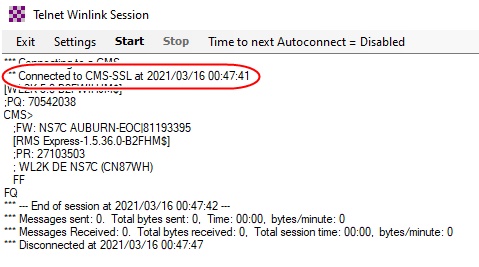
Yeah, I discussed this with the WDT, and the issue with using HamWAN or ARDEN. I had asked if we could force a non-SSL connection to the CMS. They have been under pressure from AWS to switch to all SSL connections, so they had to make the change. They did commit to leaving the client or gateway connection to RMS Relay as non-SSL, so that is why we have suggested having a regional instance of RMS Relay on HamWAN that the RMS Gateways and clients could point to. Backend of the RMS Relay would then connect to the CMS over SSL on a hardened Internet connection (like at a county EOC or the State EOC), or even HF forwarding if the Internet is down. -Scott On Mon, Mar 15, 2021 at 9:41 PM Stephen Kangas <stephen@kangas.com> wrote:
Scott, thanks for that update, interesting. “Telnet” is a misnomer in this WinLink instance, as that port 22 protocol is historically and normally unencrypted, and widely understood in the industry as such (whereas SSH is encrypted). It looks like the email client is connecting locally to an RMS Relay in that mode, which then connects to the CMS on the internet.
--Stephen W9SK
*From:* PSDR <psdr-bounces@hamwan.org> *On Behalf Of *Scott Currie *Sent:* Monday, March 15, 2021 5:56 PM *To:* Puget Sound Data Ring <psdr@hamwan.org> *Subject:* Re: [HamWAN PSDR] Newbie
This is not entirely true. Winlink does use TLS/SSL connections for some things. The normal telnet connection is now SSL (will fallback to non-SSL if the connection fails). Also, RMS Gateway to the CMS is now SSL. Telnet P2P and telnet to RMS Relay is not SSL. I believe updates are also SSL now.
Winlink Express Link Test:
Test started 2021/03/16 00:52 UTC
Testing CMS telnet connection to cms.winlink.org through port 8772... Successfully connected to a CMS through port 8772 in 253 Milliseconds
Testing CMS SSL telnet connection to cms.winlink.org through port 8773... Successfully connected to a CMS through port 8773 in 311 Milliseconds
Testing API service access through port 443 to api.winlink.org... Successfully performed API service to api.winlink.org through port 443 in 756 Milliseconds
Testing Autoupdate server access through port 443 to autoupdate2.winlink.org... Successfully checked autoupdate server through port 443 in 439 Milliseconds
Testing connection to web site - www.winlink.org:443 Successfully connected to www.winlink.org through port 443 in 47 Milliseconds
Testing FTP connection to SFI site - ftp://ftp.swpc.noaa.gov/pub/latest/SGAS.txt Successfully connected to ftp://ftp.swpc.noaa.gov/pub/latest/SGAS.txt through port 20/21 in 1522 Milliseconds
Test completed successfully.
-Scott, NS7C
On Mon, Mar 15, 2021 at 5:45 PM Stephen Kangas <stephen@kangas.com> wrote:
Phil, an example of the ham band traffic that Kenny mentioned is not permitted by the FCC is encrypted communications traffic…this means the majority of websites your visit today and many email hosters, since websites commonly use TLS/SSL encryption (indicated by “https” in front of the URL in your browser address bar) or encrypted settings in your email hoster & client. Winlink does NOT use encryption, thus is legal, and is the primary application for my ARES team using HamWAN. As Kenny points out, certain routers (not inexpensive home models) can be used to split that traffic appropriately, but it is not an easy setup unless you have a background in data networks or cybersecurity…so it’s far easier to either use HamWAN just for your dedicated ARES laptop use or switch a cable back and forth using one pipe at a time.
FWIW, Stephen W9SK
*From:* PSDR <psdr-bounces@hamwan.org> *On Behalf Of *Kenny Richards *Sent:* Monday, March 15, 2021 12:49 PM *To:* Puget Sound Data Ring <psdr@hamwan.org> *Subject:* Re: [HamWAN PSDR] Newbie
Just want to add two things to what Carl said already.
1) Line of sight means you can actually 'see' the HamWAN node, or at least you can with something like a pair of binoculars.
2) Remember that HamWAN is not meant to be a replacement for your home internet. Be very conscious of what traffic you are putting over HamWAN. I don't recommend connecting it to your home network unless you are familiar enough with routing rules to limit what traffic goes out the HamWAN link.
Good luck,
Kenny, KU7M
On Mon, Mar 15, 2021 at 12:40 PM <carl@n7kuw.com> wrote:
Hi Phil,
You can do all of the configuration while on the ground, but obviously you won’t have any signal. You don’t indicate what specific equipment you have, but if you have the mAnt30 dish and separate router/modem, make sure you have the antenna connected before powering it up.
As to trees, they are an absolute show stopper. You must have clear, visual, line of sight to the HamWAN site you are shooting to. Hopefully you will have that, or can achieve that, from where you plan to mount the dish. As to “just over them”, a microwave shot consists of the direct, pure line of sight, but also what is referred to as the Fresnel zone – a cigar shaped “balloon” around the pure line of sight. Items in the Fresnel zone (including trees) can reduce the amount of signal you have, so you may not get optimum performance, but some.
In your initial post you commented about how to balance between your regular internet and HamWAN for a Winlink node. My suggestion would be to just leave it on one (whichever one) as the norm, and only switch to the other if the one goes down. You can also acquire routers that include failover capability to automatically make that switch. You can go more advanced with load sharing and such between multiple connections, but that requires much better understanding of internet routing, and for a winlink node basic failover will serve your purpose.
Good luck, let us know how things turn out.
Carl, N7KUW
*From:* PSDR <psdr-bounces@hamwan.org> *On Behalf Of *Phil Cornell via PSDR *Sent:* Monday, March 15, 2021 12:11 PM *To:* psdr@hamwan.org *Subject:* [HamWAN PSDR] Newbie
OK, I figured out my problem and I now have Winbox talking to the radio and reporting status. I's not linking to anything since the antenna is still on the ground. How much configuration can I do before mounting it on my roof. The only question in my sight path may be some trees but I think I can aim just over them and get a signal. My friend Bruce/WA7BAM will be helping with the antenna installation on Wed afternoon. Making progress...
*Phil Cornell *
*W7PLC *
*SHARES NCS590*
*Hybrid Gateway W7PLC*
*TCARES VP*
_______________________________________________ PSDR mailing list PSDR@hamwan.org http://mail.hamwan.net/mailman/listinfo/psdr
_______________________________________________ PSDR mailing list PSDR@hamwan.org http://mail.hamwan.net/mailman/listinfo/psdr
--
*-Scott* _______________________________________________ PSDR mailing list PSDR@hamwan.org http://mail.hamwan.net/mailman/listinfo/psdr
-- *-Scott*
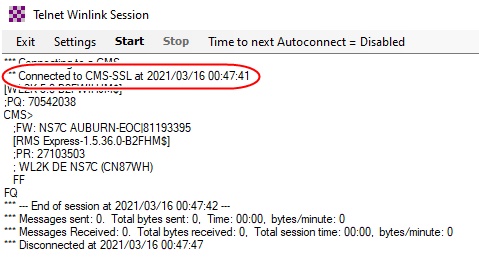

If we separate Winlink (the system) from Winlink Express (the client program), is a SSL connection also the case with the other six clients listed on the https://winlink.org/ClientSoftware page when used in telnet mode? Steve Scott Currie wrote on 3/15/21 10:06 PM:
Yeah, I discussed this with the WDT, and the issue with using HamWAN or ARDEN. I had asked if we could force a non-SSL connection to the CMS. They have been under pressure from AWS to switch to all SSL connections, so they had to make the change. They did commit to leaving the client or gateway connection to RMS Relay as non-SSL, so that is why we have suggested having a regional instance of RMS Relay on HamWAN that the RMS Gateways and clients could point to. Backend of the RMS Relay would then connect to the CMS over SSL on a hardened Internet connection (like at a county EOC or the State EOC), or even HF forwarding if the Internet is down.
-Scott
On Mon, Mar 15, 2021 at 9:41 PM Stephen Kangas <stephen@kangas.com> wrote:
Scott, thanks for that update, interesting. “Telnet” is a misnomer in this WinLink instance, as that port 22 protocol is historically and normally unencrypted, and widely understood in the industry as such (whereas SSH is encrypted). It looks like the email client is connecting locally to an RMS Relay in that mode, which then connects to the CMS on the internet.
--Stephen W9SK
*From:* PSDR <psdr-bounces@hamwan.org> *On Behalf Of *Scott Currie *Sent:* Monday, March 15, 2021 5:56 PM *To:* Puget Sound Data Ring <psdr@hamwan.org> *Subject:* Re: [HamWAN PSDR] Newbie
This is not entirely true. Winlink does use TLS/SSL connections for some things. The normal telnet connection is now SSL (will fallback to non-SSL if the connection fails). Also, RMS Gateway to the CMS is now SSL. Telnet P2P and telnet to RMS Relay is not SSL. I believe updates are also SSL now.
Winlink Express Link Test:
Test started 2021/03/16 00:52 UTC
Testing CMS telnet connection to cms.winlink.org through port 8772... Successfully connected to a CMS through port 8772 in 253 Milliseconds
Testing CMS SSL telnet connection to cms.winlink.org through port 8773... Successfully connected to a CMS through port 8773 in 311 Milliseconds
Testing API service access through port 443 to api.winlink.org... Successfully performed API service to api.winlink.org through port 443 in 756 Milliseconds
Testing Autoupdate server access through port 443 to autoupdate2.winlink.org... Successfully checked autoupdate server through port 443 in 439 Milliseconds
Testing connection to web site - www.winlink.org:443 Successfully connected to www.winlink.org through port 443 in 47 Milliseconds
Testing FTP connection to SFI site - ftp://ftp.swpc.noaa.gov/pub/latest/SGAS.txt Successfully connected to ftp://ftp.swpc.noaa.gov/pub/latest/SGAS.txt through port 20/21 in 1522 Milliseconds
Test completed successfully.
-Scott, NS7C
On Mon, Mar 15, 2021 at 5:45 PM Stephen Kangas <stephen@kangas.com> wrote:
Phil, an example of the ham band traffic that Kenny mentioned is not permitted by the FCC is encrypted communications traffic…this means the majority of websites your visit today and many email hosters, since websites commonly use TLS/SSL encryption (indicated by “https” in front of the URL in your browser address bar) or encrypted settings in your email hoster & client. Winlink does NOT use encryption, thus is legal, and is the primary application for my ARES team using HamWAN. As Kenny points out, certain routers (not inexpensive home models) can be used to split that traffic appropriately, but it is not an easy setup unless you have a background in data networks or cybersecurity…so it’s far easier to either use HamWAN just for your dedicated ARES laptop use or switch a cable back and forth using one pipe at a time.
FWIW, Stephen W9SK
*From:* PSDR <psdr-bounces@hamwan.org> *On Behalf Of *Kenny Richards *Sent:* Monday, March 15, 2021 12:49 PM *To:* Puget Sound Data Ring <psdr@hamwan.org> *Subject:* Re: [HamWAN PSDR] Newbie
Just want to add two things to what Carl said already.
1) Line of sight means you can actually 'see' the HamWAN node, or at least you can with something like a pair of binoculars.
2) Remember that HamWAN is not meant to be a replacement for your home internet. Be very conscious of what traffic you are putting over HamWAN. I don't recommend connecting it to your home network unless you are familiar enough with routing rules to limit what traffic goes out the HamWAN link.
Good luck,
Kenny, KU7M
On Mon, Mar 15, 2021 at 12:40 PM <carl@n7kuw.com> wrote:
Hi Phil,
You can do all of the configuration while on the ground, but obviously you won’t have any signal. You don’t indicate what specific equipment you have, but if you have the mAnt30 dish and separate router/modem, make sure you have the antenna connected before powering it up.
As to trees, they are an absolute show stopper. You must have clear, visual, line of sight to the HamWAN site you are shooting to. Hopefully you will have that, or can achieve that, from where you plan to mount the dish. As to “just over them”, a microwave shot consists of the direct, pure line of sight, but also what is referred to as the Fresnel zone – a cigar shaped “balloon” around the pure line of sight. Items in the Fresnel zone (including trees) can reduce the amount of signal you have, so you may not get optimum performance, but some.
In your initial post you commented about how to balance between your regular internet and HamWAN for a Winlink node. My suggestion would be to just leave it on one (whichever one) as the norm, and only switch to the other if the one goes down. You can also acquire routers that include failover capability to automatically make that switch. You can go more advanced with load sharing and such between multiple connections, but that requires much better understanding of internet routing, and for a winlink node basic failover will serve your purpose.
Good luck, let us know how things turn out.
Carl, N7KUW
*From:* PSDR <psdr-bounces@hamwan.org> *On Behalf Of *Phil Cornell via PSDR *Sent:* Monday, March 15, 2021 12:11 PM *To:* psdr@hamwan.org *Subject:* [HamWAN PSDR] Newbie
OK, I figured out my problem and I now have Winbox talking to the radio and reporting status. I's not linking to anything since the antenna is still on the ground. How much configuration can I do before mounting it on my roof. The only question in my sight path may be some trees but I think I can aim just over them and get a signal. My friend Bruce/WA7BAM will be helping with the antenna installation on Wed afternoon. Making progress...
*Phil Cornell *
*W7PLC *
*SHARES NCS590*
*Hybrid Gateway W7PLC*
*TCARES VP*
_______________________________________________ PSDR mailing list PSDR@hamwan.org http://mail.hamwan.net/mailman/listinfo/psdr
_______________________________________________ PSDR mailing list PSDR@hamwan.org http://mail.hamwan.net/mailman/listinfo/psdr
--
*-Scott* _______________________________________________ PSDR mailing list PSDR@hamwan.org http://mail.hamwan.net/mailman/listinfo/psdr
_______________________________________________ PSDR mailing list PSDR@hamwan.org http://mail.hamwan.net/mailman/listinfo/psdr
Here is my, probably incomplete, understanding of things. Originally, connections to the CMS from either clients (Winlink Express) or gateways (RMS Packet, RMS Trimode) were on port 8772 using telnet. About a year ago they introduced port 8773 which uses SSL. For the WDT products, this is now the preferred port and is tried first. If the connection fails, they will try port 8772, and today this will still work. At some point port 8772 will be turned off. Non-WDT clients and servers (BPQ, Pat, Outpost) can still use port 8772 today, but will need to switch to port 8773 eventually. I do not know what the traffic looks like on port 8773. They say it is still telnet, so I don't know if they are using SSL for authentication, and then switching to plain text, or if they are establishing an encrypted tunnel and then sending telnet through the tunnel. I'll have to trace it and see what is going on. Client and gateway connections to RMS Relay go over port 8772 using telnet, and this will not change. P2P telnet connections will continue to be unencrypted (the port default is 8772 but can be changed). RMS Relay connections to the CMS will be over port 8773 SSL. I'm not smart enough to interpret FCC rules to know if encrypted authentication is OK, as long as the actual traffic is plain text. -Scott, NS7C On Tue, Mar 16, 2021 at 6:32 AM Steve - WA7PTM <psdr-list@aberle.net> wrote:
If we separate Winlink (the system) from Winlink Express (the client program), is a SSL connection also the case with the other six clients listed on the https://winlink.org/ClientSoftware page when used in telnet mode?
Steve
Scott Currie wrote on 3/15/21 10:06 PM:
Yeah, I discussed this with the WDT, and the issue with using HamWAN or ARDEN. I had asked if we could force a non-SSL connection to the CMS. They have been under pressure from AWS to switch to all SSL connections, so they had to make the change. They did commit to leaving the client or gateway connection to RMS Relay as non-SSL, so that is why we have suggested having a regional instance of RMS Relay on HamWAN that the RMS Gateways and clients could point to. Backend of the RMS Relay would then connect to the CMS over SSL on a hardened Internet connection (like at a county EOC or the State EOC), or even HF forwarding if the Internet is down.
-Scott
On Mon, Mar 15, 2021 at 9:41 PM Stephen Kangas <stephen@kangas.com> wrote:
Scott, thanks for that update, interesting. “Telnet” is a misnomer in this WinLink instance, as that port 22 protocol is historically and normally unencrypted, and widely understood in the industry as such (whereas SSH is encrypted). It looks like the email client is connecting locally to an RMS Relay in that mode, which then connects to the CMS on the internet.
--Stephen W9SK
*From:* PSDR <psdr-bounces@hamwan.org> *On Behalf Of *Scott Currie *Sent:* Monday, March 15, 2021 5:56 PM *To:* Puget Sound Data Ring <psdr@hamwan.org> *Subject:* Re: [HamWAN PSDR] Newbie
This is not entirely true. Winlink does use TLS/SSL connections for some things. The normal telnet connection is now SSL (will fallback to non-SSL if the connection fails). Also, RMS Gateway to the CMS is now SSL. Telnet P2P and telnet to RMS Relay is not SSL. I believe updates are also SSL now.
Winlink Express Link Test:
Test started 2021/03/16 00:52 UTC
Testing CMS telnet connection to cms.winlink.org through port 8772... Successfully connected to a CMS through port 8772 in 253 Milliseconds
Testing CMS SSL telnet connection to cms.winlink.org through port 8773... Successfully connected to a CMS through port 8773 in 311 Milliseconds
Testing API service access through port 443 to api.winlink.org... Successfully performed API service to api.winlink.org through port 443 in 756 Milliseconds
Testing Autoupdate server access through port 443 to autoupdate2.winlink.org... Successfully checked autoupdate server through port 443 in 439 Milliseconds
Testing connection to web site - www.winlink.org:443 Successfully connected to www.winlink.org through port 443 in 47 Milliseconds
Testing FTP connection to SFI site - ftp://ftp.swpc.noaa.gov/pub/latest/SGAS.txt Successfully connected to ftp://ftp.swpc.noaa.gov/pub/latest/SGAS.txt through port 20/21 in 1522 Milliseconds
Test completed successfully.
-Scott, NS7C
On Mon, Mar 15, 2021 at 5:45 PM Stephen Kangas <stephen@kangas.com> wrote:
Phil, an example of the ham band traffic that Kenny mentioned is not permitted by the FCC is encrypted communications traffic…this means the majority of websites your visit today and many email hosters, since websites commonly use TLS/SSL encryption (indicated by “https” in front of the URL in your browser address bar) or encrypted settings in your email hoster & client. Winlink does NOT use encryption, thus is legal, and is the primary application for my ARES team using HamWAN. As Kenny points out, certain routers (not inexpensive home models) can be used to split that traffic appropriately, but it is not an easy setup unless you have a background in data networks or cybersecurity…so it’s far easier to either use HamWAN just for your dedicated ARES laptop use or switch a cable back and forth using one pipe at a time.
FWIW, Stephen W9SK
*From:* PSDR <psdr-bounces@hamwan.org> *On Behalf Of *Kenny Richards *Sent:* Monday, March 15, 2021 12:49 PM *To:* Puget Sound Data Ring <psdr@hamwan.org> *Subject:* Re: [HamWAN PSDR] Newbie
Just want to add two things to what Carl said already.
1) Line of sight means you can actually 'see' the HamWAN node, or at least you can with something like a pair of binoculars.
2) Remember that HamWAN is not meant to be a replacement for your home internet. Be very conscious of what traffic you are putting over HamWAN. I don't recommend connecting it to your home network unless you are familiar enough with routing rules to limit what traffic goes out the HamWAN link.
Good luck,
Kenny, KU7M
On Mon, Mar 15, 2021 at 12:40 PM <carl@n7kuw.com> wrote:
Hi Phil,
You can do all of the configuration while on the ground, but obviously you won’t have any signal. You don’t indicate what specific equipment you have, but if you have the mAnt30 dish and separate router/modem, make sure you have the antenna connected before powering it up.
As to trees, they are an absolute show stopper. You must have clear, visual, line of sight to the HamWAN site you are shooting to. Hopefully you will have that, or can achieve that, from where you plan to mount the dish. As to “just over them”, a microwave shot consists of the direct, pure line of sight, but also what is referred to as the Fresnel zone – a cigar shaped “balloon” around the pure line of sight. Items in the Fresnel zone (including trees) can reduce the amount of signal you have, so you may not get optimum performance, but some.
In your initial post you commented about how to balance between your regular internet and HamWAN for a Winlink node. My suggestion would be to just leave it on one (whichever one) as the norm, and only switch to the other if the one goes down. You can also acquire routers that include failover capability to automatically make that switch. You can go more advanced with load sharing and such between multiple connections, but that requires much better understanding of internet routing, and for a winlink node basic failover will serve your purpose.
Good luck, let us know how things turn out.
Carl, N7KUW
*From:* PSDR <psdr-bounces@hamwan.org> *On Behalf Of *Phil Cornell via PSDR *Sent:* Monday, March 15, 2021 12:11 PM *To:* psdr@hamwan.org *Subject:* [HamWAN PSDR] Newbie
OK, I figured out my problem and I now have Winbox talking to the radio and reporting status. I's not linking to anything since the antenna is still on the ground. How much configuration can I do before mounting it on my roof. The only question in my sight path may be some trees but I think I can aim just over them and get a signal. My friend Bruce/WA7BAM will be helping with the antenna installation on Wed afternoon. Making progress...
*Phil Cornell *
*W7PLC *
*SHARES NCS590*
*Hybrid Gateway W7PLC*
*TCARES VP*
_______________________________________________ PSDR mailing list PSDR@hamwan.org http://mail.hamwan.net/mailman/listinfo/psdr
_______________________________________________ PSDR mailing list PSDR@hamwan.org http://mail.hamwan.net/mailman/listinfo/psdr
--
*-Scott* _______________________________________________ PSDR mailing list PSDR@hamwan.org http://mail.hamwan.net/mailman/listinfo/psdr
_______________________________________________ PSDR mailing list PSDR@hamwan.org http://mail.hamwan.net/mailman/listinfo/psdr
_______________________________________________ PSDR mailing list PSDR@hamwan.org http://mail.hamwan.net/mailman/listinfo/psdr
-- *-Scott*

SSL (more properly SSL/TLS) is an umbrella term. There are many ciphers and protocol versions that the client and server negotiate. To comply with the FCC requirements of no encryption you would use a NULL Cipher, meaning no encryption. Because nearly nothing supports this you'd need an SSL/TLS proxy with compatible certificates installed on the clients. See attached for winlink specific analysis of 'SSL'.
From Stack overflow: "Yes, TLS and SSL support "no-encryption" modes. Whether the particular client and server in question are configured to enable is a separate issue.
It's possible, though unlikely, that a server could enable one of these cipher suites by default. What is more likely is that a server would enable weak cipher suites (like the "export"-grade DES-based suites) by default. That's why you should carefully review the server's whitelist of cipher suites, and leave only a few trusted, widely-supported algorithms. You can use the TLS_RSA_WITH_NULL_SHA cipher suite, among others, to protect the authenticity and integrity of traffic, without encryption. The "RSA" in this case refers to the key exchange algorithm, while "SHA" refers to the message authentication algorithm used to protect the traffic from being altered. "NULL" is the encryption algorithm, or, in this case, the lack of encryption. It's important to realize that the traffic, though it's not encrypted, is bundled up in SSL records. The client and server must be SSL-enabled. If you are looking for a step-down solution where some data is exchanged over SSL, then SSL is turned off but the application traffic continues, that's possible too, but keep in mind that it offers absolutely no security for the cleartext traffic; it can be tampered with by an attacker. So, for example, authenticating with SSL, then stepping down to an "in-the-clear" protocol to receive commands that use the authentication negotiated via SSL would unsafe." And if you're really bored check out this SSL/TLS analysis: http://blog.fourthbit.com/2014/12/23/traffic-analysis-of-an-ssl-slash-tls-se... On Tue, Mar 16, 2021, 7:58 AM Scott Currie <scott.d.currie@gmail.com> wrote:
Here is my, probably incomplete, understanding of things. Originally, connections to the CMS from either clients (Winlink Express) or gateways (RMS Packet, RMS Trimode) were on port 8772 using telnet. About a year ago they introduced port 8773 which uses SSL. For the WDT products, this is now the preferred port and is tried first. If the connection fails, they will try port 8772, and today this will still work. At some point port 8772 will be turned off. Non-WDT clients and servers (BPQ, Pat, Outpost) can still use port 8772 today, but will need to switch to port 8773 eventually. I do not know what the traffic looks like on port 8773. They say it is still telnet, so I don't know if they are using SSL for authentication, and then switching to plain text, or if they are establishing an encrypted tunnel and then sending telnet through the tunnel. I'll have to trace it and see what is going on.
Client and gateway connections to RMS Relay go over port 8772 using telnet, and this will not change. P2P telnet connections will continue to be unencrypted (the port default is 8772 but can be changed). RMS Relay connections to the CMS will be over port 8773 SSL.
I'm not smart enough to interpret FCC rules to know if encrypted authentication is OK, as long as the actual traffic is plain text.
-Scott, NS7C
On Tue, Mar 16, 2021 at 6:32 AM Steve - WA7PTM <psdr-list@aberle.net> wrote:
If we separate Winlink (the system) from Winlink Express (the client program), is a SSL connection also the case with the other six clients listed on the https://winlink.org/ClientSoftware page when used in telnet mode?
Steve
Scott Currie wrote on 3/15/21 10:06 PM:
Yeah, I discussed this with the WDT, and the issue with using HamWAN or ARDEN. I had asked if we could force a non-SSL connection to the CMS. They have been under pressure from AWS to switch to all SSL connections, so they had to make the change. They did commit to leaving the client or gateway connection to RMS Relay as non-SSL, so that is why we have suggested having a regional instance of RMS Relay on HamWAN that the RMS Gateways and clients could point to. Backend of the RMS Relay would then connect to the CMS over SSL on a hardened Internet connection (like at a county EOC or the State EOC), or even HF forwarding if the Internet is down.
-Scott
On Mon, Mar 15, 2021 at 9:41 PM Stephen Kangas <stephen@kangas.com> wrote:
Scott, thanks for that update, interesting. “Telnet” is a misnomer in this WinLink instance, as that port 22 protocol is historically and normally unencrypted, and widely understood in the industry as such (whereas SSH is encrypted). It looks like the email client is connecting locally to an RMS Relay in that mode, which then connects to the CMS on the internet.
--Stephen W9SK
*From:* PSDR <psdr-bounces@hamwan.org> *On Behalf Of *Scott Currie *Sent:* Monday, March 15, 2021 5:56 PM *To:* Puget Sound Data Ring <psdr@hamwan.org> *Subject:* Re: [HamWAN PSDR] Newbie
This is not entirely true. Winlink does use TLS/SSL connections for some things. The normal telnet connection is now SSL (will fallback to non-SSL if the connection fails). Also, RMS Gateway to the CMS is now SSL. Telnet P2P and telnet to RMS Relay is not SSL. I believe updates are also SSL now.
Winlink Express Link Test:
Test started 2021/03/16 00:52 UTC
Testing CMS telnet connection to cms.winlink.org through port 8772... Successfully connected to a CMS through port 8772 in 253 Milliseconds
Testing CMS SSL telnet connection to cms.winlink.org through port 8773... Successfully connected to a CMS through port 8773 in 311 Milliseconds
Testing API service access through port 443 to api.winlink.org... Successfully performed API service to api.winlink.org through port 443 in 756 Milliseconds
Testing Autoupdate server access through port 443 to autoupdate2.winlink.org... Successfully checked autoupdate server through port 443 in 439 Milliseconds
Testing connection to web site - www.winlink.org:443 Successfully connected to www.winlink.org through port 443 in 47 Milliseconds
Testing FTP connection to SFI site - ftp://ftp.swpc.noaa.gov/pub/latest/SGAS.txt Successfully connected to ftp://ftp.swpc.noaa.gov/pub/latest/SGAS.txt through port 20/21 in 1522 Milliseconds
Test completed successfully.
-Scott, NS7C
On Mon, Mar 15, 2021 at 5:45 PM Stephen Kangas <stephen@kangas.com> wrote:
Phil, an example of the ham band traffic that Kenny mentioned is not permitted by the FCC is encrypted communications traffic…this means the majority of websites your visit today and many email hosters, since websites commonly use TLS/SSL encryption (indicated by “https” in front of the URL in your browser address bar) or encrypted settings in your email hoster & client. Winlink does NOT use encryption, thus is legal, and is the primary application for my ARES team using HamWAN. As Kenny points out, certain routers (not inexpensive home models) can be used to split that traffic appropriately, but it is not an easy setup unless you have a background in data networks or cybersecurity…so it’s far easier to either use HamWAN just for your dedicated ARES laptop use or switch a cable back and forth using one pipe at a time.
FWIW, Stephen W9SK
*From:* PSDR <psdr-bounces@hamwan.org> *On Behalf Of *Kenny Richards *Sent:* Monday, March 15, 2021 12:49 PM *To:* Puget Sound Data Ring <psdr@hamwan.org> *Subject:* Re: [HamWAN PSDR] Newbie
Just want to add two things to what Carl said already.
1) Line of sight means you can actually 'see' the HamWAN node, or at least you can with something like a pair of binoculars.
2) Remember that HamWAN is not meant to be a replacement for your home internet. Be very conscious of what traffic you are putting over HamWAN. I don't recommend connecting it to your home network unless you are familiar enough with routing rules to limit what traffic goes out the HamWAN link.
Good luck,
Kenny, KU7M
On Mon, Mar 15, 2021 at 12:40 PM <carl@n7kuw.com> wrote:
Hi Phil,
You can do all of the configuration while on the ground, but obviously you won’t have any signal. You don’t indicate what specific equipment you have, but if you have the mAnt30 dish and separate router/modem, make sure you have the antenna connected before powering it up.
As to trees, they are an absolute show stopper. You must have clear, visual, line of sight to the HamWAN site you are shooting to. Hopefully you will have that, or can achieve that, from where you plan to mount the dish. As to “just over them”, a microwave shot consists of the direct, pure line of sight, but also what is referred to as the Fresnel zone – a cigar shaped “balloon” around the pure line of sight. Items in the Fresnel zone (including trees) can reduce the amount of signal you have, so you may not get optimum performance, but some.
In your initial post you commented about how to balance between your regular internet and HamWAN for a Winlink node. My suggestion would be to just leave it on one (whichever one) as the norm, and only switch to the other if the one goes down. You can also acquire routers that include failover capability to automatically make that switch. You can go more advanced with load sharing and such between multiple connections, but that requires much better understanding of internet routing, and for a winlink node basic failover will serve your purpose.
Good luck, let us know how things turn out.
Carl, N7KUW
*From:* PSDR <psdr-bounces@hamwan.org> *On Behalf Of *Phil Cornell via PSDR *Sent:* Monday, March 15, 2021 12:11 PM *To:* psdr@hamwan.org *Subject:* [HamWAN PSDR] Newbie
OK, I figured out my problem and I now have Winbox talking to the radio and reporting status. I's not linking to anything since the antenna is still on the ground. How much configuration can I do before mounting it on my roof. The only question in my sight path may be some trees but I think I can aim just over them and get a signal. My friend Bruce/WA7BAM will be helping with the antenna installation on Wed afternoon. Making progress...
*Phil Cornell *
*W7PLC *
*SHARES NCS590*
*Hybrid Gateway W7PLC*
*TCARES VP*
_______________________________________________ PSDR mailing list PSDR@hamwan.org http://mail.hamwan.net/mailman/listinfo/psdr
_______________________________________________ PSDR mailing list PSDR@hamwan.org http://mail.hamwan.net/mailman/listinfo/psdr
--
*-Scott* _______________________________________________ PSDR mailing list PSDR@hamwan.org http://mail.hamwan.net/mailman/listinfo/psdr
_______________________________________________ PSDR mailing list PSDR@hamwan.org http://mail.hamwan.net/mailman/listinfo/psdr
_______________________________________________ PSDR mailing list PSDR@hamwan.org http://mail.hamwan.net/mailman/listinfo/psdr
-- *-Scott* _______________________________________________ PSDR mailing list PSDR@hamwan.org http://mail.hamwan.net/mailman/listinfo/psdr
Scott, thanks, I find that info helpful to better understanding the Winlink stance. Hmmm…too bad that Winlink.org is pushing SSL and phasing out “true” telnet at some point. Makes me wonder if there are aware of the growing use of HamWAN for Winlink client connections, and if so they are purposely discounting/ignoring it. We need an allowed/supported solution for that to keep our self-policing ham operations low risk of FCC crack-downs or harassment from the replacement OOs (forget what they are now called). I’m optimistic there’s a doable inexpensive solution, however temporary or long term, and I’m impressed with the postings I’m seeing on this here on this forum. We’ve got the hams with needed skills & knowledge to come up with that. Stephen W9SK From: PSDR <psdr-bounces@hamwan.org> On Behalf Of Scott Currie Sent: Tuesday, March 16, 2021 7:58 AM To: Puget Sound Data Ring <psdr@hamwan.org> Subject: Re: [HamWAN PSDR] Newbie Here is my, probably incomplete, understanding of things. Originally, connections to the CMS from either clients (Winlink Express) or gateways (RMS Packet, RMS Trimode) were on port 8772 using telnet. About a year ago they introduced port 8773 which uses SSL. For the WDT products, this is now the preferred port and is tried first. If the connection fails, they will try port 8772, and today this will still work. At some point port 8772 will be turned off. Non-WDT clients and servers (BPQ, Pat, Outpost) can still use port 8772 today, but will need to switch to port 8773 eventually. I do not know what the traffic looks like on port 8773. They say it is still telnet, so I don't know if they are using SSL for authentication, and then switching to plain text, or if they are establishing an encrypted tunnel and then sending telnet through the tunnel. I'll have to trace it and see what is going on. Client and gateway connections to RMS Relay go over port 8772 using telnet, and this will not change. P2P telnet connections will continue to be unencrypted (the port default is 8772 but can be changed). RMS Relay connections to the CMS will be over port 8773 SSL. I'm not smart enough to interpret FCC rules to know if encrypted authentication is OK, as long as the actual traffic is plain text. -Scott, NS7C On Tue, Mar 16, 2021 at 6:32 AM Steve - WA7PTM <psdr-list@aberle.net <mailto:psdr-list@aberle.net> > wrote: If we separate Winlink (the system) from Winlink Express (the client program), is a SSL connection also the case with the other six clients listed on the https://winlink.org/ClientSoftware page when used in telnet mode? Steve Scott Currie wrote on 3/15/21 10:06 PM:
Yeah, I discussed this with the WDT, and the issue with using HamWAN or ARDEN. I had asked if we could force a non-SSL connection to the CMS. They have been under pressure from AWS to switch to all SSL connections, so they had to make the change. They did commit to leaving the client or gateway connection to RMS Relay as non-SSL, so that is why we have suggested having a regional instance of RMS Relay on HamWAN that the RMS Gateways and clients could point to. Backend of the RMS Relay would then connect to the CMS over SSL on a hardened Internet connection (like at a county EOC or the State EOC), or even HF forwarding if the Internet is down.
-Scott
On Mon, Mar 15, 2021 at 9:41 PM Stephen Kangas <stephen@kangas.com <mailto:stephen@kangas.com> > wrote:
Scott, thanks for that update, interesting. “Telnet” is a misnomer in this WinLink instance, as that port 22 protocol is historically and normally unencrypted, and widely understood in the industry as such (whereas SSH is encrypted). It looks like the email client is connecting locally to an RMS Relay in that mode, which then connects to the CMS on the internet.
--Stephen W9SK
*From:* PSDR <psdr-bounces@hamwan.org <mailto:psdr-bounces@hamwan.org> > *On Behalf Of *Scott Currie *Sent:* Monday, March 15, 2021 5:56 PM *To:* Puget Sound Data Ring <psdr@hamwan.org <mailto:psdr@hamwan.org> > *Subject:* Re: [HamWAN PSDR] Newbie
This is not entirely true. Winlink does use TLS/SSL connections for some things. The normal telnet connection is now SSL (will fallback to non-SSL if the connection fails). Also, RMS Gateway to the CMS is now SSL. Telnet P2P and telnet to RMS Relay is not SSL. I believe updates are also SSL now.
Winlink Express Link Test:
Test started 2021/03/16 00:52 UTC
Testing CMS telnet connection to cms.winlink.org <http://cms.winlink.org> through port 8772... Successfully connected to a CMS through port 8772 in 253 Milliseconds
Testing CMS SSL telnet connection to cms.winlink.org <http://cms.winlink.org> through port 8773... Successfully connected to a CMS through port 8773 in 311 Milliseconds
Testing API service access through port 443 to api.winlink.org... Successfully performed API service to api.winlink.org <http://api.winlink.org> through port 443 in 756 Milliseconds
Testing Autoupdate server access through port 443 to autoupdate2.winlink.org... Successfully checked autoupdate server through port 443 in 439 Milliseconds
Testing connection to web site - www.winlink.org:443 <http://www.winlink.org:443> Successfully connected to www.winlink.org <http://www.winlink.org> through port 443 in 47 Milliseconds
Testing FTP connection to SFI site - ftp://ftp.swpc.noaa.gov/pub/latest/SGAS.txt Successfully connected to ftp://ftp.swpc.noaa.gov/pub/latest/SGAS.txt through port 20/21 in 1522 Milliseconds
Test completed successfully.
-Scott, NS7C
On Mon, Mar 15, 2021 at 5:45 PM Stephen Kangas <stephen@kangas.com <mailto:stephen@kangas.com> > wrote:
Phil, an example of the ham band traffic that Kenny mentioned is not permitted by the FCC is encrypted communications traffic…this means the majority of websites your visit today and many email hosters, since websites commonly use TLS/SSL encryption (indicated by “https” in front of the URL in your browser address bar) or encrypted settings in your email hoster & client. Winlink does NOT use encryption, thus is legal, and is the primary application for my ARES team using HamWAN. As Kenny points out, certain routers (not inexpensive home models) can be used to split that traffic appropriately, but it is not an easy setup unless you have a background in data networks or cybersecurity…so it’s far easier to either use HamWAN just for your dedicated ARES laptop use or switch a cable back and forth using one pipe at a time.
FWIW, Stephen W9SK
*From:* PSDR <psdr-bounces@hamwan.org <mailto:psdr-bounces@hamwan.org> > *On Behalf Of *Kenny Richards *Sent:* Monday, March 15, 2021 12:49 PM *To:* Puget Sound Data Ring <psdr@hamwan.org <mailto:psdr@hamwan.org> > *Subject:* Re: [HamWAN PSDR] Newbie
Just want to add two things to what Carl said already.
1) Line of sight means you can actually 'see' the HamWAN node, or at least you can with something like a pair of binoculars.
2) Remember that HamWAN is not meant to be a replacement for your home internet. Be very conscious of what traffic you are putting over HamWAN. I don't recommend connecting it to your home network unless you are familiar enough with routing rules to limit what traffic goes out the HamWAN link.
Good luck,
Kenny, KU7M
On Mon, Mar 15, 2021 at 12:40 PM <carl@n7kuw.com <mailto:carl@n7kuw.com> > wrote:
Hi Phil,
You can do all of the configuration while on the ground, but obviously you won’t have any signal. You don’t indicate what specific equipment you have, but if you have the mAnt30 dish and separate router/modem, make sure you have the antenna connected before powering it up.
As to trees, they are an absolute show stopper. You must have clear, visual, line of sight to the HamWAN site you are shooting to. Hopefully you will have that, or can achieve that, from where you plan to mount the dish. As to “just over them”, a microwave shot consists of the direct, pure line of sight, but also what is referred to as the Fresnel zone – a cigar shaped “balloon” around the pure line of sight. Items in the Fresnel zone (including trees) can reduce the amount of signal you have, so you may not get optimum performance, but some.
In your initial post you commented about how to balance between your regular internet and HamWAN for a Winlink node. My suggestion would be to just leave it on one (whichever one) as the norm, and only switch to the other if the one goes down. You can also acquire routers that include failover capability to automatically make that switch. You can go more advanced with load sharing and such between multiple connections, but that requires much better understanding of internet routing, and for a winlink node basic failover will serve your purpose.
Good luck, let us know how things turn out.
Carl, N7KUW
*From:* PSDR <psdr-bounces@hamwan.org <mailto:psdr-bounces@hamwan.org> > *On Behalf Of *Phil Cornell via PSDR *Sent:* Monday, March 15, 2021 12:11 PM *To:* psdr@hamwan.org <mailto:psdr@hamwan.org> *Subject:* [HamWAN PSDR] Newbie
OK, I figured out my problem and I now have Winbox talking to the radio and reporting status. I's not linking to anything since the antenna is still on the ground. How much configuration can I do before mounting it on my roof. The only question in my sight path may be some trees but I think I can aim just over them and get a signal. My friend Bruce/WA7BAM will be helping with the antenna installation on Wed afternoon. Making progress...
*Phil Cornell *
*W7PLC *
*SHARES NCS590*
*Hybrid Gateway W7PLC*
*TCARES VP*
_______________________________________________ PSDR mailing list PSDR@hamwan.org <mailto:PSDR@hamwan.org> http://mail.hamwan.net/mailman/listinfo/psdr
_______________________________________________ PSDR mailing list PSDR@hamwan.org <mailto:PSDR@hamwan.org> http://mail.hamwan.net/mailman/listinfo/psdr
--
*-Scott* _______________________________________________ PSDR mailing list PSDR@hamwan.org <mailto:PSDR@hamwan.org> http://mail.hamwan.net/mailman/listinfo/psdr
_______________________________________________ PSDR mailing list PSDR@hamwan.org <mailto:PSDR@hamwan.org> http://mail.hamwan.net/mailman/listinfo/psdr
_______________________________________________ PSDR mailing list PSDR@hamwan.org <mailto:PSDR@hamwan.org> http://mail.hamwan.net/mailman/listinfo/psdr -- -Scott
For what it is worth, I did a couple Wireshark captures of Winlink Express connecting to the CMS. The first capture I ran with no changes, and it used port 8773. The trace shows a TLS negotiation, and then TLS packets for the duration of the session, all unreadable. For the second trace, I had the firewall block port 8773 outbound. That trace shows the connection being established on port 8772, and is in plain text. I don't know telnet well enough to know if that is the protocol, but it is easy enough to read the data as the same stuff on the Winlink session monitor. I do think the idea of installing an instance of RMS Relay on HamWAN at a reliable location is a good near term solution that should require anything fancy. -Scott, NS7C On Tue, Mar 16, 2021 at 12:15 PM Stephen Kangas <stephen@kangas.com> wrote:
Scott, thanks, I find that info helpful to better understanding the Winlink stance. Hmmm…too bad that Winlink.org is pushing SSL and phasing out “true” telnet at some point. Makes me wonder if there are aware of the growing use of HamWAN for Winlink client connections, and if so they are purposely discounting/ignoring it. We need an allowed/supported solution for that to keep our self-policing ham operations low risk of FCC crack-downs or harassment from the replacement OOs (forget what they are now called).
I’m optimistic there’s a doable inexpensive solution, however temporary or long term, and I’m impressed with the postings I’m seeing on this here on this forum. We’ve got the hams with needed skills & knowledge to come up with that.
Stephen W9SK
*From:* PSDR <psdr-bounces@hamwan.org> *On Behalf Of *Scott Currie *Sent:* Tuesday, March 16, 2021 7:58 AM *To:* Puget Sound Data Ring <psdr@hamwan.org> *Subject:* Re: [HamWAN PSDR] Newbie
Here is my, probably incomplete, understanding of things. Originally, connections to the CMS from either clients (Winlink Express) or gateways (RMS Packet, RMS Trimode) were on port 8772 using telnet. About a year ago they introduced port 8773 which uses SSL. For the WDT products, this is now the preferred port and is tried first. If the connection fails, they will try port 8772, and today this will still work. At some point port 8772 will be turned off. Non-WDT clients and servers (BPQ, Pat, Outpost) can still use port 8772 today, but will need to switch to port 8773 eventually. I do not know what the traffic looks like on port 8773. They say it is still telnet, so I don't know if they are using SSL for authentication, and then switching to plain text, or if they are establishing an encrypted tunnel and then sending telnet through the tunnel. I'll have to trace it and see what is going on.
Client and gateway connections to RMS Relay go over port 8772 using telnet, and this will not change. P2P telnet connections will continue to be unencrypted (the port default is 8772 but can be changed). RMS Relay connections to the CMS will be over port 8773 SSL.
I'm not smart enough to interpret FCC rules to know if encrypted authentication is OK, as long as the actual traffic is plain text.
-Scott, NS7C
On Tue, Mar 16, 2021 at 6:32 AM Steve - WA7PTM <psdr-list@aberle.net> wrote:
If we separate Winlink (the system) from Winlink Express (the client program), is a SSL connection also the case with the other six clients listed on the https://winlink.org/ClientSoftware page when used in telnet mode?
Steve
Scott Currie wrote on 3/15/21 10:06 PM:
Yeah, I discussed this with the WDT, and the issue with using HamWAN or ARDEN. I had asked if we could force a non-SSL connection to the CMS. They have been under pressure from AWS to switch to all SSL connections, so they had to make the change. They did commit to leaving the client or gateway connection to RMS Relay as non-SSL, so that is why we have suggested having a regional instance of RMS Relay on HamWAN that the RMS Gateways and clients could point to. Backend of the RMS Relay would then connect to the CMS over SSL on a hardened Internet connection (like at a county EOC or the State EOC), or even HF forwarding if the Internet is down.
-Scott
On Mon, Mar 15, 2021 at 9:41 PM Stephen Kangas <stephen@kangas.com> wrote:
Scott, thanks for that update, interesting. “Telnet” is a misnomer in this WinLink instance, as that port 22 protocol is historically and normally unencrypted, and widely understood in the industry as such (whereas SSH is encrypted). It looks like the email client is connecting locally to an RMS Relay in that mode, which then connects to the CMS on the internet.
--Stephen W9SK
*From:* PSDR <psdr-bounces@hamwan.org> *On Behalf Of *Scott Currie *Sent:* Monday, March 15, 2021 5:56 PM *To:* Puget Sound Data Ring <psdr@hamwan.org> *Subject:* Re: [HamWAN PSDR] Newbie
This is not entirely true. Winlink does use TLS/SSL connections for some things. The normal telnet connection is now SSL (will fallback to non-SSL if the connection fails). Also, RMS Gateway to the CMS is now SSL. Telnet P2P and telnet to RMS Relay is not SSL. I believe updates are also SSL now.
Winlink Express Link Test:
Test started 2021/03/16 00:52 UTC
Testing CMS telnet connection to cms.winlink.org through port 8772... Successfully connected to a CMS through port 8772 in 253 Milliseconds
Testing CMS SSL telnet connection to cms.winlink.org through port 8773... Successfully connected to a CMS through port 8773 in 311 Milliseconds
Testing API service access through port 443 to api.winlink.org... Successfully performed API service to api.winlink.org through port 443 in 756 Milliseconds
Testing Autoupdate server access through port 443 to autoupdate2.winlink.org... Successfully checked autoupdate server through port 443 in 439 Milliseconds
Testing connection to web site - www.winlink.org:443 Successfully connected to www.winlink.org through port 443 in 47 Milliseconds
Testing FTP connection to SFI site - ftp://ftp.swpc.noaa.gov/pub/latest/SGAS.txt Successfully connected to ftp://ftp.swpc.noaa.gov/pub/latest/SGAS.txt through port 20/21 in 1522 Milliseconds
Test completed successfully.
-Scott, NS7C
On Mon, Mar 15, 2021 at 5:45 PM Stephen Kangas <stephen@kangas.com> wrote:
Phil, an example of the ham band traffic that Kenny mentioned is not permitted by the FCC is encrypted communications traffic…this means the majority of websites your visit today and many email hosters, since websites commonly use TLS/SSL encryption (indicated by “https” in front of the URL in your browser address bar) or encrypted settings in your email hoster & client. Winlink does NOT use encryption, thus is legal, and is the primary application for my ARES team using HamWAN. As Kenny points out, certain routers (not inexpensive home models) can be used to split that traffic appropriately, but it is not an easy setup unless you have a background in data networks or cybersecurity…so it’s far easier to either use HamWAN just for your dedicated ARES laptop use or switch a cable back and forth using one pipe at a time.
FWIW, Stephen W9SK
*From:* PSDR <psdr-bounces@hamwan.org> *On Behalf Of *Kenny Richards *Sent:* Monday, March 15, 2021 12:49 PM *To:* Puget Sound Data Ring <psdr@hamwan.org> *Subject:* Re: [HamWAN PSDR] Newbie
Just want to add two things to what Carl said already.
1) Line of sight means you can actually 'see' the HamWAN node, or at least you can with something like a pair of binoculars.
2) Remember that HamWAN is not meant to be a replacement for your home internet. Be very conscious of what traffic you are putting over HamWAN. I don't recommend connecting it to your home network unless you are familiar enough with routing rules to limit what traffic goes out the HamWAN link.
Good luck,
Kenny, KU7M
On Mon, Mar 15, 2021 at 12:40 PM <carl@n7kuw.com> wrote:
Hi Phil,
You can do all of the configuration while on the ground, but obviously you won’t have any signal. You don’t indicate what specific equipment you have, but if you have the mAnt30 dish and separate router/modem, make sure you have the antenna connected before powering it up.
As to trees, they are an absolute show stopper. You must have clear, visual, line of sight to the HamWAN site you are shooting to. Hopefully you will have that, or can achieve that, from where you plan to mount the dish. As to “just over them”, a microwave shot consists of the direct, pure line of sight, but also what is referred to as the Fresnel zone – a cigar shaped “balloon” around the pure line of sight. Items in the Fresnel zone (including trees) can reduce the amount of signal you have, so you may not get optimum performance, but some.
In your initial post you commented about how to balance between your regular internet and HamWAN for a Winlink node. My suggestion would be to just leave it on one (whichever one) as the norm, and only switch to the other if the one goes down. You can also acquire routers that include failover capability to automatically make that switch. You can go more advanced with load sharing and such between multiple connections, but that requires much better understanding of internet routing, and for a winlink node basic failover will serve your purpose.
Good luck, let us know how things turn out.
Carl, N7KUW
*From:* PSDR <psdr-bounces@hamwan.org> *On Behalf Of *Phil Cornell via PSDR *Sent:* Monday, March 15, 2021 12:11 PM *To:* psdr@hamwan.org *Subject:* [HamWAN PSDR] Newbie
OK, I figured out my problem and I now have Winbox talking to the radio and reporting status. I's not linking to anything since the antenna is still on the ground. How much configuration can I do before mounting it on my roof. The only question in my sight path may be some trees but I think I can aim just over them and get a signal. My friend Bruce/WA7BAM will be helping with the antenna installation on Wed afternoon. Making progress...
*Phil Cornell *
*W7PLC *
*SHARES NCS590*
*Hybrid Gateway W7PLC*
*TCARES VP*
_______________________________________________ PSDR mailing list PSDR@hamwan.org http://mail.hamwan.net/mailman/listinfo/psdr
_______________________________________________ PSDR mailing list PSDR@hamwan.org http://mail.hamwan.net/mailman/listinfo/psdr
--
*-Scott* _______________________________________________ PSDR mailing list PSDR@hamwan.org http://mail.hamwan.net/mailman/listinfo/psdr
_______________________________________________ PSDR mailing list PSDR@hamwan.org http://mail.hamwan.net/mailman/listinfo/psdr
_______________________________________________ PSDR mailing list PSDR@hamwan.org http://mail.hamwan.net/mailman/listinfo/psdr
--
*-Scott* _______________________________________________ PSDR mailing list PSDR@hamwan.org http://mail.hamwan.net/mailman/listinfo/psdr
-- *-Scott*
On the authentication/integrity side... FCC says no encryption so we can all hear what you're on about. Ham would not be much fun if all you heard was encrypted pseudo noise. SSL/TLS authentication is a bit like me sending you a list of 100 words and asking you to tell me word 45. Everything is in the clear, but I can authenticate that whomever is at the other end at least has the right list. Another SSL/TLS feature is integrity, meaning the whole message is received. They would be like saying I sent 3421 characters CW 786 of them were vowels. Again everybody can hear what we're saying but it would be difficult to impersonate the sender (or receiver) or change the message. On Tue, Mar 16, 2021, 6:32 AM Steve - WA7PTM <psdr-list@aberle.net> wrote:
If we separate Winlink (the system) from Winlink Express (the client program), is a SSL connection also the case with the other six clients listed on the https://winlink.org/ClientSoftware page when used in telnet mode?
Steve
Scott Currie wrote on 3/15/21 10:06 PM:
Yeah, I discussed this with the WDT, and the issue with using HamWAN or ARDEN. I had asked if we could force a non-SSL connection to the CMS. They have been under pressure from AWS to switch to all SSL connections, so they had to make the change. They did commit to leaving the client or gateway connection to RMS Relay as non-SSL, so that is why we have suggested having a regional instance of RMS Relay on HamWAN that the RMS Gateways and clients could point to. Backend of the RMS Relay would then connect to the CMS over SSL on a hardened Internet connection (like at a county EOC or the State EOC), or even HF forwarding if the Internet is down.
-Scott
On Mon, Mar 15, 2021 at 9:41 PM Stephen Kangas <stephen@kangas.com> wrote:
Scott, thanks for that update, interesting. “Telnet” is a misnomer in this WinLink instance, as that port 22 protocol is historically and normally unencrypted, and widely understood in the industry as such (whereas SSH is encrypted). It looks like the email client is connecting locally to an RMS Relay in that mode, which then connects to the CMS on the internet.
--Stephen W9SK
*From:* PSDR <psdr-bounces@hamwan.org> *On Behalf Of *Scott Currie *Sent:* Monday, March 15, 2021 5:56 PM *To:* Puget Sound Data Ring <psdr@hamwan.org> *Subject:* Re: [HamWAN PSDR] Newbie
This is not entirely true. Winlink does use TLS/SSL connections for some things. The normal telnet connection is now SSL (will fallback to non-SSL if the connection fails). Also, RMS Gateway to the CMS is now SSL. Telnet P2P and telnet to RMS Relay is not SSL. I believe updates are also SSL now.
Winlink Express Link Test:
Test started 2021/03/16 00:52 UTC
Testing CMS telnet connection to cms.winlink.org through port 8772... Successfully connected to a CMS through port 8772 in 253 Milliseconds
Testing CMS SSL telnet connection to cms.winlink.org through port 8773... Successfully connected to a CMS through port 8773 in 311 Milliseconds
Testing API service access through port 443 to api.winlink.org... Successfully performed API service to api.winlink.org through port 443 in 756 Milliseconds
Testing Autoupdate server access through port 443 to autoupdate2.winlink.org... Successfully checked autoupdate server through port 443 in 439 Milliseconds
Testing connection to web site - www.winlink.org:443 Successfully connected to www.winlink.org through port 443 in 47 Milliseconds
Testing FTP connection to SFI site - ftp://ftp.swpc.noaa.gov/pub/latest/SGAS.txt Successfully connected to ftp://ftp.swpc.noaa.gov/pub/latest/SGAS.txt through port 20/21 in 1522 Milliseconds
Test completed successfully.
-Scott, NS7C
On Mon, Mar 15, 2021 at 5:45 PM Stephen Kangas <stephen@kangas.com> wrote:
Phil, an example of the ham band traffic that Kenny mentioned is not permitted by the FCC is encrypted communications traffic…this means the majority of websites your visit today and many email hosters, since websites commonly use TLS/SSL encryption (indicated by “https” in front of the URL in your browser address bar) or encrypted settings in your email hoster & client. Winlink does NOT use encryption, thus is legal, and is the primary application for my ARES team using HamWAN. As Kenny points out, certain routers (not inexpensive home models) can be used to split that traffic appropriately, but it is not an easy setup unless you have a background in data networks or cybersecurity…so it’s far easier to either use HamWAN just for your dedicated ARES laptop use or switch a cable back and forth using one pipe at a time.
FWIW, Stephen W9SK
*From:* PSDR <psdr-bounces@hamwan.org> *On Behalf Of *Kenny Richards *Sent:* Monday, March 15, 2021 12:49 PM *To:* Puget Sound Data Ring <psdr@hamwan.org> *Subject:* Re: [HamWAN PSDR] Newbie
Just want to add two things to what Carl said already.
1) Line of sight means you can actually 'see' the HamWAN node, or at least you can with something like a pair of binoculars.
2) Remember that HamWAN is not meant to be a replacement for your home internet. Be very conscious of what traffic you are putting over HamWAN. I don't recommend connecting it to your home network unless you are familiar enough with routing rules to limit what traffic goes out the HamWAN link.
Good luck,
Kenny, KU7M
On Mon, Mar 15, 2021 at 12:40 PM <carl@n7kuw.com> wrote:
Hi Phil,
You can do all of the configuration while on the ground, but obviously you won’t have any signal. You don’t indicate what specific equipment you have, but if you have the mAnt30 dish and separate router/modem, make sure you have the antenna connected before powering it up.
As to trees, they are an absolute show stopper. You must have clear, visual, line of sight to the HamWAN site you are shooting to. Hopefully you will have that, or can achieve that, from where you plan to mount the dish. As to “just over them”, a microwave shot consists of the direct, pure line of sight, but also what is referred to as the Fresnel zone – a cigar shaped “balloon” around the pure line of sight. Items in the Fresnel zone (including trees) can reduce the amount of signal you have, so you may not get optimum performance, but some.
In your initial post you commented about how to balance between your regular internet and HamWAN for a Winlink node. My suggestion would be to just leave it on one (whichever one) as the norm, and only switch to the other if the one goes down. You can also acquire routers that include failover capability to automatically make that switch. You can go more advanced with load sharing and such between multiple connections, but that requires much better understanding of internet routing, and for a winlink node basic failover will serve your purpose.
Good luck, let us know how things turn out.
Carl, N7KUW
*From:* PSDR <psdr-bounces@hamwan.org> *On Behalf Of *Phil Cornell via PSDR *Sent:* Monday, March 15, 2021 12:11 PM *To:* psdr@hamwan.org *Subject:* [HamWAN PSDR] Newbie
OK, I figured out my problem and I now have Winbox talking to the radio and reporting status. I's not linking to anything since the antenna is still on the ground. How much configuration can I do before mounting it on my roof. The only question in my sight path may be some trees but I think I can aim just over them and get a signal. My friend Bruce/WA7BAM will be helping with the antenna installation on Wed afternoon. Making progress...
*Phil Cornell *
*W7PLC *
*SHARES NCS590*
*Hybrid Gateway W7PLC*
*TCARES VP*
_______________________________________________ PSDR mailing list PSDR@hamwan.org http://mail.hamwan.net/mailman/listinfo/psdr
_______________________________________________ PSDR mailing list PSDR@hamwan.org http://mail.hamwan.net/mailman/listinfo/psdr
--
*-Scott* _______________________________________________ PSDR mailing list PSDR@hamwan.org http://mail.hamwan.net/mailman/listinfo/psdr
_______________________________________________ PSDR mailing list PSDR@hamwan.org http://mail.hamwan.net/mailman/listinfo/psdr
_______________________________________________ PSDR mailing list PSDR@hamwan.org http://mail.hamwan.net/mailman/listinfo/psdr
Thanks Aaron. I fully understand what SSL/TLS is, but am trying to zero in on how to avoid it on my HamWAN connection. Unfortunately, the sneaky protocol translations on the back end will only continue, and we just need to be know which software to stop using when things are not obvious on the front end. Steve Aaron Taggert wrote on 3/16/21 8:26 AM:
On the authentication/integrity side... FCC says no encryption so we can all hear what you're on about. Ham would not be much fun if all you heard was encrypted pseudo noise. SSL/TLS authentication is a bit like me sending you a list of 100 words and asking you to tell me word 45. Everything is in the clear, but I can authenticate that whomever is at the other end at least has the right list. Another SSL/TLS feature is integrity, meaning the whole message is received. They would be like saying I sent 3421 characters CW 786 of them were vowels. Again everybody can hear what we're saying but it would be difficult to impersonate the sender (or receiver) or change the message.
On Tue, Mar 16, 2021, 6:32 AM Steve - WA7PTM <psdr-list@aberle.net> wrote:
If we separate Winlink (the system) from Winlink Express (the client program), is a SSL connection also the case with the other six clients listed on the https://winlink.org/ClientSoftware page when used in telnet mode?
Steve
Scott Currie wrote on 3/15/21 10:06 PM:
Yeah, I discussed this with the WDT, and the issue with using HamWAN or ARDEN. I had asked if we could force a non-SSL connection to the CMS. They have been under pressure from AWS to switch to all SSL connections, so they had to make the change. They did commit to leaving the client or gateway connection to RMS Relay as non-SSL, so that is why we have suggested having a regional instance of RMS Relay on HamWAN that the RMS Gateways and clients could point to. Backend of the RMS Relay would then connect to the CMS over SSL on a hardened Internet connection (like at a county EOC or the State EOC), or even HF forwarding if the Internet is down.
-Scott
On Mon, Mar 15, 2021 at 9:41 PM Stephen Kangas <stephen@kangas.com> wrote:
Scott, thanks for that update, interesting. “Telnet” is a misnomer in this WinLink instance, as that port 22 protocol is historically and normally unencrypted, and widely understood in the industry as such (whereas SSH is encrypted). It looks like the email client is connecting locally to an RMS Relay in that mode, which then connects to the CMS on the internet.
--Stephen W9SK
*From:* PSDR <psdr-bounces@hamwan.org> *On Behalf Of *Scott Currie *Sent:* Monday, March 15, 2021 5:56 PM *To:* Puget Sound Data Ring <psdr@hamwan.org> *Subject:* Re: [HamWAN PSDR] Newbie
This is not entirely true. Winlink does use TLS/SSL connections for some things. The normal telnet connection is now SSL (will fallback to non-SSL if the connection fails). Also, RMS Gateway to the CMS is now SSL. Telnet P2P and telnet to RMS Relay is not SSL. I believe updates are also SSL now.
Winlink Express Link Test:
Test started 2021/03/16 00:52 UTC
Testing CMS telnet connection to cms.winlink.org through port 8772... Successfully connected to a CMS through port 8772 in 253 Milliseconds
Testing CMS SSL telnet connection to cms.winlink.org through port 8773... Successfully connected to a CMS through port 8773 in 311 Milliseconds
Testing API service access through port 443 to api.winlink.org... Successfully performed API service to api.winlink.org through port 443 in 756 Milliseconds
Testing Autoupdate server access through port 443 to autoupdate2.winlink.org... Successfully checked autoupdate server through port 443 in 439 Milliseconds
Testing connection to web site - www.winlink.org:443 Successfully connected to www.winlink.org through port 443 in 47 Milliseconds
Testing FTP connection to SFI site - ftp://ftp.swpc.noaa.gov/pub/latest/SGAS.txt Successfully connected to ftp://ftp.swpc.noaa.gov/pub/latest/SGAS.txt through port 20/21 in 1522 Milliseconds
Test completed successfully.
-Scott, NS7C
On Mon, Mar 15, 2021 at 5:45 PM Stephen Kangas <stephen@kangas.com> wrote:
Phil, an example of the ham band traffic that Kenny mentioned is not permitted by the FCC is encrypted communications traffic…this means the majority of websites your visit today and many email hosters, since websites commonly use TLS/SSL encryption (indicated by “https” in front of the URL in your browser address bar) or encrypted settings in your email hoster & client. Winlink does NOT use encryption, thus is legal, and is the primary application for my ARES team using HamWAN. As Kenny points out, certain routers (not inexpensive home models) can be used to split that traffic appropriately, but it is not an easy setup unless you have a background in data networks or cybersecurity…so it’s far easier to either use HamWAN just for your dedicated ARES laptop use or switch a cable back and forth using one pipe at a time.
FWIW, Stephen W9SK
*From:* PSDR <psdr-bounces@hamwan.org> *On Behalf Of *Kenny Richards *Sent:* Monday, March 15, 2021 12:49 PM *To:* Puget Sound Data Ring <psdr@hamwan.org> *Subject:* Re: [HamWAN PSDR] Newbie
Just want to add two things to what Carl said already.
1) Line of sight means you can actually 'see' the HamWAN node, or at least you can with something like a pair of binoculars.
2) Remember that HamWAN is not meant to be a replacement for your home internet. Be very conscious of what traffic you are putting over HamWAN. I don't recommend connecting it to your home network unless you are familiar enough with routing rules to limit what traffic goes out the HamWAN link.
Good luck,
Kenny, KU7M
On Mon, Mar 15, 2021 at 12:40 PM <carl@n7kuw.com> wrote:
Hi Phil,
You can do all of the configuration while on the ground, but obviously you won’t have any signal. You don’t indicate what specific equipment you have, but if you have the mAnt30 dish and separate router/modem, make sure you have the antenna connected before powering it up.
As to trees, they are an absolute show stopper. You must have clear, visual, line of sight to the HamWAN site you are shooting to. Hopefully you will have that, or can achieve that, from where you plan to mount the dish. As to “just over them”, a microwave shot consists of the direct, pure line of sight, but also what is referred to as the Fresnel zone – a cigar shaped “balloon” around the pure line of sight. Items in the Fresnel zone (including trees) can reduce the amount of signal you have, so you may not get optimum performance, but some.
In your initial post you commented about how to balance between your regular internet and HamWAN for a Winlink node. My suggestion would be to just leave it on one (whichever one) as the norm, and only switch to the other if the one goes down. You can also acquire routers that include failover capability to automatically make that switch. You can go more advanced with load sharing and such between multiple connections, but that requires much better understanding of internet routing, and for a winlink node basic failover will serve your purpose.
Good luck, let us know how things turn out.
Carl, N7KUW
*From:* PSDR <psdr-bounces@hamwan.org> *On Behalf Of *Phil Cornell via PSDR *Sent:* Monday, March 15, 2021 12:11 PM *To:* psdr@hamwan.org *Subject:* [HamWAN PSDR] Newbie
OK, I figured out my problem and I now have Winbox talking to the radio and reporting status. I's not linking to anything since the antenna is still on the ground. How much configuration can I do before mounting it on my roof. The only question in my sight path may be some trees but I think I can aim just over them and get a signal. My friend Bruce/WA7BAM will be helping with the antenna installation on Wed afternoon. Making progress...
*Phil Cornell *
*W7PLC *
*SHARES NCS590*
*Hybrid Gateway W7PLC*
*TCARES VP*
_______________________________________________ PSDR mailing list PSDR@hamwan.org http://mail.hamwan.net/mailman/listinfo/psdr
_______________________________________________ PSDR mailing list PSDR@hamwan.org http://mail.hamwan.net/mailman/listinfo/psdr
--
*-Scott* _______________________________________________ PSDR mailing list PSDR@hamwan.org http://mail.hamwan.net/mailman/listinfo/psdr
_______________________________________________ PSDR mailing list PSDR@hamwan.org http://mail.hamwan.net/mailman/listinfo/psdr
_______________________________________________ PSDR mailing list PSDR@hamwan.org http://mail.hamwan.net/mailman/listinfo/psdr
_______________________________________________ PSDR mailing list PSDR@hamwan.org http://mail.hamwan.net/mailman/listinfo/psdr
Put a firewall filter for in for ports and protocols using encryption. On Tue, Mar 16, 2021, 08:42 Steve - WA7PTM <psdr-list@aberle.net> wrote:
Thanks Aaron. I fully understand what SSL/TLS is, but am trying to zero in on how to avoid it on my HamWAN connection. Unfortunately, the sneaky protocol translations on the back end will only continue, and we just need to be know which software to stop using when things are not obvious on the front end.
Steve
Aaron Taggert wrote on 3/16/21 8:26 AM:
On the authentication/integrity side... FCC says no encryption so we can all hear what you're on about. Ham would not be much fun if all you heard was encrypted pseudo noise. SSL/TLS authentication is a bit like me sending you a list of 100 words and asking you to tell me word 45. Everything is in the clear, but I can authenticate that whomever is at the other end at least has the right list. Another SSL/TLS feature is integrity, meaning the whole message is received. They would be like saying I sent 3421 characters CW 786 of them were vowels. Again everybody can hear what we're saying but it would be difficult to impersonate the sender (or receiver) or change the message.
On Tue, Mar 16, 2021, 6:32 AM Steve - WA7PTM <psdr-list@aberle.net> wrote:
If we separate Winlink (the system) from Winlink Express (the client program), is a SSL connection also the case with the other six clients listed on the https://winlink.org/ClientSoftware page when used in telnet mode?
Steve
Scott Currie wrote on 3/15/21 10:06 PM:
Yeah, I discussed this with the WDT, and the issue with using HamWAN or ARDEN. I had asked if we could force a non-SSL connection to the CMS. They have been under pressure from AWS to switch to all SSL connections, so they had to make the change. They did commit to leaving the client or gateway connection to RMS Relay as non-SSL, so that is why we have suggested having a regional instance of RMS Relay on HamWAN that the RMS Gateways and clients could point to. Backend of the RMS Relay would then connect to the CMS over SSL on a hardened Internet connection (like at a county EOC or the State EOC), or even HF forwarding if the Internet is down.
-Scott
On Mon, Mar 15, 2021 at 9:41 PM Stephen Kangas <stephen@kangas.com> wrote:
Scott, thanks for that update, interesting. “Telnet” is a misnomer in this WinLink instance, as that port 22 protocol is historically and normally unencrypted, and widely understood in the industry as such (whereas SSH is encrypted). It looks like the email client is connecting locally to an RMS Relay in that mode, which then connects to the CMS on the internet.
--Stephen W9SK
*From:* PSDR <psdr-bounces@hamwan.org> *On Behalf Of *Scott Currie *Sent:* Monday, March 15, 2021 5:56 PM *To:* Puget Sound Data Ring <psdr@hamwan.org> *Subject:* Re: [HamWAN PSDR] Newbie
This is not entirely true. Winlink does use TLS/SSL connections for some things. The normal telnet connection is now SSL (will fallback to non-SSL if the connection fails). Also, RMS Gateway to the CMS is now SSL. Telnet P2P and telnet to RMS Relay is not SSL. I believe updates are also SSL now.
Winlink Express Link Test:
Test started 2021/03/16 00:52 UTC
Testing CMS telnet connection to cms.winlink.org through port 8772... Successfully connected to a CMS through port 8772 in 253 Milliseconds
Testing CMS SSL telnet connection to cms.winlink.org through port 8773... Successfully connected to a CMS through port 8773 in 311 Milliseconds
Testing API service access through port 443 to api.winlink.org... Successfully performed API service to api.winlink.org through port 443 in 756 Milliseconds
Testing Autoupdate server access through port 443 to autoupdate2.winlink.org... Successfully checked autoupdate server through port 443 in 439 Milliseconds
Testing connection to web site - www.winlink.org:443 Successfully connected to www.winlink.org through port 443 in 47 Milliseconds
Testing FTP connection to SFI site - ftp://ftp.swpc.noaa.gov/pub/latest/SGAS.txt Successfully connected to ftp://ftp.swpc.noaa.gov/pub/latest/SGAS.txt through port 20/21 in 1522 Milliseconds
Test completed successfully.
-Scott, NS7C
On Mon, Mar 15, 2021 at 5:45 PM Stephen Kangas <stephen@kangas.com> wrote:
Phil, an example of the ham band traffic that Kenny mentioned is not permitted by the FCC is encrypted communications traffic…this means the majority of websites your visit today and many email hosters, since websites commonly use TLS/SSL encryption (indicated by “https” in front of the URL in your browser address bar) or encrypted settings in your email hoster & client. Winlink does NOT use encryption, thus is legal, and is the primary application for my ARES team using HamWAN. As Kenny points out, certain routers (not inexpensive home models) can be used to split that traffic appropriately, but it is not an easy setup unless you have a background in data networks or cybersecurity…so it’s far easier to either use HamWAN just for your dedicated ARES laptop use or switch a cable back and forth using one pipe at a time.
FWIW, Stephen W9SK
*From:* PSDR <psdr-bounces@hamwan.org> *On Behalf Of *Kenny Richards *Sent:* Monday, March 15, 2021 12:49 PM *To:* Puget Sound Data Ring <psdr@hamwan.org> *Subject:* Re: [HamWAN PSDR] Newbie
Just want to add two things to what Carl said already.
1) Line of sight means you can actually 'see' the HamWAN node, or at least you can with something like a pair of binoculars.
2) Remember that HamWAN is not meant to be a replacement for your home internet. Be very conscious of what traffic you are putting over HamWAN. I don't recommend connecting it to your home network unless you are familiar enough with routing rules to limit what traffic goes out the HamWAN link.
Good luck,
Kenny, KU7M
On Mon, Mar 15, 2021 at 12:40 PM <carl@n7kuw.com> wrote:
Hi Phil,
You can do all of the configuration while on the ground, but obviously you won’t have any signal. You don’t indicate what specific equipment you have, but if you have the mAnt30 dish and separate router/modem, make sure you have the antenna connected before powering it up.
As to trees, they are an absolute show stopper. You must have clear, visual, line of sight to the HamWAN site you are shooting to. Hopefully you will have that, or can achieve that, from where you plan to mount the dish. As to “just over them”, a microwave shot consists of the direct, pure line of sight, but also what is referred to as the Fresnel zone – a cigar shaped “balloon” around the pure line of sight. Items in the Fresnel zone (including trees) can reduce the amount of signal you have, so you may not get optimum performance, but some.
In your initial post you commented about how to balance between your regular internet and HamWAN for a Winlink node. My suggestion would be to just leave it on one (whichever one) as the norm, and only switch to the other if the one goes down. You can also acquire routers that include failover capability to automatically make that switch. You can go more advanced with load sharing and such between multiple connections, but that requires much better understanding of internet routing, and for a winlink node basic failover will serve your purpose.
Good luck, let us know how things turn out.
Carl, N7KUW
*From:* PSDR <psdr-bounces@hamwan.org> *On Behalf Of *Phil Cornell via PSDR *Sent:* Monday, March 15, 2021 12:11 PM *To:* psdr@hamwan.org *Subject:* [HamWAN PSDR] Newbie
OK, I figured out my problem and I now have Winbox talking to the radio and reporting status. I's not linking to anything since the antenna is still on the ground. How much configuration can I do before mounting it on my roof. The only question in my sight path may be some trees but I think I can aim just over them and get a signal. My friend Bruce/WA7BAM will be helping with the antenna installation on Wed afternoon. Making progress...
*Phil Cornell *
*W7PLC *
*SHARES NCS590*
*Hybrid Gateway W7PLC*
*TCARES VP*
_______________________________________________ PSDR mailing list PSDR@hamwan.org http://mail.hamwan.net/mailman/listinfo/psdr
_______________________________________________ PSDR mailing list PSDR@hamwan.org http://mail.hamwan.net/mailman/listinfo/psdr
--
*-Scott* _______________________________________________ PSDR mailing list PSDR@hamwan.org http://mail.hamwan.net/mailman/listinfo/psdr
_______________________________________________ PSDR mailing list PSDR@hamwan.org http://mail.hamwan.net/mailman/listinfo/psdr
_______________________________________________ PSDR mailing list PSDR@hamwan.org http://mail.hamwan.net/mailman/listinfo/psdr
_______________________________________________ PSDR mailing list PSDR@hamwan.org http://mail.hamwan.net/mailman/listinfo/psdr
_______________________________________________ PSDR mailing list PSDR@hamwan.org http://mail.hamwan.net/mailman/listinfo/psdr
The only firewall rules I've done on the MikroTik are for the persistent hackers which show up in the logs. For specific ports and protocols, I expect something like this would be a start: /ip firewall filter add action=drop chain=input comment="reject ssh" disabled=no port=22 protocol=tcp /ip firewall filter add action=drop chain=input comment="reject https" disabled=no port=443 protocol=tcp /ip firewall filter add action=drop chain=input comment="reject ftps-data" disabled=no port=989 protocol=tcp /ip firewall filter add action=drop chain=input comment="reject ftps" disabled=no port=990 protocol=tcp /ip firewall filter add action=drop chain=input comment="reject telnets" disabled=no port=992 protocol=tcp /ip firewall filter add action=drop chain=input comment="reject imaps" disabled=no port=993 protocol=tcp /ip firewall filter add action=drop chain=input comment="reject pop3s" disabled=no port=995 protocol=tcp Has anyone experimented with this and have a more complete set of rules? Thanks, Steve John D. Hays wrote on 3/16/21 9:09 AM:
Put a firewall filter for in for ports and protocols using encryption.
On Tue, Mar 16, 2021, 08:42 Steve - WA7PTM<psdr-list@aberle.net> wrote:
Thanks Aaron. I fully understand what SSL/TLS is, but am trying to zero in on how to avoid it on my HamWAN connection. Unfortunately, the sneaky protocol translations on the back end will only continue, and we just need to be know which software to stop using when things are not obvious on the front end.
Steve
Aaron Taggert wrote on 3/16/21 8:26 AM:
On the authentication/integrity side... FCC says no encryption so we can all hear what you're on about. Ham would not be much fun if all you heard was encrypted pseudo noise. SSL/TLS authentication is a bit like me sending you a list of 100 words and asking you to tell me word 45. Everything is in the clear, but I can authenticate that whomever is at the other end at least has the right list. Another SSL/TLS feature is integrity, meaning the whole message is received. They would be like saying I sent 3421 characters CW 786 of them were vowels. Again everybody can hear what we're saying but it would be difficult to impersonate the sender (or receiver) or change the message.
On Tue, Mar 16, 2021, 6:32 AM Steve - WA7PTM<psdr-list@aberle.net> wrote:
If we separate Winlink (the system) from Winlink Express (the client program), is a SSL connection also the case with the other six clients listed on thehttps://winlink.org/ClientSoftware page when used in telnet mode?
Steve
Scott Currie wrote on 3/15/21 10:06 PM:
Yeah, I discussed this with the WDT, and the issue with using HamWAN or ARDEN. I had asked if we could force a non-SSL connection to the CMS. They have been under pressure from AWS to switch to all SSL connections, so they had to make the change. They did commit to leaving the client or gateway connection to RMS Relay as non-SSL, so that is why we have suggested having a regional instance of RMS Relay on HamWAN that the RMS Gateways and clients could point to. Backend of the RMS Relay would then connect to the CMS over SSL on a hardened Internet connection (like at a county EOC or the State EOC), or even HF forwarding if the Internet is down.
-Scott
On Mon, Mar 15, 2021 at 9:41 PM Stephen Kangas<stephen@kangas.com> wrote:
Scott, thanks for that update, interesting. “Telnet” is a misnomer in this WinLink instance, as that port 22 protocol is historically and normally unencrypted, and widely understood in the industry as such (whereas SSH is encrypted). It looks like the email client is connecting locally to an RMS Relay in that mode, which then connects to the CMS on the internet.
--Stephen W9SK
*From:* PSDR<psdr-bounces@hamwan.org> *On Behalf Of *Scott Currie *Sent:* Monday, March 15, 2021 5:56 PM *To:* Puget Sound Data Ring<psdr@hamwan.org> *Subject:* Re: [HamWAN PSDR] Newbie
This is not entirely true. Winlink does use TLS/SSL connections for some things. The normal telnet connection is now SSL (will fallback to non-SSL if the connection fails). Also, RMS Gateway to the CMS is now SSL. Telnet P2P and telnet to RMS Relay is not SSL. I believe updates are also SSL now.
Winlink Express Link Test:
Test started 2021/03/16 00:52 UTC
Testing CMS telnet connection to cms.winlink.org through port 8772... Successfully connected to a CMS through port 8772 in 253 Milliseconds Testing CMS SSL telnet connection to cms.winlink.org through port 8773... Successfully connected to a CMS through port 8773 in 311 Milliseconds Testing API service access through port 443 to api.winlink.org... Successfully performed API service to api.winlink.org through port 443 in 756 Milliseconds
Testing Autoupdate server access through port 443 to autoupdate2.winlink.org... Successfully checked autoupdate server through port 443 in 439 Milliseconds
Testing connection to web site -www.winlink.org:443 Successfully connected towww.winlink.org through port 443 in 47 Milliseconds
Testing FTP connection to SFI site - ftp://ftp.swpc.noaa.gov/pub/latest/SGAS.txt Successfully connected to ftp://ftp.swpc.noaa.gov/pub/latest/SGAS.txt through port 20/21 in 1522 Milliseconds
Test completed successfully.
-Scott, NS7C
Don't forget *forward* and *output* rules. On Tue, Mar 16, 2021 at 9:41 AM Steve - WA7PTM <psdr-list@aberle.net> wrote:
The only firewall rules I've done on the MikroTik are for the persistent hackers which show up in the logs. For specific ports and protocols, I expect something like this would be a start:
/ip firewall filter add action=drop chain=input comment="reject ssh" disabled=no port=22 protocol=tcp /ip firewall filter add action=drop chain=input comment="reject https" disabled=no port=443 protocol=tcp /ip firewall filter add action=drop chain=input comment="reject ftps-data" disabled=no port=989 protocol=tcp /ip firewall filter add action=drop chain=input comment="reject ftps" disabled=no port=990 protocol=tcp /ip firewall filter add action=drop chain=input comment="reject telnets" disabled=no port=992 protocol=tcp /ip firewall filter add action=drop chain=input comment="reject imaps" disabled=no port=993 protocol=tcp /ip firewall filter add action=drop chain=input comment="reject pop3s" disabled=no port=995 protocol=tcp
Has anyone experimented with this and have a more complete set of rules?
Thanks, Steve
John D. Hays wrote on 3/16/21 9:09 AM:
Put a firewall filter for in for ports and protocols using encryption.
On Tue, Mar 16, 2021, 08:42 Steve - WA7PTM<psdr-list@aberle.net> wrote:
Thanks Aaron. I fully understand what SSL/TLS is, but am trying to zero in on how to avoid it on my HamWAN connection. Unfortunately, the sneaky protocol translations on the back end will only continue, and we just need to be know which software to stop using when things are not obvious on the front end.
Steve
Aaron Taggert wrote on 3/16/21 8:26 AM:
On the authentication/integrity side... FCC says no encryption so we can all hear what you're on about. Ham would not be much fun if all you heard was encrypted pseudo noise. SSL/TLS authentication is a bit like me sending you a list of 100 words and asking you to tell me word 45. Everything is in the clear, but I can authenticate that whomever is at the other end at least has the right list. Another SSL/TLS feature is integrity, meaning the whole message is received. They would be like saying I sent 3421 characters CW 786 of them were vowels. Again everybody can hear what we're saying but it would be difficult to impersonate the sender (or receiver) or change the message.
On Tue, Mar 16, 2021, 6:32 AM Steve - WA7PTM<psdr-list@aberle.net> wrote:
If we separate Winlink (the system) from Winlink Express (the client program), is a SSL connection also the case with the other six clients listed on thehttps://winlink.org/ClientSoftware page when used in telnet mode?
Steve
Scott Currie wrote on 3/15/21 10:06 PM:
Yeah, I discussed this with the WDT, and the issue with using HamWAN or ARDEN. I had asked if we could force a non-SSL connection to the CMS. They have been under pressure from AWS to switch to all SSL connections, so they had to make the change. They did commit to leaving the client or gateway connection to RMS Relay as non-SSL, so that is why we have suggested having a regional instance of RMS Relay on HamWAN that the RMS Gateways and clients could point to. Backend of the RMS Relay would then connect to the CMS over SSL on a hardened Internet connection (like at a county EOC or the State EOC), or even HF forwarding if the Internet is down.
-Scott
On Mon, Mar 15, 2021 at 9:41 PM Stephen Kangas<stephen@kangas.com> wrote: > Scott, thanks for that update, interesting. “Telnet” is a misnomer in > this WinLink instance, as that port 22 protocol is historically and > normally unencrypted, and widely understood in the industry as such > (whereas SSH is encrypted). It looks like the email client is connecting > locally to an RMS Relay in that mode, which then connects to the CMS on the > internet. > > > > --Stephen W9SK > > > > *From:* PSDR<psdr-bounces@hamwan.org> *On Behalf Of *Scott Currie > *Sent:* Monday, March 15, 2021 5:56 PM > *To:* Puget Sound Data Ring<psdr@hamwan.org> > *Subject:* Re: [HamWAN PSDR] Newbie > > > > This is not entirely true. Winlink does use TLS/SSL connections for some > things. The normal telnet connection is now SSL (will fallback to non-SSL > if the connection fails). Also, RMS Gateway to the CMS is now SSL. Telnet > P2P and telnet to RMS Relay is not SSL. I believe updates are also SSL now. > > > Winlink Express Link Test: > > Test started 2021/03/16 00:52 UTC > > Testing CMS telnet connection to cms.winlink.org through port 8772... > Successfully connected to a CMS through port 8772 in 253 Milliseconds > Testing CMS SSL telnet connection to cms.winlink.org through port 8773... > Successfully connected to a CMS through port 8773 in 311 Milliseconds > Testing API service access through port 443 to api.winlink.org... > Successfully performed API service to api.winlink.org through port 443 > in 756 Milliseconds > > Testing Autoupdate server access through port 443 to > autoupdate2.winlink.org... > Successfully checked autoupdate server through port 443 in 439 > Milliseconds > > Testing connection to web site -www.winlink.org:443 > Successfully connected towww.winlink.org through port 443 in 47 > Milliseconds > > Testing FTP connection to SFI site - > ftp://ftp.swpc.noaa.gov/pub/latest/SGAS.txt > Successfully connected to ftp://ftp.swpc.noaa.gov/pub/latest/SGAS.txt > through port 20/21 in 1522 Milliseconds > > Test completed successfully. > > -Scott, NS7C >
PSDR mailing list PSDR@hamwan.org http://mail.hamwan.net/mailman/listinfo/psdr
-- John D. Hays Kingston, WA K7VE / WRJT-215
I do not know what router you have but you could install squid (on the router or on a raspberry pi) on the ham wan connection and 'splice' the TLS Cipher to NULL: https://wiki.squid-cache.org/Features/SslPeekAndSplice Also from HamWan.org: https://hamwan.org/Administrative/Internet%20and%20Part%2097.html https://hamwan.org/Standards/Network%20Engineering/Authentication/SSL%20with... https://hamwan.org/Standards/Network%20Engineering/Authentication.html On Tue, Mar 16, 2021, 8:42 AM Steve - WA7PTM <psdr-list@aberle.net> wrote:
Thanks Aaron. I fully understand what SSL/TLS is, but am trying to zero in on how to avoid it on my HamWAN connection. Unfortunately, the sneaky protocol translations on the back end will only continue, and we just need to be know which software to stop using when things are not obvious on the front end.
Steve
Aaron Taggert wrote on 3/16/21 8:26 AM:
On the authentication/integrity side... FCC says no encryption so we can all hear what you're on about. Ham would not be much fun if all you heard was encrypted pseudo noise. SSL/TLS authentication is a bit like me sending you a list of 100 words and asking you to tell me word 45. Everything is in the clear, but I can authenticate that whomever is at the other end at least has the right list. Another SSL/TLS feature is integrity, meaning the whole message is received. They would be like saying I sent 3421 characters CW 786 of them were vowels. Again everybody can hear what we're saying but it would be difficult to impersonate the sender (or receiver) or change the message.
On Tue, Mar 16, 2021, 6:32 AM Steve - WA7PTM <psdr-list@aberle.net> wrote:
If we separate Winlink (the system) from Winlink Express (the client program), is a SSL connection also the case with the other six clients listed on the https://winlink.org/ClientSoftware page when used in telnet mode?
Steve
Scott Currie wrote on 3/15/21 10:06 PM:
Yeah, I discussed this with the WDT, and the issue with using HamWAN or ARDEN. I had asked if we could force a non-SSL connection to the CMS. They have been under pressure from AWS to switch to all SSL connections, so they had to make the change. They did commit to leaving the client or gateway connection to RMS Relay as non-SSL, so that is why we have suggested having a regional instance of RMS Relay on HamWAN that the RMS Gateways and clients could point to. Backend of the RMS Relay would then connect to the CMS over SSL on a hardened Internet connection (like at a county EOC or the State EOC), or even HF forwarding if the Internet is down.
-Scott
On Mon, Mar 15, 2021 at 9:41 PM Stephen Kangas <stephen@kangas.com> wrote:
Scott, thanks for that update, interesting. “Telnet” is a misnomer in this WinLink instance, as that port 22 protocol is historically and normally unencrypted, and widely understood in the industry as such (whereas SSH is encrypted). It looks like the email client is connecting locally to an RMS Relay in that mode, which then connects to the CMS on the internet.
--Stephen W9SK
*From:* PSDR <psdr-bounces@hamwan.org> *On Behalf Of *Scott Currie *Sent:* Monday, March 15, 2021 5:56 PM *To:* Puget Sound Data Ring <psdr@hamwan.org> *Subject:* Re: [HamWAN PSDR] Newbie
This is not entirely true. Winlink does use TLS/SSL connections for some things. The normal telnet connection is now SSL (will fallback to non-SSL if the connection fails). Also, RMS Gateway to the CMS is now SSL. Telnet P2P and telnet to RMS Relay is not SSL. I believe updates are also SSL now.
Winlink Express Link Test:
Test started 2021/03/16 00:52 UTC
Testing CMS telnet connection to cms.winlink.org through port 8772... Successfully connected to a CMS through port 8772 in 253 Milliseconds
Testing CMS SSL telnet connection to cms.winlink.org through port 8773... Successfully connected to a CMS through port 8773 in 311 Milliseconds
Testing API service access through port 443 to api.winlink.org... Successfully performed API service to api.winlink.org through port 443 in 756 Milliseconds
Testing Autoupdate server access through port 443 to autoupdate2.winlink.org... Successfully checked autoupdate server through port 443 in 439 Milliseconds
Testing connection to web site - www.winlink.org:443 Successfully connected to www.winlink.org through port 443 in 47 Milliseconds
Testing FTP connection to SFI site - ftp://ftp.swpc.noaa.gov/pub/latest/SGAS.txt Successfully connected to ftp://ftp.swpc.noaa.gov/pub/latest/SGAS.txt through port 20/21 in 1522 Milliseconds
Test completed successfully.
-Scott, NS7C
On Mon, Mar 15, 2021 at 5:45 PM Stephen Kangas <stephen@kangas.com> wrote:
Phil, an example of the ham band traffic that Kenny mentioned is not permitted by the FCC is encrypted communications traffic…this means the majority of websites your visit today and many email hosters, since websites commonly use TLS/SSL encryption (indicated by “https” in front of the URL in your browser address bar) or encrypted settings in your email hoster & client. Winlink does NOT use encryption, thus is legal, and is the primary application for my ARES team using HamWAN. As Kenny points out, certain routers (not inexpensive home models) can be used to split that traffic appropriately, but it is not an easy setup unless you have a background in data networks or cybersecurity…so it’s far easier to either use HamWAN just for your dedicated ARES laptop use or switch a cable back and forth using one pipe at a time.
FWIW, Stephen W9SK
*From:* PSDR <psdr-bounces@hamwan.org> *On Behalf Of *Kenny Richards *Sent:* Monday, March 15, 2021 12:49 PM *To:* Puget Sound Data Ring <psdr@hamwan.org> *Subject:* Re: [HamWAN PSDR] Newbie
Just want to add two things to what Carl said already.
1) Line of sight means you can actually 'see' the HamWAN node, or at least you can with something like a pair of binoculars.
2) Remember that HamWAN is not meant to be a replacement for your home internet. Be very conscious of what traffic you are putting over HamWAN. I don't recommend connecting it to your home network unless you are familiar enough with routing rules to limit what traffic goes out the HamWAN link.
Good luck,
Kenny, KU7M
On Mon, Mar 15, 2021 at 12:40 PM <carl@n7kuw.com> wrote:
Hi Phil,
You can do all of the configuration while on the ground, but obviously you won’t have any signal. You don’t indicate what specific equipment you have, but if you have the mAnt30 dish and separate router/modem, make sure you have the antenna connected before powering it up.
As to trees, they are an absolute show stopper. You must have clear, visual, line of sight to the HamWAN site you are shooting to. Hopefully you will have that, or can achieve that, from where you plan to mount the dish. As to “just over them”, a microwave shot consists of the direct, pure line of sight, but also what is referred to as the Fresnel zone – a cigar shaped “balloon” around the pure line of sight. Items in the Fresnel zone (including trees) can reduce the amount of signal you have, so you may not get optimum performance, but some.
In your initial post you commented about how to balance between your regular internet and HamWAN for a Winlink node. My suggestion would be to just leave it on one (whichever one) as the norm, and only switch to the other if the one goes down. You can also acquire routers that include failover capability to automatically make that switch. You can go more advanced with load sharing and such between multiple connections, but that requires much better understanding of internet routing, and for a winlink node basic failover will serve your purpose.
Good luck, let us know how things turn out.
Carl, N7KUW
*From:* PSDR <psdr-bounces@hamwan.org> *On Behalf Of *Phil Cornell via PSDR *Sent:* Monday, March 15, 2021 12:11 PM *To:* psdr@hamwan.org *Subject:* [HamWAN PSDR] Newbie
OK, I figured out my problem and I now have Winbox talking to the radio and reporting status. I's not linking to anything since the antenna is still on the ground. How much configuration can I do before mounting it on my roof. The only question in my sight path may be some trees but I think I can aim just over them and get a signal. My friend Bruce/WA7BAM will be helping with the antenna installation on Wed afternoon. Making progress...
*Phil Cornell *
*W7PLC *
*SHARES NCS590*
*Hybrid Gateway W7PLC*
*TCARES VP*
_______________________________________________ PSDR mailing list PSDR@hamwan.org http://mail.hamwan.net/mailman/listinfo/psdr
_______________________________________________ PSDR mailing list PSDR@hamwan.org http://mail.hamwan.net/mailman/listinfo/psdr
--
*-Scott* _______________________________________________ PSDR mailing list PSDR@hamwan.org http://mail.hamwan.net/mailman/listinfo/psdr
_______________________________________________ PSDR mailing list PSDR@hamwan.org http://mail.hamwan.net/mailman/listinfo/psdr
_______________________________________________ PSDR mailing list PSDR@hamwan.org http://mail.hamwan.net/mailman/listinfo/psdr
_______________________________________________ PSDR mailing list PSDR@hamwan.org http://mail.hamwan.net/mailman/listinfo/psdr
_______________________________________________ PSDR mailing list PSDR@hamwan.org http://mail.hamwan.net/mailman/listinfo/psdr
The HamWAN client is a MikroTik device which has a robust IP tables implementation which could be used for filtering. On Tue, Mar 16, 2021 at 10:22 AM Aaron Taggert <aaron.taggert@gmail.com> wrote:
I do not know what router you have but you could install squid (on the router or on a raspberry pi) on the ham wan connection and 'splice' the TLS Cipher to NULL: https://wiki.squid-cache.org/Features/SslPeekAndSplice
Also from HamWan.org:
https://hamwan.org/Administrative/Internet%20and%20Part%2097.html
https://hamwan.org/Standards/Network%20Engineering/Authentication/SSL%20with...
https://hamwan.org/Standards/Network%20Engineering/Authentication.html
On Tue, Mar 16, 2021, 8:42 AM Steve - WA7PTM <psdr-list@aberle.net> wrote:
Thanks Aaron. I fully understand what SSL/TLS is, but am trying to zero in on how to avoid it on my HamWAN connection. Unfortunately, the sneaky protocol translations on the back end will only continue, and we just need to be know which software to stop using when things are not obvious on the front end.
Steve
Aaron Taggert wrote on 3/16/21 8:26 AM:
On the authentication/integrity side... FCC says no encryption so we can all hear what you're on about. Ham would not be much fun if all you heard was encrypted pseudo noise. SSL/TLS authentication is a bit like me sending you a list of 100 words and asking you to tell me word 45. Everything is in the clear, but I can authenticate that whomever is at the other end at least has the right list. Another SSL/TLS feature is integrity, meaning the whole message is received. They would be like saying I sent 3421 characters CW 786 of them were vowels. Again everybody can hear what we're saying but it would be difficult to impersonate the sender (or receiver) or change the message.
On Tue, Mar 16, 2021, 6:32 AM Steve - WA7PTM <psdr-list@aberle.net> wrote:
If we separate Winlink (the system) from Winlink Express (the client program), is a SSL connection also the case with the other six clients listed on the https://winlink.org/ClientSoftware page when used in telnet mode?
Steve
Scott Currie wrote on 3/15/21 10:06 PM:
Yeah, I discussed this with the WDT, and the issue with using HamWAN or ARDEN. I had asked if we could force a non-SSL connection to the CMS. They have been under pressure from AWS to switch to all SSL connections, so they had to make the change. They did commit to leaving the client or gateway connection to RMS Relay as non-SSL, so that is why we have suggested having a regional instance of RMS Relay on HamWAN that the RMS Gateways and clients could point to. Backend of the RMS Relay would then connect to the CMS over SSL on a hardened Internet connection (like at a county EOC or the State EOC), or even HF forwarding if the Internet is down.
-Scott
On Mon, Mar 15, 2021 at 9:41 PM Stephen Kangas <stephen@kangas.com> wrote:
Scott, thanks for that update, interesting. “Telnet” is a misnomer in this WinLink instance, as that port 22 protocol is historically and normally unencrypted, and widely understood in the industry as such (whereas SSH is encrypted). It looks like the email client is connecting locally to an RMS Relay in that mode, which then connects to the CMS on the internet.
--Stephen W9SK
*From:* PSDR <psdr-bounces@hamwan.org> *On Behalf Of *Scott Currie *Sent:* Monday, March 15, 2021 5:56 PM *To:* Puget Sound Data Ring <psdr@hamwan.org> *Subject:* Re: [HamWAN PSDR] Newbie
This is not entirely true. Winlink does use TLS/SSL connections for some things. The normal telnet connection is now SSL (will fallback to non-SSL if the connection fails). Also, RMS Gateway to the CMS is now SSL. Telnet P2P and telnet to RMS Relay is not SSL. I believe updates are also SSL now.
Winlink Express Link Test:
Test started 2021/03/16 00:52 UTC
Testing CMS telnet connection to cms.winlink.org through port 8772... Successfully connected to a CMS through port 8772 in 253 Milliseconds
Testing CMS SSL telnet connection to cms.winlink.org through port 8773... Successfully connected to a CMS through port 8773 in 311 Milliseconds
Testing API service access through port 443 to api.winlink.org... Successfully performed API service to api.winlink.org through port 443 in 756 Milliseconds
Testing Autoupdate server access through port 443 to autoupdate2.winlink.org... Successfully checked autoupdate server through port 443 in 439 Milliseconds
Testing connection to web site - www.winlink.org:443 Successfully connected to www.winlink.org through port 443 in 47 Milliseconds
Testing FTP connection to SFI site - ftp://ftp.swpc.noaa.gov/pub/latest/SGAS.txt Successfully connected to ftp://ftp.swpc.noaa.gov/pub/latest/SGAS.txt through port 20/21 in 1522 Milliseconds
Test completed successfully.
-Scott, NS7C
On Mon, Mar 15, 2021 at 5:45 PM Stephen Kangas <stephen@kangas.com> wrote:
Phil, an example of the ham band traffic that Kenny mentioned is not permitted by the FCC is encrypted communications traffic…this means the majority of websites your visit today and many email hosters, since websites commonly use TLS/SSL encryption (indicated by “https” in front of the URL in your browser address bar) or encrypted settings in your email hoster & client. Winlink does NOT use encryption, thus is legal, and is the primary application for my ARES team using HamWAN. As Kenny points out, certain routers (not inexpensive home models) can be used to split that traffic appropriately, but it is not an easy setup unless you have a background in data networks or cybersecurity…so it’s far easier to either use HamWAN just for your dedicated ARES laptop use or switch a cable back and forth using one pipe at a time.
FWIW, Stephen W9SK
*From:* PSDR <psdr-bounces@hamwan.org> *On Behalf Of *Kenny Richards *Sent:* Monday, March 15, 2021 12:49 PM *To:* Puget Sound Data Ring <psdr@hamwan.org> *Subject:* Re: [HamWAN PSDR] Newbie
Just want to add two things to what Carl said already.
1) Line of sight means you can actually 'see' the HamWAN node, or at least you can with something like a pair of binoculars.
2) Remember that HamWAN is not meant to be a replacement for your home internet. Be very conscious of what traffic you are putting over HamWAN. I don't recommend connecting it to your home network unless you are familiar enough with routing rules to limit what traffic goes out the HamWAN link.
Good luck,
Kenny, KU7M
On Mon, Mar 15, 2021 at 12:40 PM <carl@n7kuw.com> wrote:
Hi Phil,
You can do all of the configuration while on the ground, but obviously you won’t have any signal. You don’t indicate what specific equipment you have, but if you have the mAnt30 dish and separate router/modem, make sure you have the antenna connected before powering it up.
As to trees, they are an absolute show stopper. You must have clear, visual, line of sight to the HamWAN site you are shooting to. Hopefully you will have that, or can achieve that, from where you plan to mount the dish. As to “just over them”, a microwave shot consists of the direct, pure line of sight, but also what is referred to as the Fresnel zone – a cigar shaped “balloon” around the pure line of sight. Items in the Fresnel zone (including trees) can reduce the amount of signal you have, so you may not get optimum performance, but some.
In your initial post you commented about how to balance between your regular internet and HamWAN for a Winlink node. My suggestion would be to just leave it on one (whichever one) as the norm, and only switch to the other if the one goes down. You can also acquire routers that include failover capability to automatically make that switch. You can go more advanced with load sharing and such between multiple connections, but that requires much better understanding of internet routing, and for a winlink node basic failover will serve your purpose.
Good luck, let us know how things turn out.
Carl, N7KUW
*From:* PSDR <psdr-bounces@hamwan.org> *On Behalf Of *Phil Cornell via PSDR *Sent:* Monday, March 15, 2021 12:11 PM *To:* psdr@hamwan.org *Subject:* [HamWAN PSDR] Newbie
OK, I figured out my problem and I now have Winbox talking to the radio and reporting status. I's not linking to anything since the antenna is still on the ground. How much configuration can I do before mounting it on my roof. The only question in my sight path may be some trees but I think I can aim just over them and get a signal. My friend Bruce/WA7BAM will be helping with the antenna installation on Wed afternoon. Making progress...
*Phil Cornell *
*W7PLC *
*SHARES NCS590*
*Hybrid Gateway W7PLC*
*TCARES VP*
_______________________________________________ PSDR mailing list PSDR@hamwan.org http://mail.hamwan.net/mailman/listinfo/psdr
_______________________________________________ PSDR mailing list PSDR@hamwan.org http://mail.hamwan.net/mailman/listinfo/psdr
--
*-Scott* _______________________________________________ PSDR mailing list PSDR@hamwan.org http://mail.hamwan.net/mailman/listinfo/psdr
_______________________________________________ PSDR mailing list PSDR@hamwan.org http://mail.hamwan.net/mailman/listinfo/psdr
_______________________________________________ PSDR mailing list PSDR@hamwan.org http://mail.hamwan.net/mailman/listinfo/psdr
_______________________________________________ PSDR mailing list PSDR@hamwan.org http://mail.hamwan.net/mailman/listinfo/psdr
_______________________________________________ PSDR mailing list PSDR@hamwan.org http://mail.hamwan.net/mailman/listinfo/psdr
_______________________________________________ PSDR mailing list PSDR@hamwan.org http://mail.hamwan.net/mailman/listinfo/psdr
-- John D. Hays Kingston, WA K7VE / WRJT-215
John, it’s a good idea to investigate FW filtering to prevent encrypted protocols, and certainly the MikroTik RouterOS is quite capable of that. We should experiment with that to see if it breaks the Winlink Express connection with CMS. Hopefully, as Scott pointed out, it will not by simply forcing the CMS to fall back to pure telnet protocol…but he says that may not remain the case into the future. I’ll give it a try later this week when I have some time, others should, too. Stephen W9SK From: PSDR <psdr-bounces@hamwan.org> On Behalf Of John D. Hays Sent: Tuesday, March 16, 2021 11:22 AM To: Puget Sound Data Ring <psdr@hamwan.org> Subject: Re: [HamWAN PSDR] Newbie The HamWAN client is a MikroTik device which has a robust IP tables implementation which could be used for filtering. On Tue, Mar 16, 2021 at 10:22 AM Aaron Taggert <aaron.taggert@gmail.com <mailto:aaron.taggert@gmail.com> > wrote: I do not know what router you have but you could install squid (on the router or on a raspberry pi) on the ham wan connection and 'splice' the TLS Cipher to NULL: https://wiki.squid-cache.org/Features/SslPeekAndSplice Also from HamWan.org: https://hamwan.org/Administrative/Internet%20and%20Part%2097.html https://hamwan.org/Standards/Network%20Engineering/Authentication/SSL%20with... https://hamwan.org/Standards/Network%20Engineering/Authentication.html On Tue, Mar 16, 2021, 8:42 AM Steve - WA7PTM <psdr-list@aberle.net <mailto:psdr-list@aberle.net> > wrote: Thanks Aaron. I fully understand what SSL/TLS is, but am trying to zero in on how to avoid it on my HamWAN connection. Unfortunately, the sneaky protocol translations on the back end will only continue, and we just need to be know which software to stop using when things are not obvious on the front end. Steve Aaron Taggert wrote on 3/16/21 8:26 AM:
On the authentication/integrity side... FCC says no encryption so we can all hear what you're on about. Ham would not be much fun if all you heard was encrypted pseudo noise. SSL/TLS authentication is a bit like me sending you a list of 100 words and asking you to tell me word 45. Everything is in the clear, but I can authenticate that whomever is at the other end at least has the right list. Another SSL/TLS feature is integrity, meaning the whole message is received. They would be like saying I sent 3421 characters CW 786 of them were vowels. Again everybody can hear what we're saying but it would be difficult to impersonate the sender (or receiver) or change the message.
On Tue, Mar 16, 2021, 6:32 AM Steve - WA7PTM <psdr-list@aberle.net <mailto:psdr-list@aberle.net> > wrote:
If we separate Winlink (the system) from Winlink Express (the client program), is a SSL connection also the case with the other six clients listed on the https://winlink.org/ClientSoftware page when used in telnet mode?
Steve
Scott Currie wrote on 3/15/21 10:06 PM:
Yeah, I discussed this with the WDT, and the issue with using HamWAN or ARDEN. I had asked if we could force a non-SSL connection to the CMS. They have been under pressure from AWS to switch to all SSL connections, so they had to make the change. They did commit to leaving the client or gateway connection to RMS Relay as non-SSL, so that is why we have suggested having a regional instance of RMS Relay on HamWAN that the RMS Gateways and clients could point to. Backend of the RMS Relay would then connect to the CMS over SSL on a hardened Internet connection (like at a county EOC or the State EOC), or even HF forwarding if the Internet is down.
-Scott
On Mon, Mar 15, 2021 at 9:41 PM Stephen Kangas <stephen@kangas.com <mailto:stephen@kangas.com> > wrote:
Scott, thanks for that update, interesting. “Telnet” is a misnomer in this WinLink instance, as that port 22 protocol is historically and normally unencrypted, and widely understood in the industry as such (whereas SSH is encrypted). It looks like the email client is connecting locally to an RMS Relay in that mode, which then connects to the CMS on the internet.
--Stephen W9SK
*From:* PSDR <psdr-bounces@hamwan.org <mailto:psdr-bounces@hamwan.org> > *On Behalf Of *Scott Currie *Sent:* Monday, March 15, 2021 5:56 PM *To:* Puget Sound Data Ring <psdr@hamwan.org <mailto:psdr@hamwan.org> > *Subject:* Re: [HamWAN PSDR] Newbie
This is not entirely true. Winlink does use TLS/SSL connections for some things. The normal telnet connection is now SSL (will fallback to non-SSL if the connection fails). Also, RMS Gateway to the CMS is now SSL. Telnet P2P and telnet to RMS Relay is not SSL. I believe updates are also SSL now.
Winlink Express Link Test:
Test started 2021/03/16 00:52 UTC
Testing CMS telnet connection to cms.winlink.org <http://cms.winlink.org> through port 8772... Successfully connected to a CMS through port 8772 in 253 Milliseconds
Testing CMS SSL telnet connection to cms.winlink.org <http://cms.winlink.org> through port 8773... Successfully connected to a CMS through port 8773 in 311 Milliseconds
Testing API service access through port 443 to api.winlink.org... Successfully performed API service to api.winlink.org <http://api.winlink.org> through port 443 in 756 Milliseconds
Testing Autoupdate server access through port 443 to autoupdate2.winlink.org... Successfully checked autoupdate server through port 443 in 439 Milliseconds
Testing connection to web site - www.winlink.org:443 <http://www.winlink.org:443> Successfully connected to www.winlink.org <http://www.winlink.org> through port 443 in 47 Milliseconds
Testing FTP connection to SFI site - ftp://ftp.swpc.noaa.gov/pub/latest/SGAS.txt Successfully connected to ftp://ftp.swpc.noaa.gov/pub/latest/SGAS.txt through port 20/21 in 1522 Milliseconds
Test completed successfully.
-Scott, NS7C
On Mon, Mar 15, 2021 at 5:45 PM Stephen Kangas <stephen@kangas.com <mailto:stephen@kangas.com> > wrote:
Phil, an example of the ham band traffic that Kenny mentioned is not permitted by the FCC is encrypted communications traffic…this means the majority of websites your visit today and many email hosters, since websites commonly use TLS/SSL encryption (indicated by “https” in front of the URL in your browser address bar) or encrypted settings in your email hoster & client. Winlink does NOT use encryption, thus is legal, and is the primary application for my ARES team using HamWAN. As Kenny points out, certain routers (not inexpensive home models) can be used to split that traffic appropriately, but it is not an easy setup unless you have a background in data networks or cybersecurity…so it’s far easier to either use HamWAN just for your dedicated ARES laptop use or switch a cable back and forth using one pipe at a time.
FWIW, Stephen W9SK
*From:* PSDR <psdr-bounces@hamwan.org <mailto:psdr-bounces@hamwan.org> > *On Behalf Of *Kenny Richards *Sent:* Monday, March 15, 2021 12:49 PM *To:* Puget Sound Data Ring <psdr@hamwan.org <mailto:psdr@hamwan.org> > *Subject:* Re: [HamWAN PSDR] Newbie
Just want to add two things to what Carl said already.
1) Line of sight means you can actually 'see' the HamWAN node, or at least you can with something like a pair of binoculars.
2) Remember that HamWAN is not meant to be a replacement for your home internet. Be very conscious of what traffic you are putting over HamWAN. I don't recommend connecting it to your home network unless you are familiar enough with routing rules to limit what traffic goes out the HamWAN link.
Good luck,
Kenny, KU7M
On Mon, Mar 15, 2021 at 12:40 PM <carl@n7kuw.com <mailto:carl@n7kuw.com> > wrote:
Hi Phil,
You can do all of the configuration while on the ground, but obviously you won’t have any signal. You don’t indicate what specific equipment you have, but if you have the mAnt30 dish and separate router/modem, make sure you have the antenna connected before powering it up.
As to trees, they are an absolute show stopper. You must have clear, visual, line of sight to the HamWAN site you are shooting to. Hopefully you will have that, or can achieve that, from where you plan to mount the dish. As to “just over them”, a microwave shot consists of the direct, pure line of sight, but also what is referred to as the Fresnel zone – a cigar shaped “balloon” around the pure line of sight. Items in the Fresnel zone (including trees) can reduce the amount of signal you have, so you may not get optimum performance, but some.
In your initial post you commented about how to balance between your regular internet and HamWAN for a Winlink node. My suggestion would be to just leave it on one (whichever one) as the norm, and only switch to the other if the one goes down. You can also acquire routers that include failover capability to automatically make that switch. You can go more advanced with load sharing and such between multiple connections, but that requires much better understanding of internet routing, and for a winlink node basic failover will serve your purpose.
Good luck, let us know how things turn out.
Carl, N7KUW
*From:* PSDR <psdr-bounces@hamwan.org <mailto:psdr-bounces@hamwan.org> > *On Behalf Of *Phil Cornell via PSDR *Sent:* Monday, March 15, 2021 12:11 PM *To:* psdr@hamwan.org <mailto:psdr@hamwan.org> *Subject:* [HamWAN PSDR] Newbie
OK, I figured out my problem and I now have Winbox talking to the radio and reporting status. I's not linking to anything since the antenna is still on the ground. How much configuration can I do before mounting it on my roof. The only question in my sight path may be some trees but I think I can aim just over them and get a signal. My friend Bruce/WA7BAM will be helping with the antenna installation on Wed afternoon. Making progress...
*Phil Cornell *
*W7PLC *
*SHARES NCS590*
*Hybrid Gateway W7PLC*
*TCARES VP*
_______________________________________________ PSDR mailing list PSDR@hamwan.org <mailto:PSDR@hamwan.org> http://mail.hamwan.net/mailman/listinfo/psdr
_______________________________________________ PSDR mailing list PSDR@hamwan.org <mailto:PSDR@hamwan.org> http://mail.hamwan.net/mailman/listinfo/psdr
--
*-Scott* _______________________________________________ PSDR mailing list PSDR@hamwan.org <mailto:PSDR@hamwan.org> http://mail.hamwan.net/mailman/listinfo/psdr
_______________________________________________ PSDR mailing list PSDR@hamwan.org <mailto:PSDR@hamwan.org> http://mail.hamwan.net/mailman/listinfo/psdr
_______________________________________________ PSDR mailing list PSDR@hamwan.org <mailto:PSDR@hamwan.org> http://mail.hamwan.net/mailman/listinfo/psdr
_______________________________________________ PSDR mailing list PSDR@hamwan.org <mailto:PSDR@hamwan.org> http://mail.hamwan.net/mailman/listinfo/psdr
_______________________________________________ PSDR mailing list PSDR@hamwan.org <mailto:PSDR@hamwan.org> http://mail.hamwan.net/mailman/listinfo/psdr _______________________________________________ PSDR mailing list PSDR@hamwan.org <mailto:PSDR@hamwan.org> http://mail.hamwan.net/mailman/listinfo/psdr -- John D. Hays Kingston, WA K7VE / WRJT-215
Let’s keep in mind that “encryption” means purposefully hiding/obfuscating/coding information with intent of unauthorized users to discover/decode the information. To accomplish encryption, both a cipher and a key are needed; the cipher is an algorithm-driven means to hiding the information and the key is used to perform the encryption and decryption. Symmetric encryption uses a single key shared between authorized users, whereas asymmetric encryption typically uses mathematically related key pairs…it is the latter that is done with TLS/SSL via the Public Key Infrastructure. Regardless of how it is done, encryption by definition is used to keep information private to those who do not know the cipher or have the correct key, which is not legal in Part 97 for any purpose as I read it, whether for authentication, integrity, or confidentiality of communications. As we hams know, there are methods of “coding” information that may seem like purposeful encryption, but are not because the ciphers and keys are publicly, even widely, available to anyone. Examples include Morse Code, CRC checksums (for integrity), IPA, digital communications protocols OTA, etc. These are not encryption (contrary to how some old hams argue who do not understand PSK31 or other “new” digital protocols for example). So the question pertaining to what we’re discussing is: is the intent to purposely make the data private for some by a few or even a group of only those people (or machines/programs) who know the cipher used and have the key to decode? Apparently the connection from default installation of Winlink Express for Windows to CMS does intend to keep that traffic private using a method very difficult to break encryption for most public observers (at least when local RMS is performed during the install). Stephen W9SK From: PSDR <psdr-bounces@hamwan.org> On Behalf Of Aaron Taggert Sent: Tuesday, March 16, 2021 8:27 AM To: Puget Sound Data Ring <psdr@hamwan.org> Subject: Re: [HamWAN PSDR] Newbie On the authentication/integrity side... FCC says no encryption so we can all hear what you're on about. Ham would not be much fun if all you heard was encrypted pseudo noise. SSL/TLS authentication is a bit like me sending you a list of 100 words and asking you to tell me word 45. Everything is in the clear, but I can authenticate that whomever is at the other end at least has the right list. Another SSL/TLS feature is integrity, meaning the whole message is received. They would be like saying I sent 3421 characters CW 786 of them were vowels. Again everybody can hear what we're saying but it would be difficult to impersonate the sender (or receiver) or change the message. On Tue, Mar 16, 2021, 6:32 AM Steve - WA7PTM <psdr-list@aberle.net <mailto:psdr-list@aberle.net> > wrote: If we separate Winlink (the system) from Winlink Express (the client program), is a SSL connection also the case with the other six clients listed on the https://winlink.org/ClientSoftware page when used in telnet mode? Steve Scott Currie wrote on 3/15/21 10:06 PM:
Yeah, I discussed this with the WDT, and the issue with using HamWAN or ARDEN. I had asked if we could force a non-SSL connection to the CMS. They have been under pressure from AWS to switch to all SSL connections, so they had to make the change. They did commit to leaving the client or gateway connection to RMS Relay as non-SSL, so that is why we have suggested having a regional instance of RMS Relay on HamWAN that the RMS Gateways and clients could point to. Backend of the RMS Relay would then connect to the CMS over SSL on a hardened Internet connection (like at a county EOC or the State EOC), or even HF forwarding if the Internet is down.
-Scott
On Mon, Mar 15, 2021 at 9:41 PM Stephen Kangas <stephen@kangas.com <mailto:stephen@kangas.com> > wrote:
Scott, thanks for that update, interesting. “Telnet” is a misnomer in this WinLink instance, as that port 22 protocol is historically and normally unencrypted, and widely understood in the industry as such (whereas SSH is encrypted). It looks like the email client is connecting locally to an RMS Relay in that mode, which then connects to the CMS on the internet.
--Stephen W9SK
*From:* PSDR <psdr-bounces@hamwan.org <mailto:psdr-bounces@hamwan.org> > *On Behalf Of *Scott Currie *Sent:* Monday, March 15, 2021 5:56 PM *To:* Puget Sound Data Ring <psdr@hamwan.org <mailto:psdr@hamwan.org> > *Subject:* Re: [HamWAN PSDR] Newbie
This is not entirely true. Winlink does use TLS/SSL connections for some things. The normal telnet connection is now SSL (will fallback to non-SSL if the connection fails). Also, RMS Gateway to the CMS is now SSL. Telnet P2P and telnet to RMS Relay is not SSL. I believe updates are also SSL now.
Winlink Express Link Test:
Test started 2021/03/16 00:52 UTC
Testing CMS telnet connection to cms.winlink.org <http://cms.winlink.org> through port 8772... Successfully connected to a CMS through port 8772 in 253 Milliseconds
Testing CMS SSL telnet connection to cms.winlink.org <http://cms.winlink.org> through port 8773... Successfully connected to a CMS through port 8773 in 311 Milliseconds
Testing API service access through port 443 to api.winlink.org... Successfully performed API service to api.winlink.org <http://api.winlink.org> through port 443 in 756 Milliseconds
Testing Autoupdate server access through port 443 to autoupdate2.winlink.org... Successfully checked autoupdate server through port 443 in 439 Milliseconds
Testing connection to web site - www.winlink.org:443 <http://www.winlink.org:443> Successfully connected to www.winlink.org <http://www.winlink.org> through port 443 in 47 Milliseconds
Testing FTP connection to SFI site - ftp://ftp.swpc.noaa.gov/pub/latest/SGAS.txt Successfully connected to ftp://ftp.swpc.noaa.gov/pub/latest/SGAS.txt through port 20/21 in 1522 Milliseconds
Test completed successfully.
-Scott, NS7C
On Mon, Mar 15, 2021 at 5:45 PM Stephen Kangas <stephen@kangas.com <mailto:stephen@kangas.com> > wrote:
Phil, an example of the ham band traffic that Kenny mentioned is not permitted by the FCC is encrypted communications traffic…this means the majority of websites your visit today and many email hosters, since websites commonly use TLS/SSL encryption (indicated by “https” in front of the URL in your browser address bar) or encrypted settings in your email hoster & client. Winlink does NOT use encryption, thus is legal, and is the primary application for my ARES team using HamWAN. As Kenny points out, certain routers (not inexpensive home models) can be used to split that traffic appropriately, but it is not an easy setup unless you have a background in data networks or cybersecurity…so it’s far easier to either use HamWAN just for your dedicated ARES laptop use or switch a cable back and forth using one pipe at a time.
FWIW, Stephen W9SK
*From:* PSDR <psdr-bounces@hamwan.org <mailto:psdr-bounces@hamwan.org> > *On Behalf Of *Kenny Richards *Sent:* Monday, March 15, 2021 12:49 PM *To:* Puget Sound Data Ring <psdr@hamwan.org <mailto:psdr@hamwan.org> > *Subject:* Re: [HamWAN PSDR] Newbie
Just want to add two things to what Carl said already.
1) Line of sight means you can actually 'see' the HamWAN node, or at least you can with something like a pair of binoculars.
2) Remember that HamWAN is not meant to be a replacement for your home internet. Be very conscious of what traffic you are putting over HamWAN. I don't recommend connecting it to your home network unless you are familiar enough with routing rules to limit what traffic goes out the HamWAN link.
Good luck,
Kenny, KU7M
On Mon, Mar 15, 2021 at 12:40 PM <carl@n7kuw.com <mailto:carl@n7kuw.com> > wrote:
Hi Phil,
You can do all of the configuration while on the ground, but obviously you won’t have any signal. You don’t indicate what specific equipment you have, but if you have the mAnt30 dish and separate router/modem, make sure you have the antenna connected before powering it up.
As to trees, they are an absolute show stopper. You must have clear, visual, line of sight to the HamWAN site you are shooting to. Hopefully you will have that, or can achieve that, from where you plan to mount the dish. As to “just over them”, a microwave shot consists of the direct, pure line of sight, but also what is referred to as the Fresnel zone – a cigar shaped “balloon” around the pure line of sight. Items in the Fresnel zone (including trees) can reduce the amount of signal you have, so you may not get optimum performance, but some.
In your initial post you commented about how to balance between your regular internet and HamWAN for a Winlink node. My suggestion would be to just leave it on one (whichever one) as the norm, and only switch to the other if the one goes down. You can also acquire routers that include failover capability to automatically make that switch. You can go more advanced with load sharing and such between multiple connections, but that requires much better understanding of internet routing, and for a winlink node basic failover will serve your purpose.
Good luck, let us know how things turn out.
Carl, N7KUW
*From:* PSDR <psdr-bounces@hamwan.org <mailto:psdr-bounces@hamwan.org> > *On Behalf Of *Phil Cornell via PSDR *Sent:* Monday, March 15, 2021 12:11 PM *To:* psdr@hamwan.org <mailto:psdr@hamwan.org> *Subject:* [HamWAN PSDR] Newbie
OK, I figured out my problem and I now have Winbox talking to the radio and reporting status. I's not linking to anything since the antenna is still on the ground. How much configuration can I do before mounting it on my roof. The only question in my sight path may be some trees but I think I can aim just over them and get a signal. My friend Bruce/WA7BAM will be helping with the antenna installation on Wed afternoon. Making progress...
*Phil Cornell *
*W7PLC *
*SHARES NCS590*
*Hybrid Gateway W7PLC*
*TCARES VP*
_______________________________________________ PSDR mailing list PSDR@hamwan.org <mailto:PSDR@hamwan.org> http://mail.hamwan.net/mailman/listinfo/psdr
_______________________________________________ PSDR mailing list PSDR@hamwan.org <mailto:PSDR@hamwan.org> http://mail.hamwan.net/mailman/listinfo/psdr
--
*-Scott* _______________________________________________ PSDR mailing list PSDR@hamwan.org <mailto:PSDR@hamwan.org> http://mail.hamwan.net/mailman/listinfo/psdr
_______________________________________________ PSDR mailing list PSDR@hamwan.org <mailto:PSDR@hamwan.org> http://mail.hamwan.net/mailman/listinfo/psdr
_______________________________________________ PSDR mailing list PSDR@hamwan.org <mailto:PSDR@hamwan.org> http://mail.hamwan.net/mailman/listinfo/psdr

“encryption” means purposefully hiding/obfuscating/coding information with intent of unauthorized users to discover/decode the information. [...] encryption by definition is used to keep information private
You're close, but it's more nuanced than that. The actual dictionary definition of encryption is: "the process of converting information or data into a code, especially to prevent unauthorized access." They way most cryptographic protocols prevent "unauthorized access" is by using three major features, and they're not all always required: 1. Privacy - Using a cipher to encode a message in a way that hides its true meaning 2. Authentication - Verifying that the message was sent from the intended party 3. Integrity - Verifying that the message is complete and has not been altered in transit You may be surprised to hear that the word "encryption" is not actually used anywhere in part 97. What it actually says is: "No amateur station shall transmit [...] messages encoded for the purpose of obscuring their meaning, except as otherwise provided herein" - §97.113(4) There is nothing prohibiting us from using the non-privacy related features of cryptography in regular transmissions. While not common, disabling ciphers is possible in SSL, SSH, and other internet protocols. Even the IPSec tunnels HamWAN uses are part97 compliant since you can absolutely see the original traffic encapsulated in the tunnel, even though you cannot alter or impersonate it without the proper keys. On Tue, Mar 16, 2021 at 12:35 PM Stephen Kangas <stephen@kangas.com> wrote:
Let’s keep in mind that “encryption” means purposefully hiding/obfuscating/coding information with intent of unauthorized users to discover/decode the information. To accomplish encryption, both a cipher and a key are needed; the cipher is an algorithm-driven means to hiding the information and the key is used to perform the encryption and decryption. Symmetric encryption uses a single key shared between authorized users, whereas asymmetric encryption typically uses mathematically related key pairs…it is the latter that is done with TLS/SSL via the Public Key Infrastructure. Regardless of how it is done, encryption by definition is used to keep information private to those who do not know the cipher or have the correct key, which is not legal in Part 97 for any purpose as I read it, whether for authentication, integrity, or confidentiality of communications.
As we hams know, there are methods of “coding” information that may seem like purposeful encryption, but are not because the ciphers and keys are publicly, even widely, available to anyone. Examples include Morse Code, CRC checksums (for integrity), IPA, digital communications protocols OTA, etc. These are not encryption (contrary to how some old hams argue who do not understand PSK31 or other “new” digital protocols for example). So the question pertaining to what we’re discussing is: is the intent to purposely make the data private for some by a few or even a group of only those people (or machines/programs) who know the cipher used and have the key to decode? Apparently the connection from default installation of Winlink Express for Windows to CMS does intend to keep that traffic private using a method very difficult to break encryption for most public observers (at least when local RMS is performed during the install).
Stephen W9SK
*From:* PSDR <psdr-bounces@hamwan.org> *On Behalf Of *Aaron Taggert *Sent:* Tuesday, March 16, 2021 8:27 AM *To:* Puget Sound Data Ring <psdr@hamwan.org> *Subject:* Re: [HamWAN PSDR] Newbie
On the authentication/integrity side... FCC says no encryption so we can all hear what you're on about. Ham would not be much fun if all you heard was encrypted pseudo noise. SSL/TLS authentication is a bit like me sending you a list of 100 words and asking you to tell me word 45. Everything is in the clear, but I can authenticate that whomever is at the other end at least has the right list. Another SSL/TLS feature is integrity, meaning the whole message is received. They would be like saying I sent 3421 characters CW 786 of them were vowels. Again everybody can hear what we're saying but it would be difficult to impersonate the sender (or receiver) or change the message.
On Tue, Mar 16, 2021, 6:32 AM Steve - WA7PTM <psdr-list@aberle.net> wrote:
If we separate Winlink (the system) from Winlink Express (the client program), is a SSL connection also the case with the other six clients listed on the https://winlink.org/ClientSoftware page when used in telnet mode?
Steve
Scott Currie wrote on 3/15/21 10:06 PM:
Yeah, I discussed this with the WDT, and the issue with using HamWAN or ARDEN. I had asked if we could force a non-SSL connection to the CMS. They have been under pressure from AWS to switch to all SSL connections, so they had to make the change. They did commit to leaving the client or gateway connection to RMS Relay as non-SSL, so that is why we have suggested having a regional instance of RMS Relay on HamWAN that the RMS Gateways and clients could point to. Backend of the RMS Relay would then connect to the CMS over SSL on a hardened Internet connection (like at a county EOC or the State EOC), or even HF forwarding if the Internet is down.
-Scott
On Mon, Mar 15, 2021 at 9:41 PM Stephen Kangas <stephen@kangas.com> wrote:
Scott, thanks for that update, interesting. “Telnet” is a misnomer in this WinLink instance, as that port 22 protocol is historically and normally unencrypted, and widely understood in the industry as such (whereas SSH is encrypted). It looks like the email client is connecting locally to an RMS Relay in that mode, which then connects to the CMS on the internet.
--Stephen W9SK
*From:* PSDR <psdr-bounces@hamwan.org> *On Behalf Of *Scott Currie *Sent:* Monday, March 15, 2021 5:56 PM *To:* Puget Sound Data Ring <psdr@hamwan.org> *Subject:* Re: [HamWAN PSDR] Newbie
This is not entirely true. Winlink does use TLS/SSL connections for some things. The normal telnet connection is now SSL (will fallback to non-SSL if the connection fails). Also, RMS Gateway to the CMS is now SSL. Telnet P2P and telnet to RMS Relay is not SSL. I believe updates are also SSL now.
Winlink Express Link Test:
Test started 2021/03/16 00:52 UTC
Testing CMS telnet connection to cms.winlink.org through port 8772... Successfully connected to a CMS through port 8772 in 253 Milliseconds
Testing CMS SSL telnet connection to cms.winlink.org through port 8773... Successfully connected to a CMS through port 8773 in 311 Milliseconds
Testing API service access through port 443 to api.winlink.org... Successfully performed API service to api.winlink.org through port 443 in 756 Milliseconds
Testing Autoupdate server access through port 443 to autoupdate2.winlink.org... Successfully checked autoupdate server through port 443 in 439 Milliseconds
Testing connection to web site - www.winlink.org:443 Successfully connected to www.winlink.org through port 443 in 47 Milliseconds
Testing FTP connection to SFI site - ftp://ftp.swpc.noaa.gov/pub/latest/SGAS.txt Successfully connected to ftp://ftp.swpc.noaa.gov/pub/latest/SGAS.txt through port 20/21 in 1522 Milliseconds
Test completed successfully.
-Scott, NS7C
On Mon, Mar 15, 2021 at 5:45 PM Stephen Kangas <stephen@kangas.com> wrote:
Phil, an example of the ham band traffic that Kenny mentioned is not permitted by the FCC is encrypted communications traffic…this means the majority of websites your visit today and many email hosters, since websites commonly use TLS/SSL encryption (indicated by “https” in front of the URL in your browser address bar) or encrypted settings in your email hoster & client. Winlink does NOT use encryption, thus is legal, and is the primary application for my ARES team using HamWAN. As Kenny points out, certain routers (not inexpensive home models) can be used to split that traffic appropriately, but it is not an easy setup unless you have a background in data networks or cybersecurity…so it’s far easier to either use HamWAN just for your dedicated ARES laptop use or switch a cable back and forth using one pipe at a time.
FWIW, Stephen W9SK
*From:* PSDR <psdr-bounces@hamwan.org> *On Behalf Of *Kenny Richards *Sent:* Monday, March 15, 2021 12:49 PM *To:* Puget Sound Data Ring <psdr@hamwan.org> *Subject:* Re: [HamWAN PSDR] Newbie
Just want to add two things to what Carl said already.
1) Line of sight means you can actually 'see' the HamWAN node, or at least you can with something like a pair of binoculars.
2) Remember that HamWAN is not meant to be a replacement for your home internet. Be very conscious of what traffic you are putting over HamWAN. I don't recommend connecting it to your home network unless you are familiar enough with routing rules to limit what traffic goes out the HamWAN link.
Good luck,
Kenny, KU7M
On Mon, Mar 15, 2021 at 12:40 PM <carl@n7kuw.com> wrote:
Hi Phil,
You can do all of the configuration while on the ground, but obviously you won’t have any signal. You don’t indicate what specific equipment you have, but if you have the mAnt30 dish and separate router/modem, make sure you have the antenna connected before powering it up.
As to trees, they are an absolute show stopper. You must have clear, visual, line of sight to the HamWAN site you are shooting to. Hopefully you will have that, or can achieve that, from where you plan to mount the dish. As to “just over them”, a microwave shot consists of the direct, pure line of sight, but also what is referred to as the Fresnel zone – a cigar shaped “balloon” around the pure line of sight. Items in the Fresnel zone (including trees) can reduce the amount of signal you have, so you may not get optimum performance, but some.
In your initial post you commented about how to balance between your regular internet and HamWAN for a Winlink node. My suggestion would be to just leave it on one (whichever one) as the norm, and only switch to the other if the one goes down. You can also acquire routers that include failover capability to automatically make that switch. You can go more advanced with load sharing and such between multiple connections, but that requires much better understanding of internet routing, and for a winlink node basic failover will serve your purpose.
Good luck, let us know how things turn out.
Carl, N7KUW
*From:* PSDR <psdr-bounces@hamwan.org> *On Behalf Of *Phil Cornell via PSDR *Sent:* Monday, March 15, 2021 12:11 PM *To:* psdr@hamwan.org *Subject:* [HamWAN PSDR] Newbie
OK, I figured out my problem and I now have Winbox talking to the radio and reporting status. I's not linking to anything since the antenna is still on the ground. How much configuration can I do before mounting it on my roof. The only question in my sight path may be some trees but I think I can aim just over them and get a signal. My friend Bruce/WA7BAM will be helping with the antenna installation on Wed afternoon. Making progress...
*Phil Cornell *
*W7PLC *
*SHARES NCS590*
*Hybrid Gateway W7PLC*
*TCARES VP*
_______________________________________________ PSDR mailing list PSDR@hamwan.org http://mail.hamwan.net/mailman/listinfo/psdr
_______________________________________________ PSDR mailing list PSDR@hamwan.org http://mail.hamwan.net/mailman/listinfo/psdr
--
*-Scott* _______________________________________________ PSDR mailing list PSDR@hamwan.org http://mail.hamwan.net/mailman/listinfo/psdr
_______________________________________________ PSDR mailing list PSDR@hamwan.org http://mail.hamwan.net/mailman/listinfo/psdr
_______________________________________________ PSDR mailing list PSDR@hamwan.org http://mail.hamwan.net/mailman/listinfo/psdr
_______________________________________________ PSDR mailing list PSDR@hamwan.org http://mail.hamwan.net/mailman/listinfo/psdr
As is so often happens, a public dictionary definition is not always correct. It is well understood in the information security industry that I work in, and in military usage, to always mean prevention of unauthorized access/discovery of information. Hashing, CRC, etc, processes used for insuring information *integrity* are NOT encryption…because they are one-way, ie the intent is not for anyone to decode the information regardless of whether they are “authorized” users or not. Hash algorithms are typically used for verifying a message/file has not been corrupted in transit or otherwise changed, or for hiding a password (but one that cannot be decoded from the hash, ie there is no recipient key to do that). This only matters for this HamWAN case in that CRC checksums and any Hash values are communicated in an unencrypted manner, used by system components to insure integrity of data packets and perhaps entire email messages (not sure about that one), so the “encryption” prevention of Part 97 does not apply to that. Encryption algorithms such as SSL is not used to insure integrity, as even an encrypted message/packet can become corrupted, or changed by a man-in-the-middle attack such that it loses integrity. Stephen W9SK From: PSDR <psdr-bounces@hamwan.org> On Behalf Of Cory (NQ1E) Sent: Tuesday, March 16, 2021 1:45 PM To: Puget Sound Data Ring <psdr@hamwan.org> Subject: Re: [HamWAN PSDR] Newbie
“encryption” means purposefully hiding/obfuscating/coding information with intent of unauthorized users to discover/decode the information. [...] encryption by definition is used to keep information private
You're close, but it's more nuanced than that. The actual dictionary definition of encryption is: "the process of converting information or data into a code, especially to prevent unauthorized access." They way most cryptographic protocols prevent "unauthorized access" is by using three major features, and they're not all always required: 1. Privacy - Using a cipher to encode a message in a way that hides its true meaning 2. Authentication - Verifying that the message was sent from the intended party 3. Integrity - Verifying that the message is complete and has not been altered in transit You may be surprised to hear that the word "encryption" is not actually used anywhere in part 97. What it actually says is: "No amateur station shall transmit [...] messages encoded for the purpose of obscuring their meaning, except as otherwise provided herein" - §97.113(4) There is nothing prohibiting us from using the non-privacy related features of cryptography in regular transmissions. While not common, disabling ciphers is possible in SSL, SSH, and other internet protocols. Even the IPSec tunnels HamWAN uses are part97 compliant since you can absolutely see the original traffic encapsulated in the tunnel, even though you cannot alter or impersonate it without the proper keys. On Tue, Mar 16, 2021 at 12:35 PM Stephen Kangas <stephen@kangas.com <mailto:stephen@kangas.com> > wrote: Let’s keep in mind that “encryption” means purposefully hiding/obfuscating/coding information with intent of unauthorized users to discover/decode the information. To accomplish encryption, both a cipher and a key are needed; the cipher is an algorithm-driven means to hiding the information and the key is used to perform the encryption and decryption. Symmetric encryption uses a single key shared between authorized users, whereas asymmetric encryption typically uses mathematically related key pairs…it is the latter that is done with TLS/SSL via the Public Key Infrastructure. Regardless of how it is done, encryption by definition is used to keep information private to those who do not know the cipher or have the correct key, which is not legal in Part 97 for any purpose as I read it, whether for authentication, integrity, or confidentiality of communications. As we hams know, there are methods of “coding” information that may seem like purposeful encryption, but are not because the ciphers and keys are publicly, even widely, available to anyone. Examples include Morse Code, CRC checksums (for integrity), IPA, digital communications protocols OTA, etc. These are not encryption (contrary to how some old hams argue who do not understand PSK31 or other “new” digital protocols for example). So the question pertaining to what we’re discussing is: is the intent to purposely make the data private for some by a few or even a group of only those people (or machines/programs) who know the cipher used and have the key to decode? Apparently the connection from default installation of Winlink Express for Windows to CMS does intend to keep that traffic private using a method very difficult to break encryption for most public observers (at least when local RMS is performed during the install). Stephen W9SK From: PSDR <psdr-bounces@hamwan.org <mailto:psdr-bounces@hamwan.org> > On Behalf Of Aaron Taggert Sent: Tuesday, March 16, 2021 8:27 AM To: Puget Sound Data Ring <psdr@hamwan.org <mailto:psdr@hamwan.org> > Subject: Re: [HamWAN PSDR] Newbie On the authentication/integrity side... FCC says no encryption so we can all hear what you're on about. Ham would not be much fun if all you heard was encrypted pseudo noise. SSL/TLS authentication is a bit like me sending you a list of 100 words and asking you to tell me word 45. Everything is in the clear, but I can authenticate that whomever is at the other end at least has the right list. Another SSL/TLS feature is integrity, meaning the whole message is received. They would be like saying I sent 3421 characters CW 786 of them were vowels. Again everybody can hear what we're saying but it would be difficult to impersonate the sender (or receiver) or change the message. On Tue, Mar 16, 2021, 6:32 AM Steve - WA7PTM <psdr-list@aberle.net <mailto:psdr-list@aberle.net> > wrote: If we separate Winlink (the system) from Winlink Express (the client program), is a SSL connection also the case with the other six clients listed on the https://winlink.org/ClientSoftware page when used in telnet mode? Steve Scott Currie wrote on 3/15/21 10:06 PM:
Yeah, I discussed this with the WDT, and the issue with using HamWAN or ARDEN. I had asked if we could force a non-SSL connection to the CMS. They have been under pressure from AWS to switch to all SSL connections, so they had to make the change. They did commit to leaving the client or gateway connection to RMS Relay as non-SSL, so that is why we have suggested having a regional instance of RMS Relay on HamWAN that the RMS Gateways and clients could point to. Backend of the RMS Relay would then connect to the CMS over SSL on a hardened Internet connection (like at a county EOC or the State EOC), or even HF forwarding if the Internet is down.
-Scott
On Mon, Mar 15, 2021 at 9:41 PM Stephen Kangas <stephen@kangas.com <mailto:stephen@kangas.com> > wrote:
Scott, thanks for that update, interesting. “Telnet” is a misnomer in this WinLink instance, as that port 22 protocol is historically and normally unencrypted, and widely understood in the industry as such (whereas SSH is encrypted). It looks like the email client is connecting locally to an RMS Relay in that mode, which then connects to the CMS on the internet.
--Stephen W9SK
*From:* PSDR <psdr-bounces@hamwan.org <mailto:psdr-bounces@hamwan.org> > *On Behalf Of *Scott Currie *Sent:* Monday, March 15, 2021 5:56 PM *To:* Puget Sound Data Ring <psdr@hamwan.org <mailto:psdr@hamwan.org> > *Subject:* Re: [HamWAN PSDR] Newbie
This is not entirely true. Winlink does use TLS/SSL connections for some things. The normal telnet connection is now SSL (will fallback to non-SSL if the connection fails). Also, RMS Gateway to the CMS is now SSL. Telnet P2P and telnet to RMS Relay is not SSL. I believe updates are also SSL now.
Winlink Express Link Test:
Test started 2021/03/16 00:52 UTC
Testing CMS telnet connection to cms.winlink.org <http://cms.winlink.org> through port 8772... Successfully connected to a CMS through port 8772 in 253 Milliseconds
Testing CMS SSL telnet connection to cms.winlink.org <http://cms.winlink.org> through port 8773... Successfully connected to a CMS through port 8773 in 311 Milliseconds
Testing API service access through port 443 to api.winlink.org... Successfully performed API service to api.winlink.org <http://api.winlink.org> through port 443 in 756 Milliseconds
Testing Autoupdate server access through port 443 to autoupdate2.winlink.org... Successfully checked autoupdate server through port 443 in 439 Milliseconds
Testing connection to web site - www.winlink.org:443 <http://www.winlink.org:443> Successfully connected to www.winlink.org <http://www.winlink.org> through port 443 in 47 Milliseconds
Testing FTP connection to SFI site - ftp://ftp.swpc.noaa.gov/pub/latest/SGAS.txt Successfully connected to ftp://ftp.swpc.noaa.gov/pub/latest/SGAS.txt through port 20/21 in 1522 Milliseconds
Test completed successfully.
-Scott, NS7C
On Mon, Mar 15, 2021 at 5:45 PM Stephen Kangas <stephen@kangas.com <mailto:stephen@kangas.com> > wrote:
Phil, an example of the ham band traffic that Kenny mentioned is not permitted by the FCC is encrypted communications traffic…this means the majority of websites your visit today and many email hosters, since websites commonly use TLS/SSL encryption (indicated by “https” in front of the URL in your browser address bar) or encrypted settings in your email hoster & client. Winlink does NOT use encryption, thus is legal, and is the primary application for my ARES team using HamWAN. As Kenny points out, certain routers (not inexpensive home models) can be used to split that traffic appropriately, but it is not an easy setup unless you have a background in data networks or cybersecurity…so it’s far easier to either use HamWAN just for your dedicated ARES laptop use or switch a cable back and forth using one pipe at a time.
FWIW, Stephen W9SK
*From:* PSDR <psdr-bounces@hamwan.org <mailto:psdr-bounces@hamwan.org> > *On Behalf Of *Kenny Richards *Sent:* Monday, March 15, 2021 12:49 PM *To:* Puget Sound Data Ring <psdr@hamwan.org <mailto:psdr@hamwan.org> > *Subject:* Re: [HamWAN PSDR] Newbie
Just want to add two things to what Carl said already.
1) Line of sight means you can actually 'see' the HamWAN node, or at least you can with something like a pair of binoculars.
2) Remember that HamWAN is not meant to be a replacement for your home internet. Be very conscious of what traffic you are putting over HamWAN. I don't recommend connecting it to your home network unless you are familiar enough with routing rules to limit what traffic goes out the HamWAN link.
Good luck,
Kenny, KU7M
On Mon, Mar 15, 2021 at 12:40 PM <carl@n7kuw.com <mailto:carl@n7kuw.com> > wrote:
Hi Phil,
You can do all of the configuration while on the ground, but obviously you won’t have any signal. You don’t indicate what specific equipment you have, but if you have the mAnt30 dish and separate router/modem, make sure you have the antenna connected before powering it up.
As to trees, they are an absolute show stopper. You must have clear, visual, line of sight to the HamWAN site you are shooting to. Hopefully you will have that, or can achieve that, from where you plan to mount the dish. As to “just over them”, a microwave shot consists of the direct, pure line of sight, but also what is referred to as the Fresnel zone – a cigar shaped “balloon” around the pure line of sight. Items in the Fresnel zone (including trees) can reduce the amount of signal you have, so you may not get optimum performance, but some.
In your initial post you commented about how to balance between your regular internet and HamWAN for a Winlink node. My suggestion would be to just leave it on one (whichever one) as the norm, and only switch to the other if the one goes down. You can also acquire routers that include failover capability to automatically make that switch. You can go more advanced with load sharing and such between multiple connections, but that requires much better understanding of internet routing, and for a winlink node basic failover will serve your purpose.
Good luck, let us know how things turn out.
Carl, N7KUW
*From:* PSDR <psdr-bounces@hamwan.org <mailto:psdr-bounces@hamwan.org> > *On Behalf Of *Phil Cornell via PSDR *Sent:* Monday, March 15, 2021 12:11 PM *To:* psdr@hamwan.org <mailto:psdr@hamwan.org> *Subject:* [HamWAN PSDR] Newbie
OK, I figured out my problem and I now have Winbox talking to the radio and reporting status. I's not linking to anything since the antenna is still on the ground. How much configuration can I do before mounting it on my roof. The only question in my sight path may be some trees but I think I can aim just over them and get a signal. My friend Bruce/WA7BAM will be helping with the antenna installation on Wed afternoon. Making progress...
*Phil Cornell *
*W7PLC *
*SHARES NCS590*
*Hybrid Gateway W7PLC*
*TCARES VP*
_______________________________________________ PSDR mailing list PSDR@hamwan.org <mailto:PSDR@hamwan.org> http://mail.hamwan.net/mailman/listinfo/psdr
_______________________________________________ PSDR mailing list PSDR@hamwan.org <mailto:PSDR@hamwan.org> http://mail.hamwan.net/mailman/listinfo/psdr
--
*-Scott* _______________________________________________ PSDR mailing list PSDR@hamwan.org <mailto:PSDR@hamwan.org> http://mail.hamwan.net/mailman/listinfo/psdr
_______________________________________________ PSDR mailing list PSDR@hamwan.org <mailto:PSDR@hamwan.org> http://mail.hamwan.net/mailman/listinfo/psdr
_______________________________________________ PSDR mailing list PSDR@hamwan.org <mailto:PSDR@hamwan.org> http://mail.hamwan.net/mailman/listinfo/psdr _______________________________________________ PSDR mailing list PSDR@hamwan.org <mailto:PSDR@hamwan.org> http://mail.hamwan.net/mailman/listinfo/psdr
As a long time member of that industry myself, I can assure you that's not the case. Hashing is indeed a cryptographic function. Just because I use basic terminology in these messages for the sake of the audience, doesn't mean I'm not aware of how it works. As HamWAN's license trustee, I am quite literally betting my license on it. ;) On Tue, Mar 16, 2021 at 2:23 PM Stephen Kangas <stephen@kangas.com> wrote:
As is so often happens, a public dictionary definition is not always correct. It is well understood in the information security industry that I work in, and in military usage, to always mean prevention of unauthorized access/discovery of information.
Hashing, CRC, etc, processes used for insuring information **integrity** are NOT encryption…because they are one-way, ie the intent is not for anyone to decode the information regardless of whether they are “authorized” users or not. Hash algorithms are typically used for verifying a message/file has not been corrupted in transit or otherwise changed, or for hiding a password (but one that cannot be decoded from the hash, ie there is no recipient key to do that). This only matters for this HamWAN case in that CRC checksums and any Hash values are communicated in an unencrypted manner, used by system components to insure integrity of data packets and perhaps entire email messages (not sure about that one), so the “encryption” prevention of Part 97 does not apply to that. Encryption algorithms such as SSL is not used to insure integrity, as even an encrypted message/packet can become corrupted, or changed by a man-in-the-middle attack such that it loses integrity.
Stephen W9SK
*From:* PSDR <psdr-bounces@hamwan.org> *On Behalf Of *Cory (NQ1E) *Sent:* Tuesday, March 16, 2021 1:45 PM *To:* Puget Sound Data Ring <psdr@hamwan.org> *Subject:* Re: [HamWAN PSDR] Newbie
“encryption” means purposefully hiding/obfuscating/coding information with intent of unauthorized users to discover/decode the information. [...] encryption by definition is used to keep information private
You're close, but it's more nuanced than that. The actual dictionary definition of encryption is:
"the process of converting information or data into a code, especially to prevent unauthorized access."
They way most cryptographic protocols prevent "unauthorized access" is by using three major features, and they're not all always required:
1. Privacy - Using a cipher to encode a message in a way that hides its true meaning
2. Authentication - Verifying that the message was sent from the intended party
3. Integrity - Verifying that the message is complete and has not been altered in transit
You may be surprised to hear that the word "encryption" is not actually used anywhere in part 97. What it actually says is:
"No amateur station shall transmit [...] messages encoded for the purpose of obscuring their meaning, except as otherwise provided herein" - §97.113(4)
There is nothing prohibiting us from using the non-privacy related features of cryptography in regular transmissions. While not common, disabling ciphers is possible in SSL, SSH, and other internet protocols. Even the IPSec tunnels HamWAN uses are part97 compliant since you can absolutely see the original traffic encapsulated in the tunnel, even though you cannot alter or impersonate it without the proper keys.
On Tue, Mar 16, 2021 at 12:35 PM Stephen Kangas <stephen@kangas.com> wrote:
Let’s keep in mind that “encryption” means purposefully hiding/obfuscating/coding information with intent of unauthorized users to discover/decode the information. To accomplish encryption, both a cipher and a key are needed; the cipher is an algorithm-driven means to hiding the information and the key is used to perform the encryption and decryption. Symmetric encryption uses a single key shared between authorized users, whereas asymmetric encryption typically uses mathematically related key pairs…it is the latter that is done with TLS/SSL via the Public Key Infrastructure. Regardless of how it is done, encryption by definition is used to keep information private to those who do not know the cipher or have the correct key, which is not legal in Part 97 for any purpose as I read it, whether for authentication, integrity, or confidentiality of communications.
As we hams know, there are methods of “coding” information that may seem like purposeful encryption, but are not because the ciphers and keys are publicly, even widely, available to anyone. Examples include Morse Code, CRC checksums (for integrity), IPA, digital communications protocols OTA, etc. These are not encryption (contrary to how some old hams argue who do not understand PSK31 or other “new” digital protocols for example). So the question pertaining to what we’re discussing is: is the intent to purposely make the data private for some by a few or even a group of only those people (or machines/programs) who know the cipher used and have the key to decode? Apparently the connection from default installation of Winlink Express for Windows to CMS does intend to keep that traffic private using a method very difficult to break encryption for most public observers (at least when local RMS is performed during the install).
Stephen W9SK
*From:* PSDR <psdr-bounces@hamwan.org> *On Behalf Of *Aaron Taggert *Sent:* Tuesday, March 16, 2021 8:27 AM *To:* Puget Sound Data Ring <psdr@hamwan.org> *Subject:* Re: [HamWAN PSDR] Newbie
On the authentication/integrity side... FCC says no encryption so we can all hear what you're on about. Ham would not be much fun if all you heard was encrypted pseudo noise. SSL/TLS authentication is a bit like me sending you a list of 100 words and asking you to tell me word 45. Everything is in the clear, but I can authenticate that whomever is at the other end at least has the right list. Another SSL/TLS feature is integrity, meaning the whole message is received. They would be like saying I sent 3421 characters CW 786 of them were vowels. Again everybody can hear what we're saying but it would be difficult to impersonate the sender (or receiver) or change the message.
On Tue, Mar 16, 2021, 6:32 AM Steve - WA7PTM <psdr-list@aberle.net> wrote:
If we separate Winlink (the system) from Winlink Express (the client program), is a SSL connection also the case with the other six clients listed on the https://winlink.org/ClientSoftware page when used in telnet mode?
Steve
Scott Currie wrote on 3/15/21 10:06 PM:
Yeah, I discussed this with the WDT, and the issue with using HamWAN or ARDEN. I had asked if we could force a non-SSL connection to the CMS. They have been under pressure from AWS to switch to all SSL connections, so they had to make the change. They did commit to leaving the client or gateway connection to RMS Relay as non-SSL, so that is why we have suggested having a regional instance of RMS Relay on HamWAN that the RMS Gateways and clients could point to. Backend of the RMS Relay would then connect to the CMS over SSL on a hardened Internet connection (like at a county EOC or the State EOC), or even HF forwarding if the Internet is down.
-Scott
On Mon, Mar 15, 2021 at 9:41 PM Stephen Kangas <stephen@kangas.com> wrote:
Scott, thanks for that update, interesting. “Telnet” is a misnomer in this WinLink instance, as that port 22 protocol is historically and normally unencrypted, and widely understood in the industry as such (whereas SSH is encrypted). It looks like the email client is connecting locally to an RMS Relay in that mode, which then connects to the CMS on the internet.
--Stephen W9SK
*From:* PSDR <psdr-bounces@hamwan.org> *On Behalf Of *Scott Currie *Sent:* Monday, March 15, 2021 5:56 PM *To:* Puget Sound Data Ring <psdr@hamwan.org> *Subject:* Re: [HamWAN PSDR] Newbie
This is not entirely true. Winlink does use TLS/SSL connections for some things. The normal telnet connection is now SSL (will fallback to non-SSL if the connection fails). Also, RMS Gateway to the CMS is now SSL. Telnet P2P and telnet to RMS Relay is not SSL. I believe updates are also SSL now.
Winlink Express Link Test:
Test started 2021/03/16 00:52 UTC
Testing CMS telnet connection to cms.winlink.org through port 8772... Successfully connected to a CMS through port 8772 in 253 Milliseconds
Testing CMS SSL telnet connection to cms.winlink.org through port 8773... Successfully connected to a CMS through port 8773 in 311 Milliseconds
Testing API service access through port 443 to api.winlink.org... Successfully performed API service to api.winlink.org through port 443 in 756 Milliseconds
Testing Autoupdate server access through port 443 to autoupdate2.winlink.org... Successfully checked autoupdate server through port 443 in 439 Milliseconds
Testing connection to web site - www.winlink.org:443 Successfully connected to www.winlink.org through port 443 in 47 Milliseconds
Testing FTP connection to SFI site - ftp://ftp.swpc.noaa.gov/pub/latest/SGAS.txt Successfully connected to ftp://ftp.swpc.noaa.gov/pub/latest/SGAS.txt through port 20/21 in 1522 Milliseconds
Test completed successfully.
-Scott, NS7C
On Mon, Mar 15, 2021 at 5:45 PM Stephen Kangas <stephen@kangas.com> wrote:
Phil, an example of the ham band traffic that Kenny mentioned is not permitted by the FCC is encrypted communications traffic…this means the majority of websites your visit today and many email hosters, since websites commonly use TLS/SSL encryption (indicated by “https” in front of the URL in your browser address bar) or encrypted settings in your email hoster & client. Winlink does NOT use encryption, thus is legal, and is the primary application for my ARES team using HamWAN. As Kenny points out, certain routers (not inexpensive home models) can be used to split that traffic appropriately, but it is not an easy setup unless you have a background in data networks or cybersecurity…so it’s far easier to either use HamWAN just for your dedicated ARES laptop use or switch a cable back and forth using one pipe at a time.
FWIW, Stephen W9SK
*From:* PSDR <psdr-bounces@hamwan.org> *On Behalf Of *Kenny Richards *Sent:* Monday, March 15, 2021 12:49 PM *To:* Puget Sound Data Ring <psdr@hamwan.org> *Subject:* Re: [HamWAN PSDR] Newbie
Just want to add two things to what Carl said already.
1) Line of sight means you can actually 'see' the HamWAN node, or at least you can with something like a pair of binoculars.
2) Remember that HamWAN is not meant to be a replacement for your home internet. Be very conscious of what traffic you are putting over HamWAN. I don't recommend connecting it to your home network unless you are familiar enough with routing rules to limit what traffic goes out the HamWAN link.
Good luck,
Kenny, KU7M
On Mon, Mar 15, 2021 at 12:40 PM <carl@n7kuw.com> wrote:
Hi Phil,
You can do all of the configuration while on the ground, but obviously you won’t have any signal. You don’t indicate what specific equipment you have, but if you have the mAnt30 dish and separate router/modem, make sure you have the antenna connected before powering it up.
As to trees, they are an absolute show stopper. You must have clear, visual, line of sight to the HamWAN site you are shooting to. Hopefully you will have that, or can achieve that, from where you plan to mount the dish. As to “just over them”, a microwave shot consists of the direct, pure line of sight, but also what is referred to as the Fresnel zone – a cigar shaped “balloon” around the pure line of sight. Items in the Fresnel zone (including trees) can reduce the amount of signal you have, so you may not get optimum performance, but some.
In your initial post you commented about how to balance between your regular internet and HamWAN for a Winlink node. My suggestion would be to just leave it on one (whichever one) as the norm, and only switch to the other if the one goes down. You can also acquire routers that include failover capability to automatically make that switch. You can go more advanced with load sharing and such between multiple connections, but that requires much better understanding of internet routing, and for a winlink node basic failover will serve your purpose.
Good luck, let us know how things turn out.
Carl, N7KUW
*From:* PSDR <psdr-bounces@hamwan.org> *On Behalf Of *Phil Cornell via PSDR *Sent:* Monday, March 15, 2021 12:11 PM *To:* psdr@hamwan.org *Subject:* [HamWAN PSDR] Newbie
OK, I figured out my problem and I now have Winbox talking to the radio and reporting status. I's not linking to anything since the antenna is still on the ground. How much configuration can I do before mounting it on my roof. The only question in my sight path may be some trees but I think I can aim just over them and get a signal. My friend Bruce/WA7BAM will be helping with the antenna installation on Wed afternoon. Making progress...
*Phil Cornell *
*W7PLC *
*SHARES NCS590*
*Hybrid Gateway W7PLC*
*TCARES VP*
_______________________________________________ PSDR mailing list PSDR@hamwan.org http://mail.hamwan.net/mailman/listinfo/psdr
_______________________________________________ PSDR mailing list PSDR@hamwan.org http://mail.hamwan.net/mailman/listinfo/psdr
--
*-Scott* _______________________________________________ PSDR mailing list PSDR@hamwan.org http://mail.hamwan.net/mailman/listinfo/psdr
_______________________________________________ PSDR mailing list PSDR@hamwan.org http://mail.hamwan.net/mailman/listinfo/psdr
_______________________________________________ PSDR mailing list PSDR@hamwan.org http://mail.hamwan.net/mailman/listinfo/psdr
_______________________________________________ PSDR mailing list PSDR@hamwan.org http://mail.hamwan.net/mailman/listinfo/psdr
_______________________________________________ PSDR mailing list PSDR@hamwan.org http://mail.hamwan.net/mailman/listinfo/psdr
participants (11)
-
 Aaron Taggert
 -
 carl@n7kuw.com
 -
 Cory (NQ1E)
 -
 John D. Hays
 -
 Kenny Richards
 -
 lionelhlvrsn@gmail.com
 -
 Nigel Vander Houwen
 -
 Phil Cornell
 -
 Scott Currie
 -
 Stephen Kangas
 -
 Steve - WA7PTM